利用STM32F429Disco的角速度计l3gd20实现一个迷宫游戏,程序的功能框图如下。
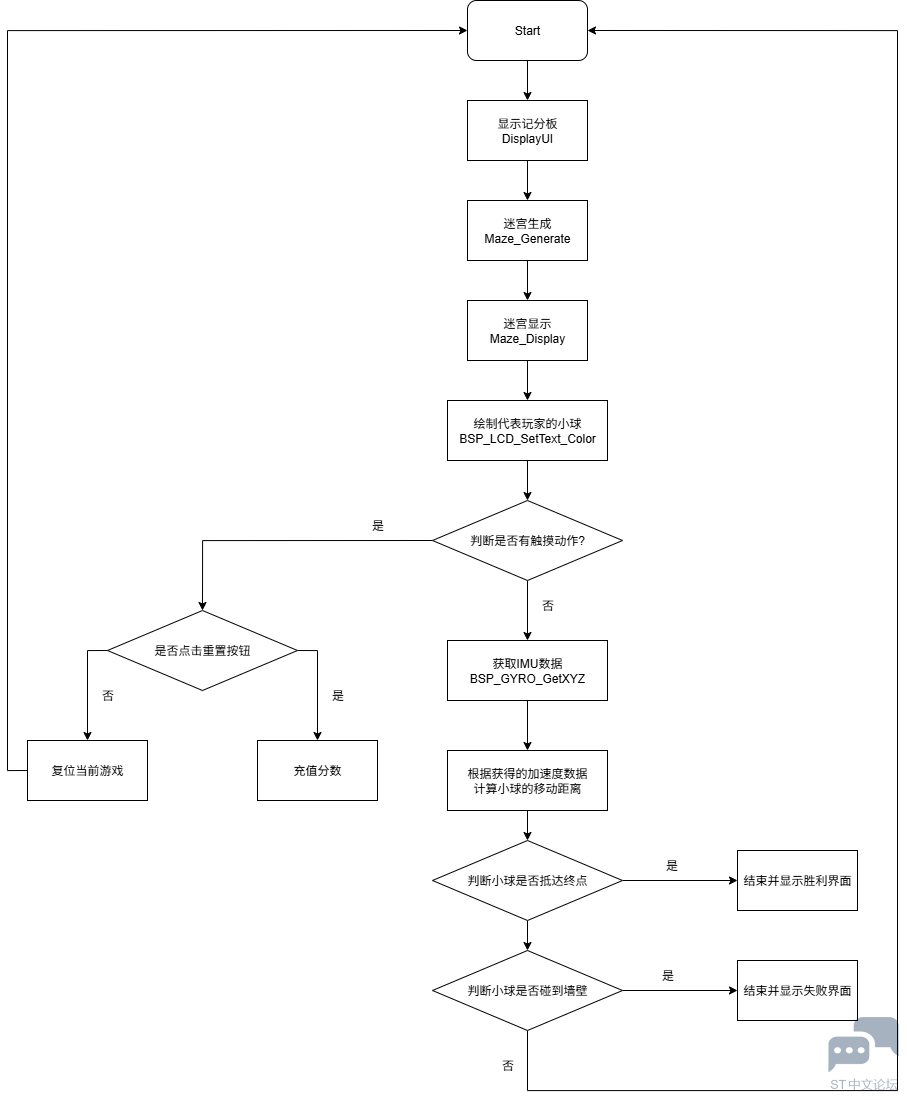
STM32F429Disco有官方提供的BSP可供使用,利用CubeMX可以创建基于BSP的工程项目。
https://shequ.stmicroelectronics.cn/forum.php?mod=viewthread&tid=869338
以此为基础,添加迷宫地图生成、加速度计控制小球和小球碰撞检测的功能。
1、迷宫地图生成和显示
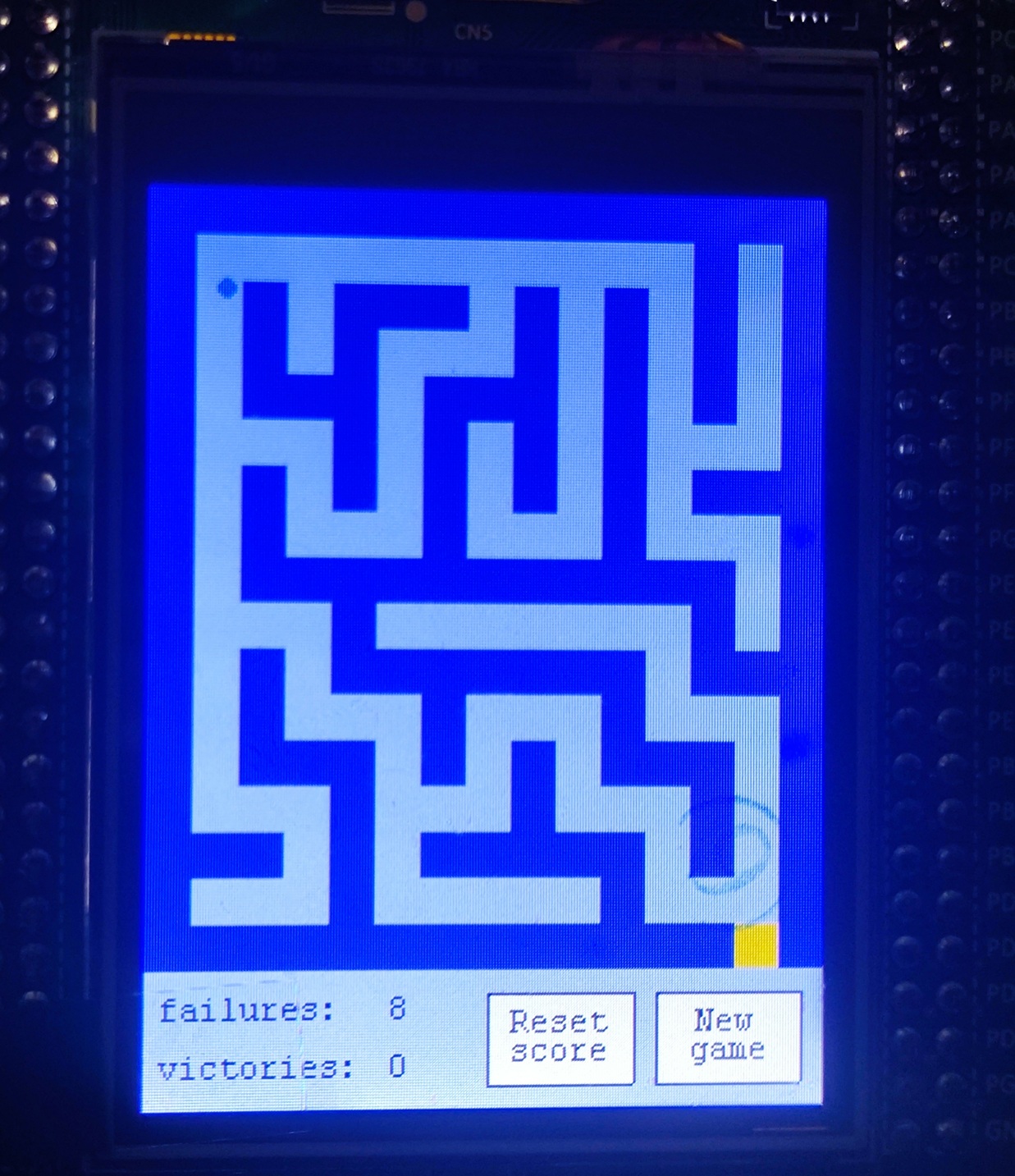
迷宫地图由网格构成,STM32F429Disco的屏幕分辨率为240x320。以16x16pixl大小的网格划分迷宫,可以设计一个15x17大小的迷宫。每个网格使用0或1表示该网格是否可以通行。在程序中以一个数据来表示迷宫的可通行属性。
int static maze[255];
迷宫地图的初始化、路径生成以及设定起点和终点的函数如下
void Maze_Generate(int array[], const int width, const int height, RNG_HandleTypeDef *hrng) {

   int x, y;
   /* Initialize the maze. */
   for(x = 0; x < width * height; x++) {

       array[x] = 1;
   }

   /* Carve the maze. */
   for(y = 1; y < height; y += 2) {
      for(x = 1; x < width; x += 2) {
          Maze_Carve(array, width, height, x, y, hrng);
      }
   }

   /* Set up an entry and an exit. */
   array[16] = 0; //Maze entry
   array[(height - 1) * width + (width - 2)] = 0;
}

void Maze_Carve(int maze[], const int width, const int height, int x, int y, RNG_HandleTypeDef *hrng) {

   int x1, y1;
   int x2, y2;
   int dx, dy;
   int dir, count;
   uint32_t generatedNumber;

   HAL_RNG_GenerateRandomNumber(hrng, &generatedNumber);

   dir = generatedNumber % 4;

   count = 0;
   while(count < 4) {
      dx = 0; dy = 0;
      switch(dir) {
      case 0:  dx = 1;  break;
      case 1:  dy = 1;  break;
      case 2:  dx = -1; break;
      default: dy = -1; break;
      }
      x1 = x + dx;
      y1 = y + dy;
      x2 = x1 + dx;
      y2 = y1 + dy;
      if(   x2 > 0 && x2 < width && y2 > 0 && y2 < height
         && maze[y1 * width + x1] == 1 && maze[y2 * width + x2] == 1) {
         maze[y1 * width + x1] = 0;
         maze[y2 * width + x2] = 0;
         x = x2; y = y2;
         HAL_RNG_GenerateRandomNumber(hrng, &generatedNumber);
         dir = generatedNumber % 4;
         count = 0;
      } else {
         dir = (dir + 1) % 4;
         count += 1;
      }
   }

}
根据生成的数据,调用BSP中的LCD绘制图形的函数,绘制相应的迷宫地图。
void Maze_Display(const int maze[], const int width, const int height, const int rectangle_side_size, uint32_t color) {

    int i, j, top_left_rectangle_pixel_X = 0, top_left_rectangle_pixel_Y = 0;

    for(j = 0; j < height; j++)
    {
        for(i = 0; i < width; i++)
        {
            int debug = maze[j * width + i];
            if(debug == 1)
            {
                LCD_Drawing_Rectangle(top_left_rectangle_pixel_X, top_left_rectangle_pixel_Y, rectangle_side_size, rectangle_side_size, color);
            }

            top_left_rectangle_pixel_X += rectangle_side_size;
      }

      top_left_rectangle_pixel_X = 0;
      top_left_rectangle_pixel_Y += rectangle_side_size;
   }

    LCD_Drawing_Rectangle(208, 256, rectangle_side_size, rectangle_side_size, LCD_COLOR_ORANGE);
}
2、游戏流程
一局游戏开始时,设置游戏起点并绘制代表玩家的圆点。
int x_position = 25, y_position = 23;
    BSP_LCD_FillCircle(x_position, y_position, 3);
通过调用BSP中读取角速度传感器l3gd20的数据,得到XYZ的速度信息,通过与对应的阈值进行对比,对小球在X与Y方向的位移进行调制,得到下一个位置的值。
float gyroBuffer[3];
    float Xval, Yval, Zval = 0x00;
    float sensitivity = 5000.0f;
    int distance = 1;

    while(1){
        BSP_GYRO_GetXYZ(gyroBuffer);

        Xval = gyroBuffer[0];
        Yval = gyroBuffer[1];
        Zval = gyroBuffer[2];

        if (Xval > sensitivity && Yval < sensitivity && Yval > -sensitivity)
        {
            BSP_LCD_SetTextColor(LCD_COLOR_LIGHTBLUE);
            BSP_LCD_FillCircle(x_position, y_position, 3);
            y_position += distance;
            BSP_LCD_SetTextColor(LCD_COLOR_BLUE);
            BSP_LCD_FillCircle(x_position, y_position, 3);
            if (BallHitTheWinningWall(x_position, y_position))
            {
                DisplayWinningScreen();
                goto start;
            }
            if (BallHitTheLosingWall(maze, x_position, y_position, 3))
            {
                DisplayFailureScreen();
                goto start;
            }
        }
        ....
        Hal_Delay(20);
    }
得到新的位置,通过与maze数据中存储的迷宫数据做对比,判断小球是否抵达终点。
bool BallHitTheWinningWall(int x_position, int y_position)
{
    if (x_position >= 208 && x_position <= 224 && y_position >= 256 && y_position <= 272)
    {
        victories++;
        return true;
    }

    return false;
}


bool BallHitTheLosingWall(int array[], int x_position, int y_position, int radius)
{
    int32_t  d;
    uint32_t  curx;
    uint32_t  cury;

    d = 3 - (radius << 1);
    curx = 0;
    cury = radius;

    while (curx <= cury)
    {
        if (CalculateIfCollisionOccurred(array, x_position + curx, y_position - cury) ||
        CalculateIfCollisionOccurred(array, x_position - curx, y_position - cury) ||
        CalculateIfCollisionOccurred(array, x_position + cury, y_position - curx) ||
        CalculateIfCollisionOccurred(array, x_position - cury, y_position - curx) ||
        CalculateIfCollisionOccurred(array, x_position + curx, y_position + cury) ||
        CalculateIfCollisionOccurred(array, x_position - curx, y_position + cury) ||
        CalculateIfCollisionOccurred(array, x_position + cury, y_position + curx) ||
        CalculateIfCollisionOccurred(array, x_position - cury, y_position + curx))
        {
            failures++;
            return true;
        }

        if (d < 0)
        {
              d += (curx << 2) + 6;
        }
        else
        {
              d += ((curx - cury) << 2) + 10;
              cury--;
        }
        curx++;
    }

    return false;
}

bool CalculateIfCollisionOccurred(int array[], int x, int y)
{
    int row = floor(x / 16);
    int col = floor(y / 16);

    if (!(array[row + 15 * col] == 1)) return false;

    return true;
}
以上为利用STM32F429I-Disco的角速度计实现的迷宫游戏代码说明。








 微信公众号
微信公众号
 手机版
手机版


