




|
本帖最后由 点点&木木 于 2019-4-12 12:07 编辑 ! _$ k8 ]3 e% v' i( g 一个完全自动的坑洼探测器,可实时更新可视后端,并提供存储在SD卡上的详细数据。 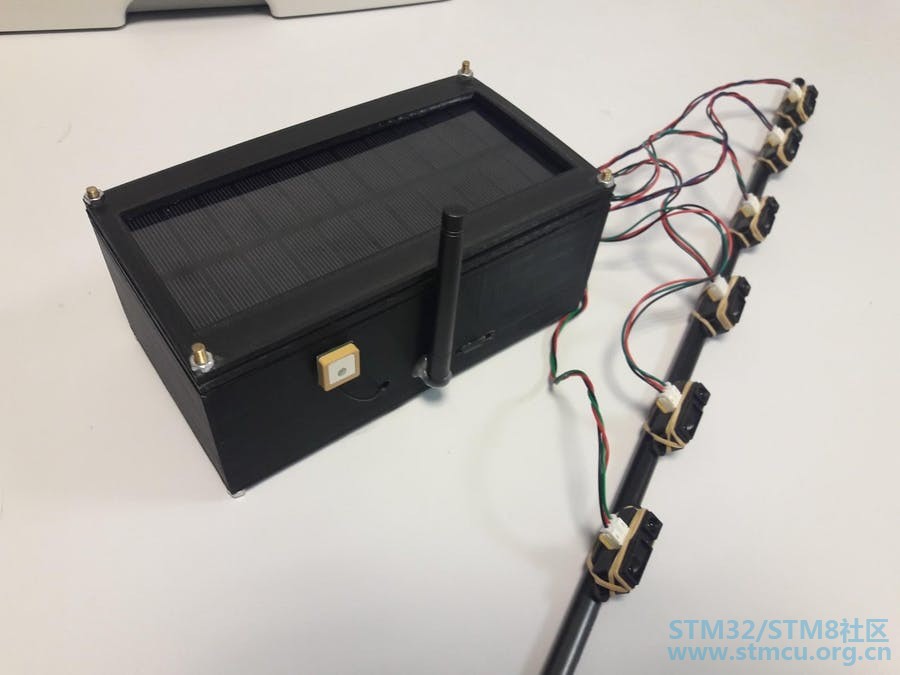
7 ^: u* T l, q+ F5 z 硬件组件 STM32 Nucleo-L432KC × 1 Grove - 3轴数字加速度计(±1.5g) Seeed Grove - 3轴数字加速度计(±1.5g) × 1 Seeed Grove GPS × 1 Sigfox模块 × 1 夏普红外传感器 × 6 DFRobot Micro-SD模块 × 1 锂离子充电器MAX1555DS × 1 降压 - 升压转换器MCP1252 / 3 × 1 100kΩ电阻 × 1 1μF电容 × 4 10μF电容 × 2 太阳能电池 × 1 锂离子电池 × 1 10μF电容 × 12 % j* m7 E# Q' _- x' D* z1 j 介绍 每年,雷诺都会举办一场黑客攻击Twizy平台(基于电动城市车辆的设计)的比赛。我们参加了那次比赛(通过我们的大学,Polytech Sorbonne),并提出了破解平台的想法,制作一个坑洞探测车,可以实时更新地下坑洞的位置。 : ?7 o W% I7 r8 _# e8 s% ~那么它是怎样工作的? 其安装在车辆下方的6个红外传感器阵列向下检测车辆与道路之间的距离变化,从而检测坑洼。系统的加速度计还可以检测由于异常垂直变化导致的车辆经历的坑洼和突然冲击。 系统然后将该信息(通过Sigfox模块)发送到我们使用MicrosoftAzure制作的后端,然后信息显示在我们使用PowerBI制作的地图界面上。该系统还以JSON格式存储有关板载micro-SD卡的详细数据,因此用户可以恢复该信息,以便构建系统检测到的每个坑洞严重程度的更清晰图像。 0 r4 d7 I. P. ?8 T 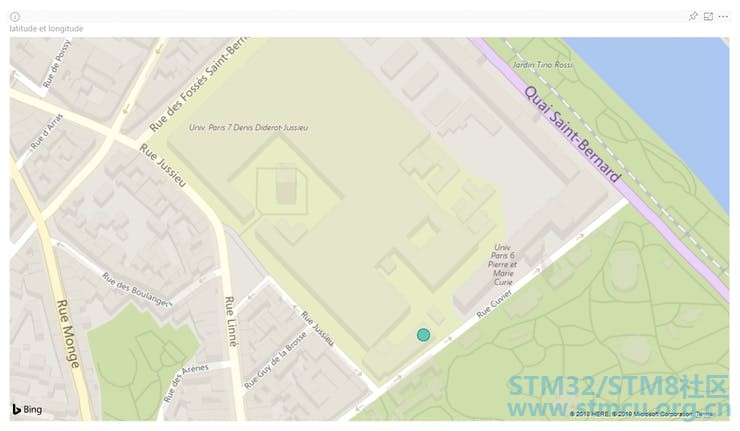
地图上的蓝点表示我们测试坑洞探测系统的位置。 + t! V" z8 O, }0 I: A $ s2 h0 v! u$ ]/ M# A该系统由锂离子电池供电,通过太阳能电池板充电。 ; b; q2 J4 Q) U# n) c; B/ ]* n 现在让我们继续讨论如何制作这个项目! + F8 A; l2 W6 } ' \+ ^' Z5 n1 x3 @" x: f& I 主板PCB 首先,您需要按照主PCB原理图布线PCB: # v6 g/ T( D9 j' G/ w* D% v4 ~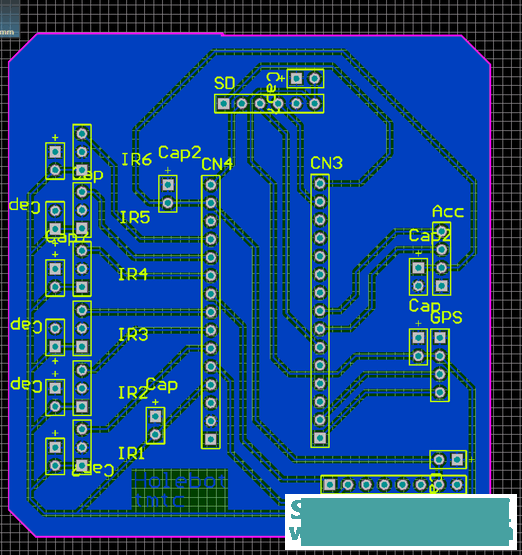
主板PCB原理图 1 n% e' }$ A. z$ l' ~7 _0 b9 ^9 d5 y 6 H1 M7 ^$ ^! H4 O( A2 z; ~& j: R% f) D 完成后,您可以将所有主要组件焊接到位:微控制器(注意不要将其放在后面!),红外传感器,GPS和加速度计模块,Sigfox以及最后SD模块的接头。一旦焊接或连接到PCB,您就可以焊接去耦电容。 电源PCB 现在是时候制作电源PCB为电池充电并为微控制器(以及主PCB的其余部分)提供稳定的5V电压。 您首先需要按照此原理图布线PCB: 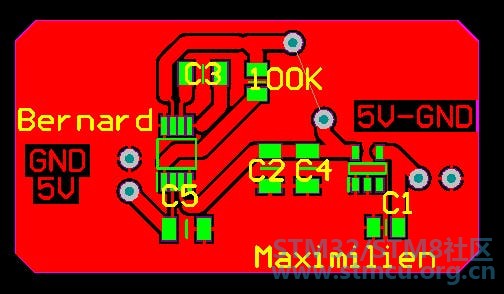
电源PCB原理图 中间的两个点需要连接,因此需要在它们之间焊接跳线。然后,您可以将太阳能电池板焊接在图表右侧的连接焊盘上,并将电池焊接在两个中间点(+端子)的下部之间,并将 - 端子连接到地。您现在应该在左侧的连接点之间保持稳定的5V。您可以将两根电缆焊接到这些点,并在Nucleo微控制器上相应地连接到VIN和GND引脚。 1 [: \! q, b5 e# `0 E; l) | 4 j7 R% M! R7 o 3D打印外壳(可选) 您可以在您选择的建模软件中制作一个简单的盒子容器,然后进行3D打印,以便有一个容器可以放置您的电子产品。这是可选的(您也可以购买预制容器)。 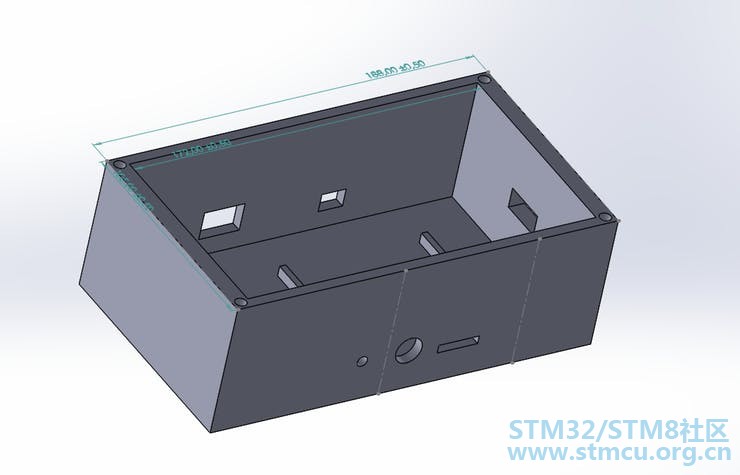
我们的容器(我们添加了几个孔,因此我们可以访问模块:SD,Sigfox,GPS) 把它们放在一起 现在一切都在电子设备上工作,你可以将所有东西放在容器中,然后将红外传感器安装在可以安装到车辆上的条上: 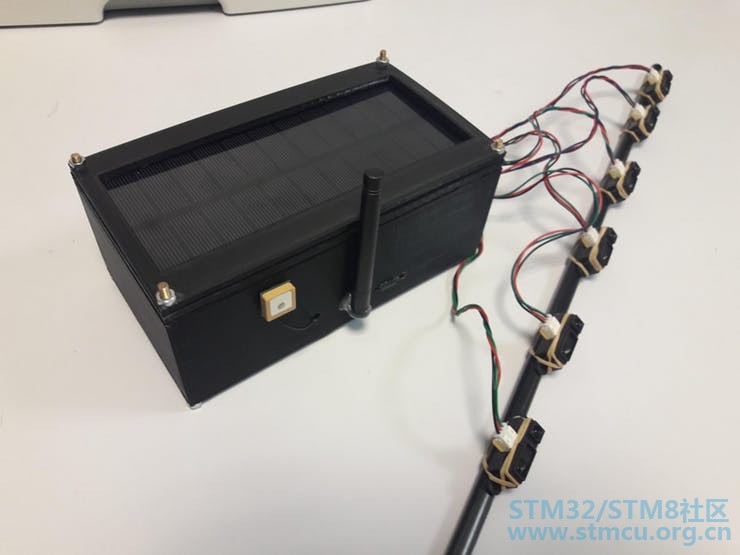
最终产品 我们将数据传输到Sigfox后端。我们每天可以发送140封邮件。这是足够的,因为我们每天都没有检测到140个坑洞。我们发送它的经度和经度。 为了处理我们收集的所有信息,我们选择使用Microsoft Azure,因为我们可以为学生免费试用。我们通过这个github教程配置 后端分为两部分:Microsoft Azure用于收集信息,Power BI用于处理数据。鉴于我们从Sigfox后端收到的消息,我们将它打印在Power BI上的地图上,您可以在Story部分的屏幕截图中看到。 6 s( G3 a/ k) ]4 R L$ Z$ Y/ d1 { 原理图 主PCB原理图 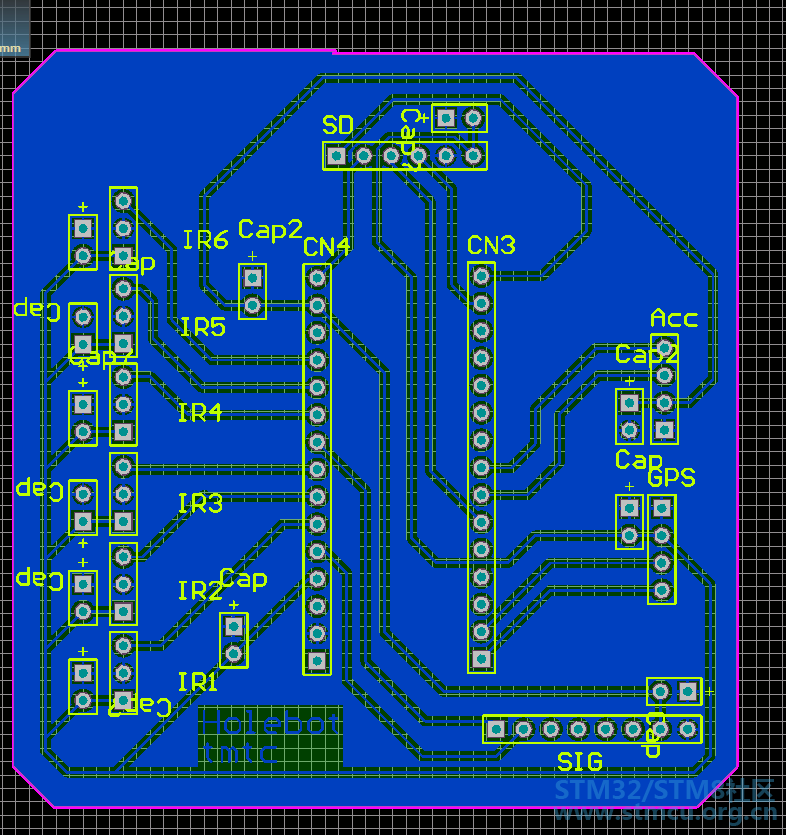
电源PCB原理图 5 e) K1 T9 t! `1 ~/ X( L3 w; v0 p; Q/ y) ]3 T- R; O4 l2 t# W ; X9 F3 z4 E4 c! u4 o: z 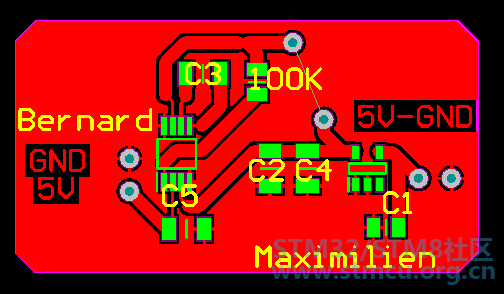
4 T. U. l2 Y! p0 b* w# j1 i 功能图 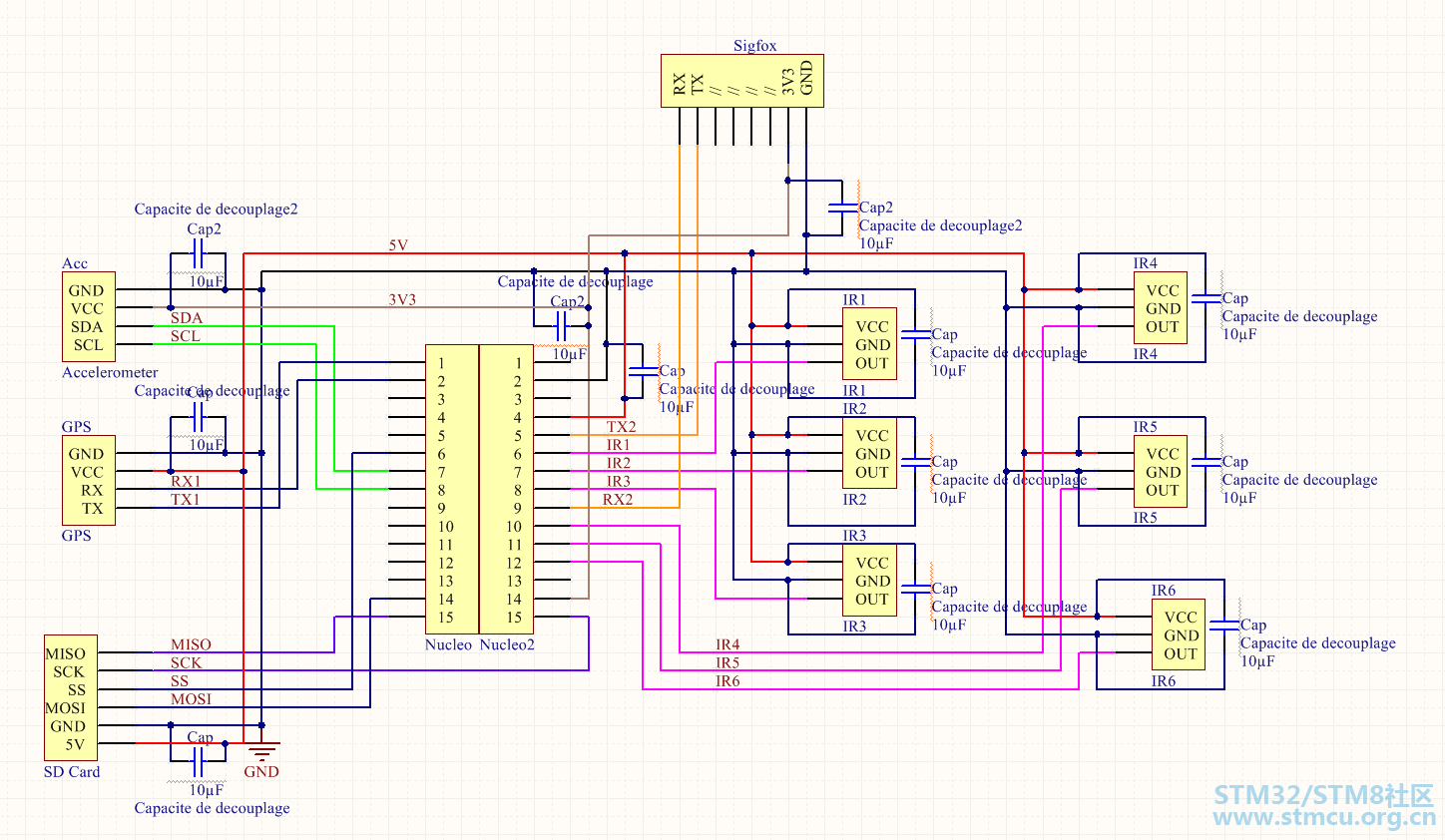
能源消耗 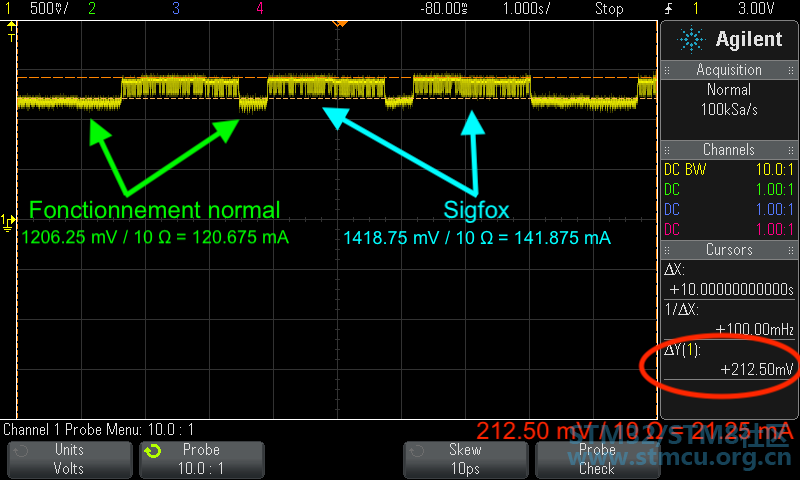
外壳3D模型 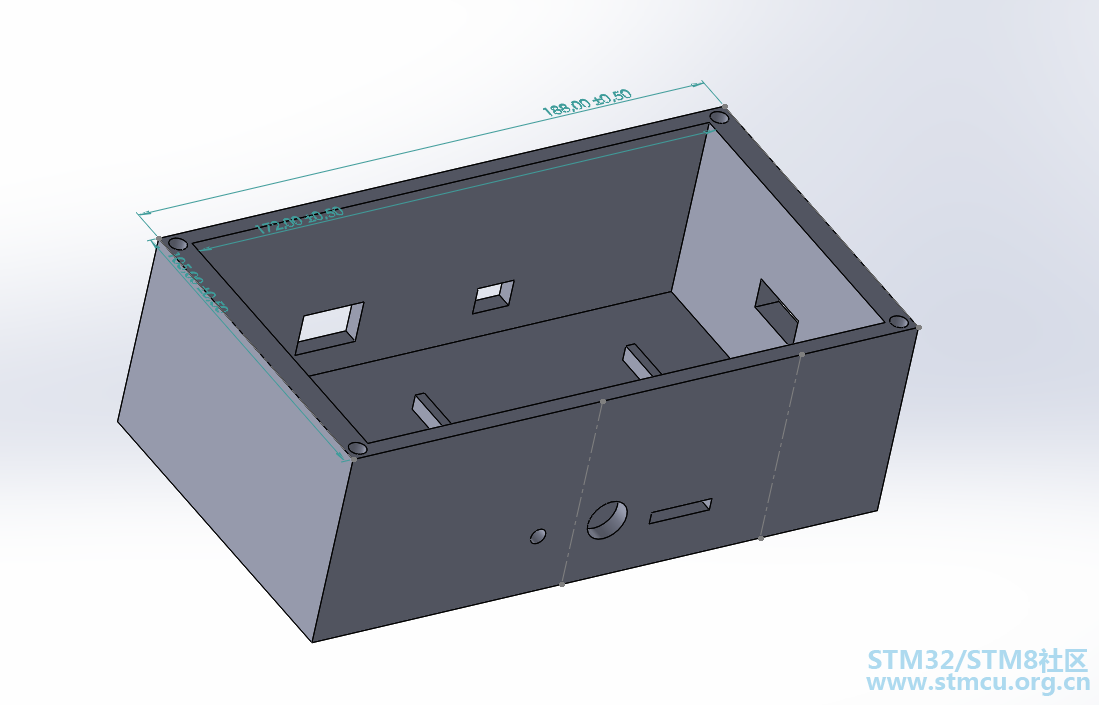
4 ~- @3 M4 D( A+ {) \. K1 s 代码 #include "mbed.h" #include "GroveGPS.h" #include <SDBlockDevice.h> #include <FATFileSystem.h> #include <string> #include <cstring> #include <sstream> #include <string> d+ h1 g0 l/ ]: f x6 E% F1 K/////////////////////////// //// Various Constants //// /////////////////////////// #define COOLDOWN 100000 // Cooldown time #define GPS_SIZE 16 // Size of GPS position arrays #define NORMAL_DISTANCE 15 // Normal IR-sensor-to-ground distance (in cm) #define SENSITIVITY 3 // IR sensorsensitivity (in cm) AnalogIn ir1(A0); // IR sensor AnalogIn ir2(A1); AnalogIn ir3(A3); AnalogIn ir4(A4); AnalogIn ir5(A5); AnalogIn ir6(A6); Serial gpsSerial(D1, D0, 9600); // GPS module Serial sigfox(SERIAL_TX, SERIAL_RX, 9600); //Telecommunications module Serial pc(SERIAL_TX, SERIAL_RX, 9600); // Transistors DigitalOut line_5V(D7); DigitalOut line_3V(D8); , }0 K$ O! s! t6 g8 i( ^9 |) O6 B( RSDBlockDevice sd(D11, D12, D13, D3); // SD card reader module FATFileSystem fs("sd"); // FAT file system to handle SD card Thread gpsThread; // Initialize two threads for the Thread irThread; // telemeter and the GPS. GroveGPS gps; // Initialize the Grove GPS I2C i2c(D4, D5); // I2C for the accelerometer * _* M. @; ^5 v: W6 Y//// Variables for the accelerometercalculus : char addr_accel = 0x4C<<1; // Adress of the device char regAddr[1]; // Registers for the address, char regRead[2]; // to read and to write the registers char regWrite[3]; const int SeuilTrigger = 150; // Match-to-trigger value. const float SeuilTremblement = 0.8; q7 g' i5 H. x1 T- l// Arrays of previous registered values : float* xTab = (float*)malloc(100*sizeof(float)); float* yTab = (float*)malloc(100*sizeof(float)); float* zTab = (float*)malloc(100*sizeof(float)); float xGet, yGet, zGet; // Current registered values float distance_ir1; // Current IR distance float distance_ir2; float distance_ir3; float distance_ir4; float distance_ir5; float distance_ir6; float max_distance_ir; , `. d: a% Z: U$ S+ p! V0 D3 Ychar *gps_pos[20]; // Array of recorded positions int gps_index = 0; // Index to navigate the position array bool begin_capture = false; ( r& d- W1 O# e6 f/////////////////////// //// GPS FUNCTIONS //// /////////////////////// bool checkValidityGPS (char* latBuffer,char* lonBuffer) { // Checks if a given GPS position pair is valid/ if (latBuffer[0] == 'N') return false; if (latBuffer[0] == '-') return false; return true; } //////////////////////////// //// INFRARED FUNCTIONS //// //////////////////////////// float voltsIR (float measure) { // Gets the voltage produced by the IR sensor return measure * 5; } float distanceIR (float measure) { // Calculates the distance based on an IR sensor measure(in cm) float a = 127.728; float b = 0.353553; return a * pow(b,voltsIR(measure)); } 7 O: [: ]+ X- G) O& c6 _/ v- t///////////////////////////// //// MMA7660FC FUNCTIONS //// ///////////////////////////// void write_reg(char addReg, char value){ // Writes valueinto the register at the address 0x[addReg}. regAddr[0] = addReg; regWrite[0] = regAddr[0]; regWrite[1] = value; i2c.write(addr_accel, regWrite, 2); } $ k- z$ c9 P: Qint read_reg(char addReg){ // Reads the value of the register 0x[addReg] and returnsit. regAddr[0] = addReg; i2c.write(addr_accel, regAddr, 1, true); // Selection of the register i2c.read(addr_accel, regRead, 2); // Read the value inside. return regRead[0]; } int convert_6bitC2(int ValReg){ // The registers XOUT, YOUT, ZOUT contain the values ofthe accelerations // on 6 bits. These values are between -32 and 31,following // the two's convention. int result = 0; result += (ValReg & 0b00011111); result -= (ValReg & 0b00100000); return result; } void init_i2c(){ / y7 I. M* x+ w1 v; I+ Z0 F) K // Peripheral Functions. // The device works by stocking its data into differentregisters. The full // documentation can be read at the following address : " D$ x7 b+ N. m6 s+ D+ ^( B // In order to understand the code, you can read thefollowing pages : // -> p14 : Addresses of the interesting registers(XOUT, YOUT, ZOUT) // -> p17 : MODE Register Configuration. (Reallyimportant) // -> p22 : Serial and I2C. ?7 u7 b5 i8 b* l. ]$ e' v- R! }' ~ // Interrupt Setp : Edit write_reg(0x06, 0b00000000); // Disable tous les Interrupt. // Mode Setup : Edit write_reg(0x07, 0b00000001); ) [( @, L: w' k4 I // Sampling Rate : Edit write_reg(0x08, 0b00000001); // 64 sample per second, so 1 in 0.0156 s. } void mesure_accels(){ // First step : Initialize the data. xGet = 0.0; yGet = 0.0; zGet = 0.0; 8 T5 G, ~4 O4 t6 Y$ Z1 P* n // Second step : Mesure the accelerations in bothdirections, three times. for (int i = 0; i < 3; i++){ xGet += convert_6bitC2(read_reg(0x00)); yGet += convert_6bitC2(read_reg(0x01)); zGet += convert_6bitC2(read_reg(0x02)); wait(0.01); } ; _( `5 b a, d // Third step : Calibrate the data in m.s-2 xGet = xGet / (2.14*3); yGet = yGet / (2.14*3); zGet = zGet / (2.14*3); & K. h) [+ K* H$ _. N4 T3 `6 ?9 Z // Fourth step : Shift the whole arrays. for (int i = 0; i < 99; i++){ xTab = xTab[i+1]; yTab = yTab[i+1]; zTab = zTab[i+1]; } 6 ^' J- Z8 F- P' K6 H" ? // Finally : Put the new data into the arrays. xTab[99] = xGet; yTab[99] = yGet; zTab[99] = zGet; } . d7 ?) ^1 Y# p* a1 p6 ]2 Q( I///////////////////////// //// PRINT TO SERIAL //// ///////////////////////// 9 e# }6 y J' D5 x9 Gvoid write_serial (bool first, char *lat,char *lon, float ir, float acc) { // If it's not the first object, print a ',' character toseparate them. if (!first) pc.printf(","); // Print the LONG JSON content pc.printf("\r\n\t{\r\n"); pc.printf("\t\t\"lat\": \"%s\",\r\n", lat); pc.printf("\t\t\"lon\": \"%s\",\r\n", lon); pc.printf("\t\t\"infrared\": \"%f\",\r\n", ir); pc.printf("\t\t\"accelerometer\": \"%f\"\r\n\t}", acc); } void write_JSON_object (bool first, FILE*fp, char *lat, char *lon, float ir, float acc) { if (!first) fprintf(fp, ","); fprintf(fp, "\r\n\t{\r\n"); fprintf(fp, "\t\t\"lat\": \"%s\",\r\n", lat); fprintf(fp, "\t\t\"lon\": \"%s\",\r\n", lon); fprintf(fp, "\t\t\"infrared\": \"%f\",\r\n", ir); fprintf(fp, "\t\t\"accelerometer\": \"%f\"\r\n\t}", acc); } //////////////// //// SIGFOX //// //////////////// void sendViaSigfox (char *lat, char *lon) { // Converts char * positions into floats float temp_lat = atof(lat); float temp_lon = atof(lon); - K/ M0 N* W# M( G5 u' f // Multiply them by 1e5 and keep the integer part int int_lat = (int) (temp_lat * 1e5); int int_lon = (int) (temp_lon * 1e5); % Z. f: g/ o3 u/ z0 k // Sends the Sigfox command (8 hex chars for eachposition element) pc.printf("AT$SF=%08X%08X\n", int_lat, int_lon); } ! k: E' P$ P2 G D) F) svoid gpsUpdaterThread () { char latBuffer[GPS_SIZE]; char lonBuffer[GPS_SIZE]; . r' z: Z4 G4 C. S6 l. [ bool measured = false; int capture_cooldown = COOLDOWN; int sd_measure_number = 1; / u! g6 Z& @# L& ~ while (1) { // Update the GPS gps.getLatitude(latBuffer); gps.getLongitude(lonBuffer); 8 Y) Q: m! s* B- f1 z. L6 o. | // If GPS is valid if (checkValidityGPS(latBuffer, lonBuffer)) { // Update the position array sprintf(gps_pos[gps_index], "%s", latBuffer); sprintf(gps_pos[gps_index + 1], "%s", lonBuffer); // Move the pointer in the array gps_index += 2; 5 i+ y0 I( [2 r4 d9 f9 T: Z // If the pointer overflows, move it back if (gps_index>= 20) gps_index = 0; } 2 u ^2 _% \# D // Begin capture only if GPS is valid if(strcmp(gps_pos[gps_index - 2], "") != 0) { if (!measured) { line_5V = 1; line_3V = 1; 4 o- i' s! w3 g. D std::stringstream s; // TODO sd_measure_number / 10 s << "/sd/measure_" << sd_measure_number << ".json"; 5 o* o! Y5 b$ v* B6 h char fo[s.str().length() + 1]; strcpy(fo, s.str().c_str()); 9 ]. N p% U( F- h // Get the current acceleration mesure_accels(); ' I3 N! J6 u/ l$ G // Get the current distance measured by the IR sensor distance_ir1 = distanceIR(ir1.read()); distance_ir2 =distanceIR(ir2.read()); distance_ir3 =distanceIR(ir3.read()); distance_ir4 =distanceIR(ir4.read()); distance_ir5 =distanceIR(ir5.read()); distance_ir6 =distanceIR(ir6.read()); max_distance_ir = distance_ir1; if (distance_ir2 > max_distance_ir)max_distance_ir = distance_ir2; if (distance_ir3 > max_distance_ir)max_distance_ir = distance_ir3; if (distance_ir4 > max_distance_ir)max_distance_ir = distance_ir4; if (distance_ir5 > max_distance_ir)max_distance_ir = distance_ir5; if (distance_ir6 > max_distance_ir)max_distance_ir = distance_ir6; // MOYENNE TELEMETRES 1 ET 2 // Les autres ne fonctionnent pas correctement max_distance_ir = (distance_ir1+ distance_ir2) / 2; / W: S( g2 _- L; u1 D // If either the IR sensor or the accelerometer get triggered if ((max_distance_ir > NORMAL_DISTANCE +SENSITIVITY) or (zGet > 14)) { // initialize and mount SD card sd.init(); fs.mount(&sd); , ]* a! d2 ~% O FILE *fp = fopen(fo, "w"); if (!fp) pc.printf("error handling file %s\r\n", fo); else pc.printf("Writing to %s\r\n", fo); fprintf(fp, "["); ! a. S# S0 ~) J/ T: _+ g! F3 j6 i write_JSON_object(true, fp,gps_pos[gps_index - 2], gps_pos[gps_index - 1], max_distance_ir, zGet); 3 s. v1 Q1 Y2 i$ X! B- `" h fprintf(fp, "\n]\n"); % _# B8 I! w! m) W( |! m fclose(fp); 4 u( x0 E5 x7 c2 u0 L fs.unmount(); sd.deinit(); ; f$ q& k5 ~7 N" p( k // Send the position via Sigfox sendViaSigfox(gps_pos[gps_index - 2], gps_pos[gps_index -1]); line_5V = 0; line_3V = 0; ; X* k2 D2 B8 _* |4 b& Z measured = true; sd_measure_number++; } } else { if (capture_cooldown > 0) { capture_cooldown--; } else { capture_cooldown =COOLDOWN; measured = false; } } } } } ) s7 m7 t3 ^0 w1 {5 w) u/////////////////////// //// MAIN FUNCTION //// /////////////////////// ; ~3 O# E i* s, w7 Q% J- sint main () { // Turn off 5V and 3.3V rails line_5V = 0; line_3V = 0; // Initialize the position array for (int i = 0; i < 20; i++) { gps_pos = (char *) malloc(GPS_SIZE * sizeof(char)); } 0 \; E0 g. b4 j- ^* i5 X4 ` // Initialize I2C communications init_i2c(); // Start a thread to get updated GPS values gpsThread.start(gpsUpdaterThread); 3 ?! A4 A2 r# A& `7 o while (1) { ( v1 f4 B* j2 y2 t L // get GPS data if(gpsSerial.readable()) { gps.readCharacter(gpsSerial.getc()); } } return 0; } 4 R" F2 @3 F9 i* K |
 微信公众号
微信公众号
 手机版
手机版


厉害了我的哥!