




|
Sampler是一个用于shell命令执行,可视化和告警的工具。其配置使用的是一个简单的YAML文件。 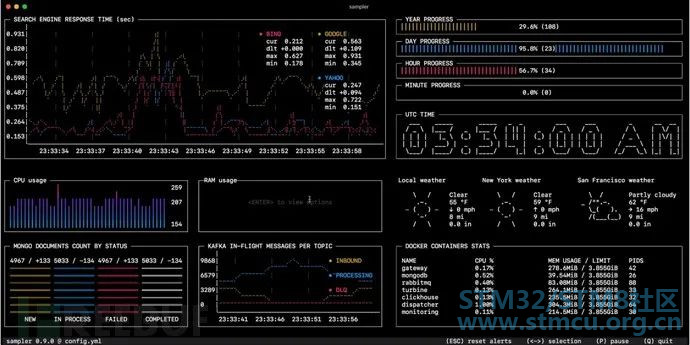
你可以直接从终端对任意动态进程进行采样 – 观察数据库中的更改,监控MQ动态消息(in-flight messages),触发部署脚本并在完成后获取通知。 如果有一种方法可以使用shell命令获取指标(metric),那么可以使用Sampler立即对其进行可视化。 安装macOS% }( t: ~5 a/ y7 Xbrew cask install sampler 5 `" l0 ^, }2 O0 J. i 或 sudo curl -Lo /usr/local/bin/sampler https://github.com/sqshq/sampler ... -1.0.3-darwin-amd64' u, j( w( u+ I; T- e, j5 hsudo chmod +x /usr/local/bin/sampler Linux sudo wget https://github.com/sqshq/sampler ... r-1.0.3-linux-amd64 -O /usr/local/bin/sampler! L4 _ K* V# f8 e( [ sudo chmod +x /usr/local/bin/sampler Windows(实验) 建议在高级控制台模拟器下使用,如Cmder 使用 市面早已有许多监控系统 Sampler绝不是监控系统的替代品,而是易于设置的开发工具。 如果spinning up和使用Grafana配置Prometheus是完全多余的任务,那么Sampler可能是正确的解决方案。没有服务器,没有数据库,不需要部署 – 你指定了shell命令,它就可以工作了。 我监控的每台服务器上都需要安装吗?不,你可以在本地运行Sampler,但仍然可以从多台远程计算机上收集遥测数据。任何可视化都可能具有init命令,你可以在其中ssh到远程服务器。请参阅SSH example 组件以下是每种组件类型的配置示例列表,其中包含与macOS兼容的采样脚本。 Runchart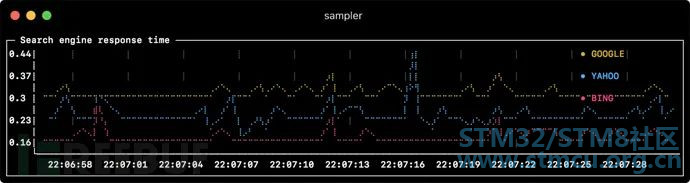
- title: Search engine response time rate-ms: 500 # sampling rate, default = 1000 scale: 2 # number of digits after sample decimal point, default = 1) u( G2 E- `8 F1 m legend: enabled: true # enables item labels, default = true3 g" ?% i/ J4 ? details: false # enables item statistics: cur/min/max/dlt values, default = true items:1 z1 N4 E, X2 ?" r0 z$ I4 g - label: GOOGLE. O" K4 U, c8 e2 V0 H k; g5 a1 G4 W0 }4 R sample: curl -o /dev/null -s -w '%{time_total}' https://www.google.com color: 178 # 8-bit color number, default one is chosen from a pre-defined palette1 P+ O" E& z3 B - label: YAHOO0 E" Q' L' Z3 [ sample: curl -o /dev/null -s -w '%{time_total}' https://search.yahoo.com - label: BING sample: curl -o /dev/null -s -w '%{time_total}' https://www.bing.com u* Y4 w; \& V8 h+ b* U Sparkline 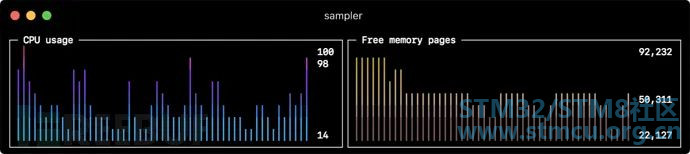
- title: CPU usage0 i% c; b; A r8 o. k rate-ms: 200 scale: 0& s8 g9 L; \) t4 ]) l sample: ps -A -o %cpu | awk '{s+=$1} END {print s}' - title: Free memory pages7 q3 Y$ C* \+ u& P rate-ms: 2003 k# e |4 r# ?2 O- ? scale: 0: j& _1 U5 N" F; a7 @ sample: memory_pressure | grep 'Pages free' | awk '{print $3}'/ [7 j9 R# Q- U9 v7 { $ \3 ~. B2 Z$ J4 @4 j: j9 K 2 j E& p; O% e' X, v# k0 o Barchart 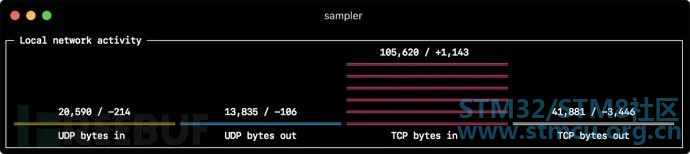
- title: Local network activity1 l0 ~7 q5 A$ q$ W; R# {0 D rate-ms: 500 # sampling rate, default = 1000! V# Z/ m* I, f+ t2 X scale: 0 # number of digits after sample decimal point, default = 1% p4 L) A7 q/ A; g/ j items: - label: UDP bytes in9 S( J- r6 w0 M& \ A, z' b. B; U sample: nettop -J bytes_in -l 1 -m udp | awk '{sum += $4} END {print sum}' - label: UDP bytes out* V0 I6 E( @: G4 s/ g8 e& F. i* a sample: nettop -J bytes_out -l 1 -m udp | awk '{sum += $4} END {print sum}' - label: TCP bytes in2 r' B1 p$ k. N+ {' L; p sample: nettop -J bytes_in -l 1 -m tcp | awk '{sum += $4} END {print sum}' - label: TCP bytes out sample: nettop -J bytes_out -l 1 -m tcp | awk '{sum += $4} END {print sum}'# ]+ d7 r! }- k3 t2 K5 h5 g 9 z: l8 S' J7 L) }& ] : v! ^) u% P! U Gauge 
- title: Minute progress3 r0 v0 G6 x. v: v3 j rate-ms: 500 # sampling rate, default = 1000 scale: 2 # number of digits after sample decimal point, default = 13 p& u3 {# u& q6 o7 k8 F percent-only: false # toggle display of the current value, default = false color: 178 # 8-bit color number, default one is chosen from a pre-defined palette% z, R' P) Q# a7 e H3 f8 B U {) B cur:# ]( W. q2 s, @( } sample: date +%S # sample script for current value2 C9 H$ ?, X0 j max: sample: echo 60 # sample script for max value min: sample: echo 0 # sample script for min value - title: Year progress' z( b- R6 M1 r8 K1 Q; R- E( a cur: sample: date +%j! \1 E% S% F+ C% @8 W! E max:$ z* f4 A& @+ @; \) d' B2 o sample: echo 365 min: sample: echo 0 1 ~; Q5 N+ z# L, q2 l# e Textbox 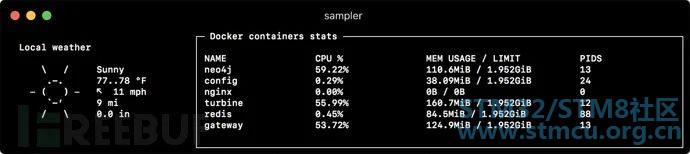
- title: Local weather rate-ms: 10000 # sampling rate, default = 1000 sample: curl wttr.in?0ATQF0 u$ N+ o" j; C/ W2 T0 x border: false # border around the item, default = true4 A- d$ h- u5 o; e( B' {1 _8 N- x color: 178 # 8-bit color number, default is white, n+ _" w0 B8 Y" l1 l# d8 w7 T) h - title: Docker containers stats) A3 i) u3 N1 _9 k( r' w rate-ms: 500; T6 e5 ^: G2 k0 n$ M& s% s9 A sample: docker stats --no-stream --format "table {{.Name}}\t{{.CPUPerc}}\t{{.MemUsage}}\t{{.PIDs}}" $ k5 q1 K/ B$ O% P, r& O: E Asciibox 
- title: UTC time/ x; n# N/ e3 N8 Y- T rate-ms: 500 # sampling rate, default = 10007 A' L* |/ \* X- ]) o$ u! ? font: 3d # font type, default = 2d border: false # border around the item, default = true $ I: g7 l; P; s* P( m% m, w- g7 Q color: 43 # 8-bit color number, default is white sample: env TZ=UTC date +%r额外功能 , h% V) b5 U4 I1 t* ^6 ` 8 }, _" H1 q6 ^ Triggers9 h* G' G% c2 w$ [% o4 b# u6 x 触发器允许执行条件操作,如视觉/声音告警或任意shell命令。以下示例说明了此概念。 Clock gauge,从开始的每分钟显示时间进度和当前时间 gauges:* M1 E, ~ u1 h6 q) c- title: MINUTE PROGRESS position: [[0, 18], [80, 0]] cur: sample: date +%S max:& |# D" R1 F% y7 U4 i sample: echo 601 G5 @" W& p: e# r) I& x min:# g' S7 Y# k8 ?& v5 Y8 j sample: echo 0 triggers:, v: N/ ^! O9 b - title: CLOCK BELL EVERY MINUTE% d. K* N; x# h& N condition: '[ $label == "cur" ] && [ $cur -eq 0 ] && echo 1 || echo 0' # expects "1" as TRUE indicator actions:+ l! g+ ~3 R v5 | terminal-bell: true # standard terminal bell, default = false sound: true # NASA quindar tone, default = false visual: false # notification with current value on top of the component area, default = false script: say -v samantha `date +%I:%M%p` # an arbitrary script, which can use $cur, $prev and $label variables 9 c9 V/ ]/ F% g3 j2 r 搜索引擎延迟图表,在延迟超过阈值时向用户发出告警 runcharts:* c; {; L& N3 n" m( H, N- title: SEARCH ENGINE RESPONSE TIME (sec)' } `5 P* j4 Z! X7 v- j& i rate-ms: 200 items:4 x+ _: S( I3 u& v' Y - label: GOOGLE7 H0 M2 t1 U l# C* F% B sample: curl -o /dev/null -s -w '%{time_total}' https://www.google.com - label: YAHOO sample: curl -o /dev/null -s -w '%{time_total}' https://search.yahoo.com triggers: - title: Latency threshold exceeded condition: echo "$prev < 0.3 && $cur > 0.3" |bc -l # expects "1" as TRUE indicator actions:8 p$ [7 k# b, r# A% _. W( H) n terminal-bell: true # standard terminal bell, default = false8 I# F5 i; s2 o' q- C sound: true # NASA quindar tone, default = false3 Y" m" }3 U! D) A4 ^ visual: true # visual notification on top of the component area, default = false& i2 J# u; s* ]4 v7 u/ Q script: 'say alert: ${label} latency exceeded ${cur} second' # an arbitrary script, which can use $cur, $prev and $label variables 3 y- F' W6 X2 N( Q$ V& j 交互式 shell 支持 除了sample命令之外,还可以指定init命令(在采样前仅执行一次)和transform命令(后处理采样命令输出)。这包括交互式shell用例,例如仅建立与数据库的连接一次,然后在交互式shell会话中执行轮询。 $ z- h9 h( N {$ Q2 r5 g0 D1 F Basic modetextboxes:' C3 }- Z) s. Z, x7 ^2 i( { - title: MongoDB polling6 I! s4 N( Q+ j4 `/ }: f0 _ rate-ms: 500 init: mongo --quiet --host=localhost test # executes only once to start the interactive session sample: Date.now(); # executes with a required rate, in scope of the interactive session7 q0 P; z7 U; {* c9 n# W! O: u transform: echo result = $sample # executes in scope of local session, $sample variable is available for transformation- T7 J( @5 @2 k: t8 n ' |& m5 t3 U( R2 K* }4 E 1 |0 N" i7 L1 F2 r0 K* J6 D PTY mode 在某些情况下,交互式shell将无法工作,因为它的stdin不是终端。这种情况下我们可以使用PTY模式: textboxes:- title: Neo4j polling: C) w2 A; S9 F$ h' W/ I( X, v6 p. A pty: true # enables pseudo-terminal mode, default = false2 ?& f& ^1 {! d, { init: cypher-shell -u neo4j -p pwd --format plain7 K) y8 Q, j) z sample: RETURN rand(); transform: echo "$sample" | tail -n 1' H# Z9 F! W9 A - title: Top on a remote server pty: true # enables pseudo-terminal mode, default = false( D. b7 t A" E3 d init: ssh -i ~/user.pem ec2-user@1.2.3.4 sample: top. u5 e. g; u+ z2 j$ q - U/ X9 Z* r6 F+ T% l init 命令逐步执行 在开始采样之前,还可以逐个执行多个init命令。 textboxes:- title: Java application uptime multistep-init:7 I% _+ @- E9 N - java -jar jmxterm-1.0.0-uber.jar - open host:port # or local PID- K9 b/ h) d! E+ Z: z+ ~' X( m - bean java.lang:type=Runtime8 x( G; F! v& G- b8 X7 I- X( p4 s sample: get Uptime & r6 u- Q2 q/ Z( f. d6 ~* t8 w: n* U 7 D" I: @$ x% g 变量 如果配置文件包含重复的模式,则可以将它们提取到变量部分。此外,还可以在启动时使用-v/–variable标志指定变量,并且任意的系统环境变量也可以在脚本中使用。 variables:mongoconnection: mongo --quiet --host=localhost test* s! O& ~1 m* V$ F2 W* m barcharts: - title: MongoDB documents by status* Z: Y4 ^$ c5 W/ h: {- W items: - label: IN_PROGRESS init: $mongoconnection sample: db.getCollection('events').find({status:'IN_PROGRESS'}).count()3 u0 w. \3 Q' a1 O' A4 y - label: SUCCESS init: $mongoconnection sample: db.getCollection('events').find({status:'SUCCESS'}).count()- b; ]5 ^8 [( o/ i - label: FAIL n, S% J" P% L0 T init: $mongoconnection. P. `& {3 e) x/ t" W/ p! E* C sample: db.getCollection('events').find({status:'FAIL'}).count() / x3 Y4 t6 K( ]& v/ n! Z 颜色主题 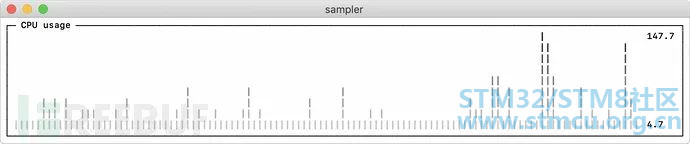
sparklines:! F! ~" U: o! }- R - title: CPU usage sample: ps -A -o %cpu | awk '{s+=$1} END {print s}'真实场景 5 E- @# n% H' o W4 d# v 数据库 以下是不同的数据库连接示例。建议使用交互式shell(init脚本)仅建立一次连接,然后在采样期间重用即可。 # prerequisite: installed mysql shell variables: mysql_connection: mysql -u root -s --database mysql --skip-column-names3 z. k- T8 ^% f sparklines: - title: MySQL (random number example) pty: true init: $mysql_connection/ g" h% Z# T: J- }) \' Y. N sample: select rand(); ' A% K1 G! l- h- G 6 |4 S' j2 Q* M& t PostgreSQL # prerequisite: installed psql shell$ i, `, S7 Z8 _0 z variables:+ Q4 D7 _- u7 y6 B% D PGPASSWORD: pwd postgres_connection: psql -h localhost -U postgres --no-align --tuples-only sparklines:* x) m0 o0 D5 ]" C! V9 ^' Z- U N - title: PostgreSQL (random number example) init: $postgres_connection sample: select random();9 O* V7 w/ I! h( g( g 3 s, Q. h$ M v 0 U, {/ w4 W8 w MongoDB # prerequisite: installed mongo shell- T% ?: z e N3 i% q variables:& m; X9 k% m2 k9 F1 n" a mongo_connection: mongo --quiet --host=localhost test sparklines:7 _; O9 f. h( S2 }5 V/ Q - title: MongoDB (random number example); P2 y) [3 N4 q' _' a3 ~3 ~ init: $mongo_connection sample: Math.random(); Neo4j # prerequisite: installed cypher shell variables: neo4j_connection: cypher-shell -u neo4j -p pwd --format plain sparklines: - title: Neo4j (random number example)# f3 U3 C/ M+ `0 n5 \/ Q" a pty: true; V, [- D, _8 v' R5 ]- {2 T$ v9 | init: $neo4j_connection sample: RETURN rand();9 w! n/ u9 m3 c# [, t transform: echo "$sample" | tail -n 1/ A; I* R% I. r Kafka 检查kafka lag值,计算每个队列lag值的和,高于阈值报警,多consumergroup,多topic。 variables:4 D5 L4 I H; D3 x6 B7 P w* D. pkafka_connection: $KAFKA_HOME/bin/kafka-consumer-groups --bootstrap-server localhost:9092 runcharts:$ l% [7 o% U/ o - title: Kafka lag per consumer group rate-ms: 5000$ \. o( \" Y# d0 Z5 ~, k) P3 N scale: 0! Z3 A( k- X) v: U items:3 O& |; a3 @, {4 u5 b - label: A->B sample: $kafka_connection --group group_a --describe | awk 'NR>1 {sum += $5} END {print sum}' - label: B->C sample: $kafka_connection --group group_b --describe | awk 'NR>1 {sum += $5} END {print sum}'2 r' p3 Z, ?! H* ?1 W - label: C->D sample: $kafka_connection --group group_c --describe | awk 'NR>1 {sum += $5} END {print sum}'3 l6 {/ L; Z e4 [7 p0 A% ~0 | Docker Docker容器统计信息(CPU,MEM,O/I) textboxes:- title: Docker containers stats% s: Q4 ]: p" Z( y; x$ P( T9 | sample: docker stats --no-stream --format "table {{.Name}}\t{{.CPUPerc}}\t{{.MemPerc}}\t{{.MemUsage}}\t{{.NetIO}}\t{{.BlockIO}}\t{{.PIDs}}"; B& _. h5 n$ P0 w6 r" N# B( n# u ) S ^9 N+ E- d0 T3 M % R1 ^$ }6 Y4 s, i" o: Q5 \ SSH 远程服务器上的TOP命令 variables: N9 M! N, e: Z2 b2 U) M) E2 Isshconnection: ssh -i ~/my-key-pair.pem ec2-user@1.2.3.4 textboxes: - title: SSH( ~% P% Y! }' M m+ ~1 k pty: true. z) q) P! O. A: s0 D init: $sshconnection$ K8 w3 |3 x' Y1 b' { sample: top& X- u( J; s- v" d+ i# c# H; G 9 I, E3 q0 G& r) a JMX Java应用程序的正常运行示例 # prerequisite: download [jmxterm jar file](https://docs.cyclopsgroup.org/jmxterm)1 v6 G& w3 [( ^2 }7 Utextboxes: B4 f* I8 z4 J7 m - title: Java application uptime multistep-init: - java -jar jmxterm-1.0.0-uber.jar - open host:port # or local PID - bean java.lang:type=Runtime sample: get Uptime transform: echo $sample | tr -dc '0-9' | awk '{printf "%.1f min", $1/1000/60}' 5 V, _+ o8 V7 H2 Q |
 微信公众号
微信公众号
 手机版
手机版


