




|
一、MySQL自带的压力测试工具 Mysqlslap mysqlslap是mysql自带的基准测试工具,该工具查询数据,语法简单,灵活容易使用.该工具可以模拟多个客户端同时并发的向服务器发出查询更新,给出了性能测试数据而且提供了多种引擎的性能比较。mysqlslap为mysql性能优化前后提供了直观的验证依据,系统运维和DBA人员应该掌握一些常见的压力测试工具,才能准确的掌握线上数据库支撑的用户流量上限及其抗压性等问题。 1、更改其默认的最大连接数 在对MySQL进行压力测试之前,需要更改其默认的最大连接数,如下: [root@mysql ~]# vim /etc/my.cnf................ [mysqld], x* u' G+ R1 @% W3 G | max_connections=1024# k; r9 Z: i- u8 a- t P [root@mysql ~]# systemctl restart mysqld5 J% ], J3 y n$ f1 u 查看最大连接数 mysql> show variables like 'max_connections';* {* Q/ K" {$ L+ Z; _+-----------------+-------+ | Variable_name | Value | +-----------------+-------+ | max_connections | 1024 | +-----------------+--------+8 {4 [% N q- [0 r! ?( k& q 1 row in set (0.00 sec) 进行压力测试: [root@mysql ~]# mysqlslap --defaults-file=/etc/my.cnf --concurrency=100,200 --iterations=1 --number-int-cols=20 --number-char-cols=30 \& e% o# b' T$ S --auto-generate-sql --auto-generate-sql-add-autoincrement --auto-generate-sql-load-type=mixed --engine=myisam,innodb --number-of-queries=2000 -uroot -p123 --verbose2 ~4 ]) e: d5 ]! f' T, f3 a 上述命令测试说明:模拟测试两次读写并发,第一次100,第二次200,自动生成SQL脚本,测试表包含20个init字段,30个char字段,每次执行2000查询请求。测试引擎分别是myisam,innodb。(上述选项中有很多都是默认值,可以省略,如果想要了解各个选项的解释,可以使用mysqlslap --help进行查询)。 测试结果说明:
可以根据实际需求,一点点的加大并发数量进行压力测试。 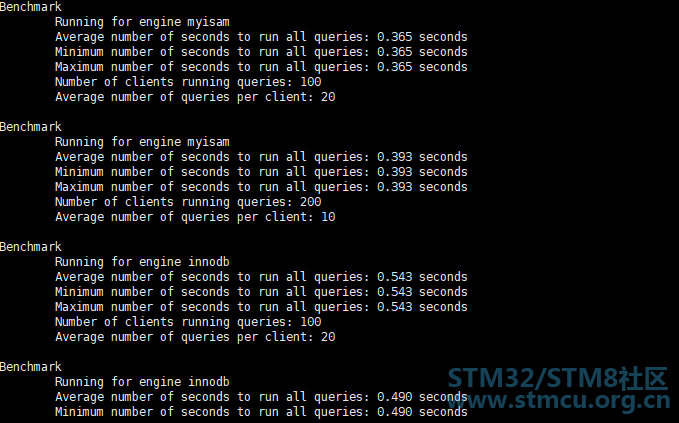
1、安装sysbench工具 [root@mysql ~]# yum -y install epel-release #安装第三方epel源2 I7 Z0 G! r- X- A3 s6 B8 v[root@mysql ~]# yum -y install sysbench #安装sysbench工具+ h5 a5 J# H% R 5 t- c( L1 H+ s. r: M, _ [root@mysql ~]# sysbench --version #确定工具已安装 sysbench 1.0.174 l+ y' Z$ t, j6 u sysbench可以进行以下测试:
数据库性能测试(OLTP 基准测试,需要通过 /usr/share/sysbench/ 目录中的 Lua 脚本执行,例如 oltp_read_only.lua 脚本执行只读测试)。 sysbench 还可以通过运行命令时指定自己的 Lua 脚本来自定义测试。 2、查看sysbench工具的帮助选项 [root@mysql ~]# sysbench --help5 A+ Y1 c) N4 F% }Usage: sysbench [options]... [testname] [command] Commands implemented by most tests: prepare run cleanup help # 可用的命令,四个 1 J' D) \' r; N% D+ ]! z General options: # 通用选项/ h) h, e' n- ^1 B0 ~% `. R" \ --threads=N 要使用的线程数,默认 1 个 [1] --events=N 最大允许的事件个数 [0]) b5 G9 P; \& c --time=N 最大的总执行时间,以秒为单位 [10]' E3 E, y Z5 l1 b x: ^' ~9 [ --forced-shutdown=STRING 在 --time 时间限制到达后,强制关闭之前等待的秒数,默认“off”禁用(number of seconds to wait after the --time limit before forcing shutdown, or 'off' to disable) [off] --thread-stack-size=SIZE 每个线程的堆栈大小 [64K]9 ^! c" y7 z! p! O3 l4 T --rate=N 平均传输速率。0 则无限制 [0]8 G3 o5 Q% h0 ]6 E( i --report-interval=N 以秒为单位定期报告具有指定间隔的中间统计信息 0 禁用中间报告 [0] --report-checkpoints=[LIST,...] 转储完整的统计信息并在指定的时间点重置所有计数器。参数是一个逗号分隔的值列表,表示从测试开始经过这个时间量时必须执行报告检查点(以秒为单位)。报告检查点默认关闭。 [] --debug[=on|off] 打印更多 debug 信息 [off], h: L8 K& V3 N( ^) I$ V7 _ --validate[=on|off] 尽可能执行验证检查 [off]2 `; |" E% B2 L --help[=on|off] 显示帮助信息并退出 [off]5 J/ F" g$ ~8 w2 R/ F --version[=on|off] 显示版本信息并退出 [off] --config-file=FILENAME 包含命令行选项的文件 --tx-rate=N 废弃,改用 --rate [0]: Q5 m, w/ ~+ d) r --max-requests=N 废弃,改用 --events [0]. D/ e/ Y# Y8 r6 l --max-time=N 废弃,改用 --time [0] --num-threads=N 废弃,改用 --threads [1] ) J1 u3 ~ d8 ~% L) ~ Pseudo-Random Numbers Generator options: # 伪随机数发生器选项 --rand-type=STRING random numbers distribution {uniform,gaussian,special,pareto} [special]( n( P l' A) m6 }' P --rand-spec-iter=N number of iterations used for numbers generation [12]0 Z6 Y. y" X7 `$ y0 o --rand-spec-pct=N percentage of values to be treated as 'special' (for special distribution) [1]4 b# M2 q3 _% H7 ~( D2 h --rand-spec-res=N percentage of 'special' values to use (for special distribution) [75] --rand-seed=N seed for random number generator. When 0, the current time is used as a RNG seed. [0]' w0 w% k+ o( q5 @ G+ ]+ J --rand-pareto-h=N parameter h for pareto distribution [0.2]6 T" e/ U/ f/ d% P3 p' t Log options: # 日志选项+ Q- {5 H. X2 a+ f1 a --verbosity=N verbosity level {5 - debug, 0 - only critical messages} [3]9 q1 i2 a! u8 t! r --percentile=N percentile to calculate in latency statistics (1-100). Use the special value of 0 to disable percentile calculations [95]4 s+ z* l" |5 q4 ~3 s. @8 L --histogram[=on|off] print latency histogram in report [off] M1 L6 j( l7 n$ x6 [4 ^ ) W4 g' x* A9 C/ F ~3 ] General database options: # 通用的数据库选项/ v& m: q' h/ i! R& o0 a f& ? --db-driver=STRING 指定要使用的数据库驱动程序 ('help' to get list of available drivers) --db-ps-mode=STRING prepared statements usage mode {auto, disable} [auto]9 r0 d. X1 j0 L! \, Y0 q- g --db-debug[=on|off] print database-specific debug information [off]1 Q) l2 u( h9 d1 N2 y0 b8 C Compiled-in database drivers: # 內建的数据库驱动程序,默认支持 MySQL 和 PostgreSQL mysql - MySQL driver pgsql - PostgreSQL driver - f6 w/ h5 p8 K: V, @+ t$ ~ mysql options: # MySQL 数据库专用选项 --mysql-host=[LIST,...] MySQL server host [localhost] --mysql-port=[LIST,...] MySQL server port [3306]" v5 l6 X& |" p7 d- \+ m- } --mysql-socket=[LIST,...] MySQL socket- b7 H: T i5 R8 l! D6 \/ X- `7 D& M6 Y --mysql-user=STRING MySQL user [sbtest] --mysql-password=STRING MySQL password [] --mysql-db=STRING MySQL database name [sbtest]$ j) l+ ~$ S: D+ F H% | --mysql-ssl[=on|off] use SSL connections, if available in the client library [off]' g: b }+ y- H3 F0 e --mysql-ssl-cipher=STRING use specific cipher for SSL connections [] --mysql-compression[=on|off] use compression, if available in the client library [off] _2 W. |6 o2 c1 [- _2 v4 V --mysql-debug[=on|off] trace all client library calls [off] --mysql-ignore-errors=[LIST,...] list of errors to ignore, or "all" [1213,1020,1205]% Y3 ?; L1 k9 t5 [% J1 g9 L* F. e/ P --mysql-dry-run[=on|off] Dry run, pretend that all MySQL client API calls are successful without executing them [off] 5 A+ W( W9 y1 s pgsql options: # PostgreSQL 数据库专用选项 --pgsql-host=STRING PostgreSQL server host [localhost] --pgsql-port=N PostgreSQL server port [5432]2 k# ]9 ^/ ?/ U! T7 a+ P9 Y+ J/ d --pgsql-user=STRING PostgreSQL user [sbtest]: Z5 b0 S/ J4 V" E( I' z5 ^: } --pgsql-password=STRING PostgreSQL password [] --pgsql-db=STRING PostgreSQL database name [sbtest]& j( c+ p7 V/ Z; |- B) z Compiled-in tests: # 內建测试类型# B% K/ d) c2 G0 n# B; k$ d fileio - File I/O test cpu - CPU performance test memory - Memory functions speed test threads - Threads subsystem performance test7 `5 w" r& t* T1 r2 N5 q mutex - Mutex performance test See 'sysbench <testname> help' for a list of options for each test.& b: h8 p$ i) ]$ W) ]: J 3、sysbench测试MySQL数据库性能 1)准备测试数据 #查看sysbench自带的lua脚本使用方法[root@mysql ~]# sysbench /usr/share/sysbench/oltp_common.lua help 0 u V$ r2 g( m% A# b# Q #必须创建sbtest库,sbtest是sysbench默认使用的库名 [root@mysql ~]# mysqladmin -uroot -p123 create sbtest;8 ~% H& R) ~8 r, M) h3 Z2 Z1 z, } #然后,准备测试所用的表,这些测试表放在测试库sbtest中。这里使用的lua脚本为/usr/share/sysbench/oltp_common.lua。 [root@mysql ~]# sysbench --mysql-host=127.0.0.1 \' M) N$ p( z5 {: R; e! F- U4 f --mysql-port=3306 \5 e/ M) W. ]# o4 B- C --mysql-user=root \, o. i( ^4 S6 I" i- F" F. h; i --mysql-password=123 \ /usr/share/sysbench/oltp_common.lua \: f: G& C/ A2 A: V. W7 {0 U7 ^ --tables=10 \ --table_size=100000 \ prepare& e0 T$ Y; h8 N) u: t b) u #其中--tables=10表示创建10个测试表, #--table_size=100000表示每个表中插入10W行数据, #prepare表示这是准备数的过程。 2)确认测试数据以存在 [root@mysql ~]# mysql -uroot -p123 sbtest; #登录到sbtest库; {7 d% L/ k- K6 Y mysql> show tables; #查看相应的表% u$ X' O# ?# I +------------------+ | Tables_in_sbtest | +------------------+ | sbtest1 |3 N d E9 t& a" C( \2 Z8 I | sbtest10 |6 i# t$ Y n& C7 m# T | sbtest2 |( R7 u _ r+ ~, T | sbtest3 |8 o% A# v) `3 W$ X+ s# A- g! s | sbtest4 |- r" ~" I( M# M2 f5 _ | sbtest5 |2 X! G( X& P) H" J5 ~ K; l | sbtest6 |' v) o2 j2 f o3 n, j) U9 n) r9 u | sbtest7 |, G3 W* s `& y+ S% J# K& q | sbtest8 |/ h6 h9 W6 p3 g ` | sbtest9 | +------------------+ 10 rows in set (0.00 sec) mysql> select count(*) from sbtest1; #随机选择一个表,确认其有100000条数据# f, z0 \/ }4 T* J: E& V% K +----------+9 a3 E5 o1 C( w7 @ | count(*) | F3 Y0 L' C: w4 W' d& @& F3 w) W; ^ +----------+ | 100000 | +----------+ 1 row in set (0.01 sec) 3)数据库测试和结果分析 稍微修改下之前准备数据的语句,就可以拿来测试了。需要注意的是,之前使用的lua脚本为oltp_common.lua,它是一个通用脚本,是被其它lua脚本调用的,它不能直接拿来测试。 所以,我这里用oltp_read_write.lua脚本来做读、写测试。还有很多其它类型的测试,比如只读测试、只写测试、删除测试、大批量插入测试等等。可找到对应的lua脚本进行调用即可。 #执行测试命令如下:[root@mysql ~]# sysbench --threads=4 \ --time=20 \8 r+ Q& z* ?: ]2 H --report-interval=5 \ --mysql-host=127.0.0.1 \ --mysql-port=3306 \ --mysql-user=root \9 F. G/ u$ G% Z/ B --mysql-password=123 \ /usr/share/sysbench/oltp_read_write.lua \9 r1 p# E% w8 ]% W s9 z# P --tables=10 \ --table_size=100000 \" A' `1 X+ R6 r( g3 I8 { run 上述命令返回的结果如下: [root@mysql ~]# sysbench --threads=4 --time=20 --report-interval=5 --mysql-host=127.0.0.1 --mysql-port=3306 --mysql-user=root --mysql-password=123 /usr/share/sysbench/oltp_read_write.lua --tables=10 --table_size=100000 runsysbench 1.0.17 (using system LuaJIT 2.0.4) N0 c- }1 w/ a9 w% i Running the test with following options:0 I3 G# O: C( A5 O; P2 S( w# U4 A Number of threads: 4 Report intermediate results every 5 second(s)* \) M. h$ |, l# ~6 X Initializing random number generator from current time8 {9 w4 Z- h/ e7 N Initializing worker threads... Threads started! #以下是每5秒返回一次的结果,统计的指标包括: # 线程数、tps(每秒事务数)、qps(每秒查询数)、. {2 W( C* G" u$ p! z # 每秒的读/写/其它次数、延迟、每秒错误数、每秒重连次数 [ 5s ] thds: 4 tps: 1040.21 qps: 20815.65 (r/w/o: 14573.17/4161.25/2081.22) lat (ms,95%): 7.17 err/s: 0.00 reconn/s: 0.00 [ 10s ] thds: 4 tps: 1083.34 qps: 21667.15 (r/w/o: 15165.93/4334.55/2166.68) lat (ms,95%): 6.55 err/s: 0.00 reconn/s: 0.008 i+ T ^# l* r, p6 X E+ J* u [ 15s ] thds: 4 tps: 1121.57 qps: 22429.09 (r/w/o: 15700.64/4485.30/2243.15) lat (ms,95%): 6.55 err/s: 0.00 reconn/s: 0.00 [ 20s ] thds: 4 tps: 1141.69 qps: 22831.98 (r/w/o: 15982.65/4566.16/2283.18) lat (ms,95%): 6.09 err/s: 0.00 reconn/s: 0.00 SQL statistics: queries performed: read: 307146 # 执行的读操作数量* x' _6 Y, q0 `* J write: 87756 # 执行的写操作数量 other: 43878 # 执行的其它操作数量" Q- [# P5 K; x% b _ , U" ]& i2 l# b( r* L9 S- w4 B7 R total: 438780 transactions: 21939 (1096.57 per sec.) # 执行事务的平均速率 queries: 438780 (21931.37 per sec.) # 平均每秒能执行多少次查询/ F" I& A( `0 i" {3 l' u ignored errors: 0 (0.00 per sec.) reconnects: 0 (0.00 per sec.)( V7 m z. B" X$ A) e: s7 `+ \ General statistics:6 u" Q' J5 M: A1 ~ total time: 20.0055s # 总消耗时间 total number of events: 21939 # 总请求数量(读、写、其它), n. s# L3 K! @3 g 1 C9 n* M( L) J- l Latency (ms): min: 1.39/ @$ r" J' p/ ^/ [2 D. S avg: 3.64 max: 192.05 95th percentile: 6.67 # 采样计算的平均延迟 sum: 79964.26 % v3 K5 _6 s7 ?$ u- G' ? Threads fairness: events (avg/stddev): 5484.7500/15.12# {" u% O& t) d$ G execution time (avg/stddev): 19.9911/0.00% m" S% W& r g$ A 4、cpu/io/内存等测试 sysbench内置的几个测试指标如下: [root@mysql ~]# sysbench --help( X: f$ @ F+ g& d2 i: r% D; i, t.......... # 省略部分内容 Compiled-in tests: fileio - File I/O test6 h. C3 p; U4 r7 F cpu - CPU performance test# f9 y! E% ]1 S; ~" V+ m& m memory - Memory functions speed test; G: i$ o V1 f! T! M( z% _ threads - Threads subsystem performance test2 t% D4 H8 ?* o2 w6 `+ i mutex - Mutex performance test 可以直接help输出测试方法,例如,fileio测试: [root@mysql ~]# sysbench fileio helpsysbench 1.0.17 (using system LuaJIT 2.0.4) fileio options: --file-num=N number of files to create [128]6 T! u) r9 A& A' \9 z* \ --file-block-size=N block size to use in all IO operations [16384] --file-total-size=SIZE total size of files to create [2G] --file-test-mode=STRING test mode {seqwr, seqrewr, seqrd, rndrd, rndwr, rndrw}3 B. t* Q. c+ Y" n L --file-io-mode=STRING file operations mode {sync,async,mmap} [sync]" c [( V( y3 N2 p, q --file-async-backlog=N number of asynchronous operatons to queue per thread [128] --file-extra-flags=[LIST,...] list of additional flags to use to open files {sync,dsync,direct} [] --file-fsync-freq=N do fsync() after this number of requests (0 - don't use fsync()) [100] --file-fsync-all[=on|off] do fsync() after each write operation [off]- D7 u) @( r( k2 U --file-fsync-end[=on|off] do fsync() at the end of test [on] --file-fsync-mode=STRING which method to use for synchronization {fsync, fdatasync} [fsync]) a( z: Q0 g0 b9 x4 x --file-merged-requests=N merge at most this number of IO requests if possible (0 - don't merge) [0] --file-rw-ratio=N reads/writes ratio for combined test [1.5] 1)测试io性能 例如,创建5个文件,总共2G,每个文件大概400M。 [root@mysql ~]# sysbench fileio --file-num=5 --file-total-size=2G prepare. r7 c( R2 t h[root@mysql ~]# ll -lh test* -rw------- 1 root root 410M May 26 16:05 test_file.0 -rw------- 1 root root 410M May 26 16:05 test_file.1 -rw------- 1 root root 410M May 26 16:05 test_file.2 -rw------- 1 root root 410M May 26 16:05 test_file.3$ f$ ]: g7 ?" k+ ] -rw------- 1 root root 410M May 26 16:05 test_file.4 然后运行测试: [root@mysql ~]# sysbench --events=5000 \--threads=16 \+ V! B* e& D l% I' Z1 G/ A: Y% ] fileio \ --file-num=5 \ --file-total-size=2G \ --file-test-mode=rndrw \ --file-fsync-freq=0 \ --file-block-size=16384 \ run6 h0 H' U" [2 b/ h6 {) |5 T X1 ? 返回的结果如下: Running the test with following options:Number of threads: 16! z$ o1 f7 P+ @7 q0 L& h Initializing random number generator from current time6 O0 m( ]6 T/ i% u6 r Extra file open flags: (none) 5 files, 409.6MiB each 2GiB total file size7 p/ ?' {) i+ ? Block size 16KiB& x# N7 D! ^& X$ A) f* h) S8 N Number of IO requests: 5000 Read/Write ratio for combined random IO test: 1.50 Calling fsync() at the end of test, Enabled. Using synchronous I/O mode* O9 `( R" n6 w; I Doing random r/w test Initializing worker threads...1 ^* B: l# {/ e$ b# [3 U Threads started! . r$ ^( A$ H$ v& t File operations:4 z, [" S; r+ w* P9 j" J reads/s: 9899.03* ? b3 S# e/ T% S! d3 b i writes/s: 6621.38 fsyncs/s: 264.33# h! l' ^% t/ C( F! x* | Throughput: # 吞吐量& m& n$ o8 y9 {: @ `0 F0 c read, MiB/s: 154.66 #表示读带宽- G1 |' J6 ~, b3 E2 A* F; r written, MiB/s: 103.46 #表示写的带宽( s8 A6 G5 M, t% q8 E# } 9 g" N3 w. z! U O, L! N6 I' Y& N General statistics: total time: 0.3014s total number of events: 50007 b j8 |0 c, W( V2 ~: }1 h Latency (ms):( l2 \3 u+ g8 _' i min: 0.00 avg: 0.81 max: 53.56 95th percentile: 4.10+ i% k. J5 o) d9 } sum: 4030.48 Threads fairness: events (avg/stddev): 312.5000/27.64( G1 l/ f4 O# c$ D* I2 x s+ w execution time (avg/stddev): 0.2519/0.02 2)测试cpu性能 [root@mysql ~]# sysbench cpu --threads=40 --events=10000 --cpu-max-prime=20000 run+ G* d# V; _$ D7 @% A压测时,还请小心谨慎!!!! |
 微信公众号
微信公众号
 手机版
手机版


