基于Zephyr RTOS LVGL的测试工程
硬件
STM32L562E-DK
软件环境
Zephyr RTOS sdk 4.4.0
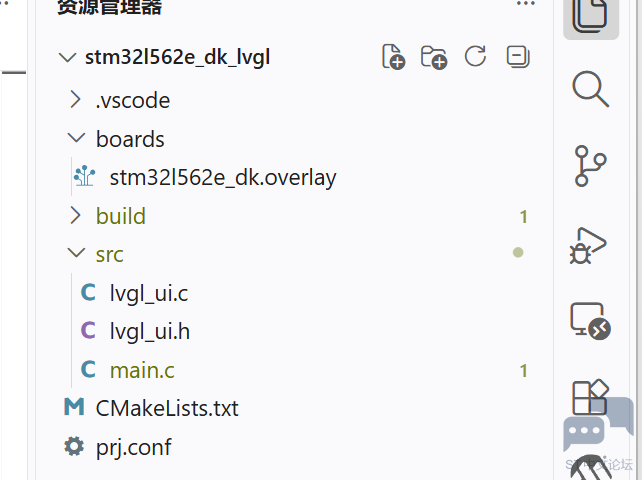
工程目录
软件实现
1、prj.con
在配置中,需要打display、lvgl 、触摸、字体并配置合适的栈空间。代码如下:
CONFIG_MAIN_STACK_SIZE=4096

CONFIG_DISPLAY=y
CONFIG_INPUT=y
CONFIG_LVGL=y
CONFIG_LV_Z_MEM_POOL_SIZE=32768

CONFIG_LV_FONT_MONTSERRAT_14=y
CONFIG_LV_FONT_MONTSERRAT_20=y
2、添加一个ui界面文件,里面添加两个按键以后哪个按下的标,以及计数据标签,代码如下:
/*
 * LVGL test UI for STM32L562E-DK: title, status/counter labels
 * and two touch buttons.
 *
 * SPDX-License-Identifier: Apache-2.0
 */

#include <lvgl.h>

#include "lvgl_ui.h"

static lv_obj_t *status_label;
static lv_obj_t *count_label;
static uint32_t press_count;

static void update_count_label(void)
{
    lv_label_set_text_fmt(count_label, "Press count: %u", press_count);
}

static void btn_event_cb(lv_event_t *e)
{
    const char *name = lv_event_get_user_data(e);

    press_count++;
    lv_label_set_text_fmt(status_label, "Pressed: %s", name);
    update_count_label();
}

static lv_obj_t *create_button(lv_obj_t *parent, const char *text, lv_coord_t x_ofs,
                   lv_coord_t y_ofs, lv_color_t color)
{
    lv_obj_t *btn = lv_button_create(parent);

    lv_obj_set_size(btn, 90, 44);
    lv_obj_align(btn, LV_ALIGN_BOTTOM_MID, x_ofs, y_ofs);
    lv_obj_set_style_bg_color(btn, color, LV_PART_MAIN);
    lv_obj_add_event_cb(btn, btn_event_cb, LV_EVENT_CLICKED, (void *)text);

    lv_obj_t *label = lv_label_create(btn);

    lv_label_set_text(label, text);
    lv_obj_set_style_text_font(label, &lv_font_montserrat_14, LV_PART_MAIN);
    lv_obj_center(label);

    return btn;
}

void lvgl_ui_create(void)
{
    lv_obj_t *screen = lv_screen_active();

    /* dark blue background */
    lv_obj_set_style_bg_color(screen, lv_color_hex(0x003a57), LV_PART_MAIN);
    lv_obj_set_style_bg_opa(screen, LV_OPA_COVER, LV_PART_MAIN);

    /* main title */
    lv_obj_t *title = lv_label_create(screen);

    lv_label_set_text(title, "Hello World!");
    lv_obj_set_style_text_font(title, &lv_font_montserrat_20, LV_PART_MAIN);
    lv_obj_set_style_text_color(title, lv_color_white(), LV_PART_MAIN);
    lv_obj_align(title, LV_ALIGN_TOP_MID, 0, 30);

    /* subtitle */
    lv_obj_t *subtitle = lv_label_create(screen);

    lv_label_set_text(subtitle, "STM32L562E-DK + LVGL");
    lv_obj_set_style_text_font(subtitle, &lv_font_montserrat_14, LV_PART_MAIN);
    lv_obj_set_style_text_color(subtitle, lv_color_hex(0x00cfc1), LV_PART_MAIN);
    lv_obj_align(subtitle, LV_ALIGN_TOP_MID, 0, 62);

    /* status + counter feedback */
    status_label = lv_label_create(screen);
    lv_label_set_text(status_label, "Touch a button...");
    lv_obj_set_style_text_font(status_label, &lv_font_montserrat_14, LV_PART_MAIN);
    lv_obj_set_style_text_color(status_label, lv_color_hex(0xffe37e), LV_PART_MAIN);
    lv_obj_align(status_label, LV_ALIGN_TOP_MID, 0, 100);

    count_label = lv_label_create(screen);
    lv_obj_set_style_text_font(count_label, &lv_font_montserrat_14, LV_PART_MAIN);
    lv_obj_set_style_text_color(count_label, lv_color_white(), LV_PART_MAIN);
    lv_obj_align(count_label, LV_ALIGN_TOP_MID, 0, 126);
    update_count_label();

    /* two touch buttons at the bottom */
    create_button(screen, "BTN A", -52, -30, lv_color_hex(0x2b8a3e));
    create_button(screen, "BTN B", 52, -30, lv_color_hex(0xc92a2a));
}
3、main.c
在main.c中,初始化lvgl并在while中调用tick来响应触摸
/*
 * LVGL Hello World + touch buttons for STM32L562E-DK (240x240 ST7789V)
 *
 * SPDX-License-Identifier: Apache-2.0
 */

#include <zephyr/kernel.h>
#include <zephyr/device.h>
#include <zephyr/drivers/display.h>
#include <lvgl.h>
#include <lvgl_zephyr.h>
#include <stdio.h>

#include "lvgl_ui.h"

int main(void)
{
    const struct device *display_dev = DEVICE_DT_GET(DT_CHOSEN(zephyr_display));

    if (!device_is_ready(display_dev)) {
        printf("Display device not ready, aborting\n");
        return 0;
    }

    lvgl_lock();
    lvgl_ui_create();
    lv_timer_handler();
    lvgl_unlock();

    int ret = display_blanking_off(display_dev);

    if (ret < 0 && ret != -ENOSYS) {
        printf("Failed to turn blanking off (error %d)\n", ret);
        return 0;
    }

    printf("LVGL Hello World started\n");

    while (1) {
        uint32_t sleep_ms;

        lvgl_lock();
        sleep_ms = lv_timer_handler();
        lvgl_unlock();

        k_msleep(MIN(sleep_ms, INT32_MAX));
    }

    return 0;
}
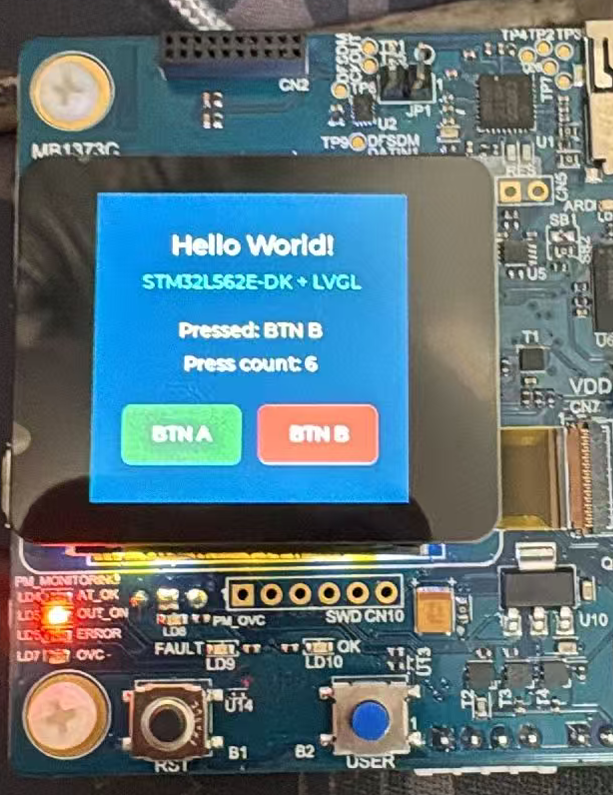
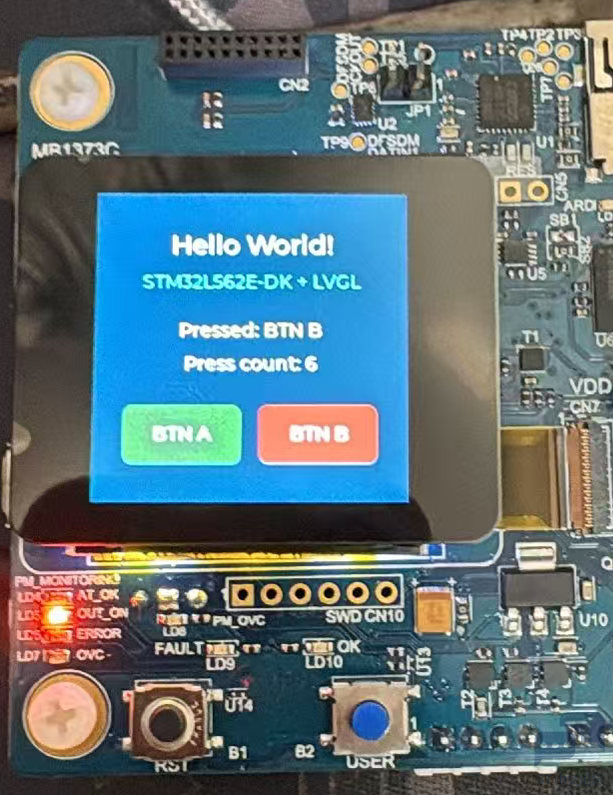
实现效果:





 微信公众号
微信公众号
 手机版
手机版