基于Zephyr RTOS LCD图形化测试
Zephyr已经完美支持这块开发板了,本篇将分享如何快速进行lcd的hello world测试
添加LCD显示支持
在prj.conf中添加display开关,即可以把开发板上的LCD加入驱动并参与编译
CONFIG_DISPLAY=y
测试程序
在src目录下面添加lcd_test.c
/*
 * LCD test for STM32L562E-DK on-board 240x240 TFT (ST7789V via FMC MIPI-DBI).
 * Draws text, color blocks and curves using the raw Zephyr display API,
 * no LVGL involved.
 *
 * SPDX-License-Identifier: Apache-2.0
 */

#include <zephyr/kernel.h>
#include <zephyr/device.h>
#include <zephyr/drivers/display.h>

#include <math.h>
#include <string.h>
#include <ctype.h>
#include <stdlib.h>

#include "lcd_test.h"

#define LCD_W 240
#define LCD_H 240

/* RGB565 colors (host order, byte swap handled at draw time if needed) */
#define COLOR_BLACK   0x0000
#define COLOR_WHITE   0xFFFF
#define COLOR_RED     0xF800
#define COLOR_GREEN   0x07E0
#define COLOR_BLUE    0x001F
#define COLOR_YELLOW  0xFFE0
#define COLOR_CYAN    0x07FF
#define COLOR_MAGENTA 0xF81F
#define COLOR_GRAY    0x8410

/* Full-screen framebuffer: 240 * 240 * 2 = 115200 bytes */
static uint16_t fb[LCD_W * LCD_H];
static bool fb_swap_bytes;

struct glyph {
    char ch;
    uint8_t row[8]; /* bit 7 = leftmost column */
};

/* 5x7 font in an 8x8 cell (columns 1-5 used), uppercase + digits */
static const struct glyph font[] = {
    { ' ', { 0x00, 0x00, 0x00, 0x00, 0x00, 0x00, 0x00, 0x00 } },
    { '!', { 0x10, 0x10, 0x10, 0x10, 0x10, 0x00, 0x10, 0x00 } },
    { '-', { 0x00, 0x00, 0x00, 0x7C, 0x00, 0x00, 0x00, 0x00 } },
    { '.', { 0x00, 0x00, 0x00, 0x00, 0x00, 0x30, 0x30, 0x00 } },
    { ':', { 0x00, 0x30, 0x30, 0x00, 0x30, 0x30, 0x00, 0x00 } },
    { '0', { 0x38, 0x44, 0x44, 0x44, 0x44, 0x44, 0x38, 0x00 } },
    { '1', { 0x10, 0x30, 0x10, 0x10, 0x10, 0x10, 0x38, 0x00 } },
    { '2', { 0x38, 0x44, 0x04, 0x08, 0x10, 0x20, 0x7C, 0x00 } },
    { '3', { 0x38, 0x44, 0x04, 0x18, 0x04, 0x44, 0x38, 0x00 } },
    { '4', { 0x08, 0x18, 0x28, 0x48, 0x7C, 0x08, 0x08, 0x00 } },
    { '5', { 0x7C, 0x40, 0x78, 0x04, 0x04, 0x44, 0x38, 0x00 } },
    { '6', { 0x38, 0x40, 0x40, 0x78, 0x44, 0x44, 0x38, 0x00 } },
    { '7', { 0x7C, 0x04, 0x08, 0x10, 0x10, 0x10, 0x10, 0x00 } },
    { '8', { 0x38, 0x44, 0x44, 0x38, 0x44, 0x44, 0x38, 0x00 } },
    { '9', { 0x38, 0x44, 0x44, 0x3C, 0x04, 0x04, 0x38, 0x00 } },
    { 'A', { 0x38, 0x44, 0x44, 0x7C, 0x44, 0x44, 0x44, 0x00 } },
    { 'B', { 0x78, 0x44, 0x44, 0x78, 0x44, 0x44, 0x78, 0x00 } },
    { 'C', { 0x38, 0x44, 0x40, 0x40, 0x40, 0x44, 0x38, 0x00 } },
    { 'D', { 0x78, 0x44, 0x44, 0x44, 0x44, 0x44, 0x78, 0x00 } },
    { 'E', { 0x7C, 0x40, 0x40, 0x78, 0x40, 0x40, 0x7C, 0x00 } },
    { 'F', { 0x7C, 0x40, 0x40, 0x78, 0x40, 0x40, 0x40, 0x00 } },
    { 'G', { 0x38, 0x44, 0x40, 0x5C, 0x44, 0x44, 0x38, 0x00 } },
    { 'H', { 0x44, 0x44, 0x44, 0x7C, 0x44, 0x44, 0x44, 0x00 } },
    { 'I', { 0x38, 0x10, 0x10, 0x10, 0x10, 0x10, 0x38, 0x00 } },
    { 'J', { 0x1C, 0x08, 0x08, 0x08, 0x08, 0x48, 0x30, 0x00 } },
    { 'K', { 0x44, 0x48, 0x50, 0x60, 0x50, 0x48, 0x44, 0x00 } },
    { 'L', { 0x40, 0x40, 0x40, 0x40, 0x40, 0x40, 0x7C, 0x00 } },
    { 'M', { 0x44, 0x6C, 0x54, 0x54, 0x44, 0x44, 0x44, 0x00 } },
    { 'N', { 0x44, 0x64, 0x54, 0x4C, 0x44, 0x44, 0x44, 0x00 } },
    { 'O', { 0x38, 0x44, 0x44, 0x44, 0x44, 0x44, 0x38, 0x00 } },
    { 'P', { 0x78, 0x44, 0x44, 0x78, 0x40, 0x40, 0x40, 0x00 } },
    { 'Q', { 0x38, 0x44, 0x44, 0x44, 0x54, 0x48, 0x34, 0x00 } },
    { 'R', { 0x78, 0x44, 0x44, 0x78, 0x50, 0x48, 0x44, 0x00 } },
    { 'S', { 0x38, 0x44, 0x40, 0x38, 0x04, 0x44, 0x38, 0x00 } },
    { 'T', { 0x7C, 0x10, 0x10, 0x10, 0x10, 0x10, 0x10, 0x00 } },
    { 'U', { 0x44, 0x44, 0x44, 0x44, 0x44, 0x44, 0x38, 0x00 } },
    { 'V', { 0x44, 0x44, 0x44, 0x44, 0x44, 0x28, 0x10, 0x00 } },
    { 'W', { 0x44, 0x44, 0x44, 0x54, 0x54, 0x6C, 0x44, 0x00 } },
    { 'X', { 0x44, 0x44, 0x28, 0x10, 0x28, 0x44, 0x44, 0x00 } },
    { 'Y', { 0x44, 0x44, 0x28, 0x10, 0x10, 0x10, 0x10, 0x00 } },
    { 'Z', { 0x7C, 0x04, 0x08, 0x10, 0x20, 0x40, 0x7C, 0x00 } },
};

static const struct glyph *find_glyph(char ch)
{
    ch = toupper((unsigned char)ch);
    for (size_t i = 0; i < ARRAY_SIZE(font); i++) {
        if (font[i].ch == ch) {
            return &font[i];
        }
    }
    return &font[0]; /* space */
}

static inline void fb_pixel(int x, int y, uint16_t color565)
{
    if (x < 0 || x >= LCD_W || y < 0 || y >= LCD_H) {
        return;
    }
    fb[y * LCD_W + x] = fb_swap_bytes ? (uint16_t)((color565 >> 8) | (color565 << 8))
                      : color565;
}

static void fb_fill(uint16_t color565)
{
    uint16_t c = fb_swap_bytes ? (uint16_t)((color565 >> 8) | (color565 << 8))
                   : color565;

    for (size_t i = 0; i < LCD_W * LCD_H; i++) {
        fb[i] = c;
    }
}

static void fb_fill_rect(int x, int y, int w, int h, uint16_t color565)
{
    for (int j = y; j < y + h; j++) {
        for (int i = x; i < x + w; i++) {
            fb_pixel(i, j, color565);
        }
    }
}

static void fb_draw_rect(int x, int y, int w, int h, uint16_t color565)
{
    for (int i = x; i < x + w; i++) {
        fb_pixel(i, y, color565);
        fb_pixel(i, y + h - 1, color565);
    }
    for (int j = y; j < y + h; j++) {
        fb_pixel(x, j, color565);
        fb_pixel(x + w - 1, j, color565);
    }
}

/* Bresenham line */
static void fb_draw_line(int x0, int y0, int x1, int y1, uint16_t color565)
{
    int dx = abs(x1 - x0);
    int dy = -abs(y1 - y0);
    int sx = x0 < x1 ? 1 : -1;
    int sy = y0 < y1 ? 1 : -1;
    int err = dx + dy;

    for (;;) {
        fb_pixel(x0, y0, color565);
        if (x0 == x1 && y0 == y1) {
            break;
        }
        int e2 = 2 * err;

        if (e2 >= dy) {
            err += dy;
            x0 += sx;
        }
        if (e2 <= dx) {
            err += dx;
            y0 += sy;
        }
    }
}

static void fb_draw_char(int x, int y, char ch, int scale, uint16_t color565)
{
    const struct glyph *g = find_glyph(ch);

    for (int r = 0; r < 8; r++) {
        for (int c = 0; c < 8; c++) {
            if (g->row[r] & (0x80 >> c)) {
                fb_fill_rect(x + c * scale, y + r * scale,
                         scale, scale, color565);
            }
        }
    }
}

static void fb_draw_string(int x, int y, const char *s, int scale, uint16_t color565)
{
    int cx = x;

    while (*s) {
        fb_draw_char(cx, y, *s++, scale, color565);
        cx += 6 * scale; /* 5 px glyph + 1 px spacing, scaled */
    }
}

int lcd_test_run(void)
{
    const struct device *dev = DEVICE_DT_GET(DT_CHOSEN(zephyr_display));
    struct display_capabilities caps;

    if (!device_is_ready(dev)) {
        printk("LCD: display device not ready\n");
        return -ENODEV;
    }

    display_get_capabilities(dev, &caps);
    fb_swap_bytes = (caps.current_pixel_format == PIXEL_FORMAT_RGB_565X);

    printk("LCD: %ux%u, pixel format 0x%x%s\n",
           caps.x_resolution, caps.y_resolution, caps.current_pixel_format,
           fb_swap_bytes ? " (byte swapped)" : "");

    /* 1. background */
    fb_fill(COLOR_BLACK);

    /* 2. text */
    fb_draw_string(30, 12, "HELLO LCD!", 3, COLOR_WHITE);
    fb_draw_string(42, 48, "STM32L562E-DK", 2, COLOR_CYAN);

    /* 3. color blocks with white frames */
    fb_fill_rect(20, 80, 60, 50, COLOR_RED);
    fb_draw_rect(20, 80, 60, 50, COLOR_WHITE);
    fb_fill_rect(90, 80, 60, 50, COLOR_GREEN);
    fb_draw_rect(90, 80, 60, 50, COLOR_WHITE);
    fb_fill_rect(160, 80, 60, 50, COLOR_BLUE);
    fb_draw_rect(160, 80, 60, 50, COLOR_WHITE);

    /* 4. curves: sine (yellow) and cosine (magenta), 2.5 periods */
    fb_draw_line(10, 195, 230, 195, COLOR_GRAY); /* x axis */
    fb_draw_string(12, 150, "SIN", 1, COLOR_YELLOW);
    fb_draw_string(52, 150, "COS", 1, COLOR_MAGENTA);

    int prev_sin_y = 0, prev_cos_y = 0;

    for (int x = 10; x <= 230; x += 2) {
        float t = (float)(x - 10) / 220.0f * 2.5f * 2.0f * 3.14159265f;
        int sin_y = 195 - (int)(28.0f * sinf(t));
        int cos_y = 195 - (int)(28.0f * cosf(t));

        if (x > 10) {
            fb_draw_line(x - 2, prev_sin_y, x, sin_y, COLOR_YELLOW);
            fb_draw_line(x - 2, prev_cos_y, x, cos_y, COLOR_MAGENTA);
        }
        prev_sin_y = sin_y;
        prev_cos_y = cos_y;
    }

    /* flush whole framebuffer to the panel */
    struct display_buffer_descriptor desc = {
        .buf_size = sizeof(fb),
        .width = LCD_W,
        .pitch = LCD_W,
        .height = LCD_H,
    };

    display_blanking_off(dev);
    int ret = display_write(dev, 0, 0, &desc, fb);

    if (ret != 0) {
        printk("LCD: display_write failed: %d\n", ret);
        return ret;
    }

    printk("LCD: test pattern written\n");
    return 0;
}
并添加lcd_test.h把test开放出来
/*
 * SPDX-License-Identifier: Apache-2.0
 */

#ifndef LCD_TEST_H_
#define LCD_TEST_H_

int lcd_test_run(void);

#endif /* LCD_TEST_H_ */
3、在main.c中添加 lcd_test_run
#include <stdio.h>
#include <zephyr/kernel.h>

#include "lcd_test.h"

int main(void)
{
    printf("Hello World! %s\n", CONFIG_BOARD_TARGET);

    int ret = lcd_test_run();

    printf("LCD test %s\n", ret == 0 ? "passed" : "failed");

    return 0;
}
效果展示
编译下载后,可以看到绘出了完美的helloworld的测试界面:
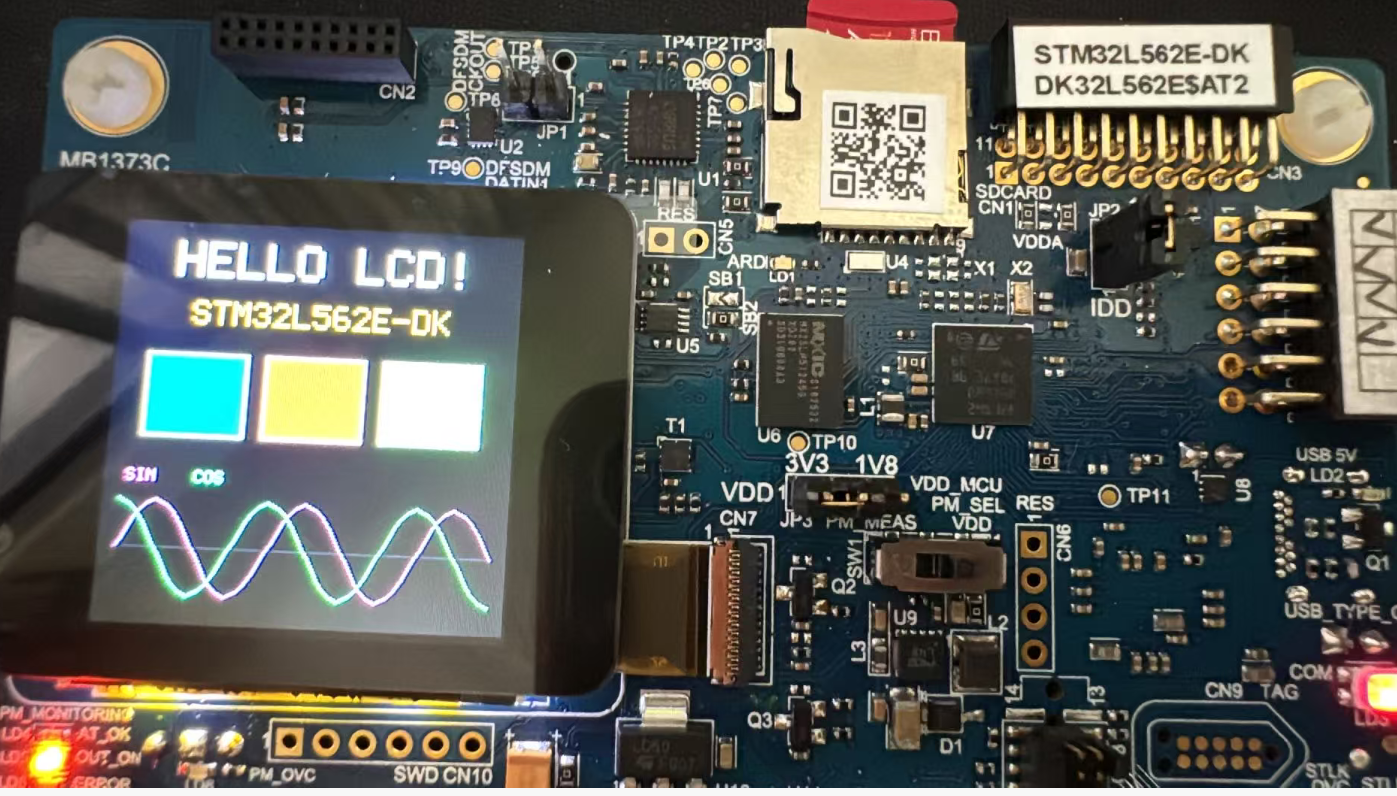
总结
Zephyr RTOS完美支持这块开发板,只需要添加lcd开关即可成功驱动。不需要复杂的配置即可实现。





 微信公众号
微信公众号
 手机版
手机版


