




|
生产环境中经常会遇到某个ip地址频繁异常的访问nginx网站,此时我们需要通过安全措施保护我们的服务器,接下来为大家介绍几种方式。 * m. V% ]( g+ f- H/ g( k- H Q \ 实验环境 3 @5 K& ]# j6 [$ {6 b" k版本:redhat6.5 172.16.1.10部署nginx [root@localhost tools]# ls. O6 V; y5 @5 o( L* ]8 _: ^. Y nginx-1.11.2.tar.gz3 N# k7 n, b1 E [root@localhost tools]# yum install gcc gcc-c++ make automake autoconf libtool pcre* zlib openssl openssl-devel) b2 M* S( s/ C6 f3 | [root@localhost tools]# tar xf nginx-1.11.2.tar.gz * O% h; H7 u6 d$ o, i2 b [root@localhost tools]# ls$ C; [+ l8 @6 y0 t nginx-1.11.2 nginx-1.11.2.tar.gz; Y, s8 e: a2 g% r [root@localhost tools]# cd nginx-1.11.25 R$ T1 L2 @+ T6 S# g) t( r [root@localhost nginx-1.11.2]# ls; T& ?8 \; D7 U% a7 M3 J2 V9 S auto CHANGES CHANGES.ru conf configure contrib html LICENSE man README src [root@localhost nginx-1.11.2]# ./configure [root@localhost nginx-1.11.2]# make [root@localhost nginx-1.11.2]# make install$ e, F" o/ U2 l1 g* n 测试nginx服务 [root@localhost ~]# curl -I 172.16.1.100 HTTP/1.1 200 OK" @$ C4 k) z' D7 Q Server: nginx/1.11.2: D5 `9 U6 I: Q; c6 p( H) W Date: Mon, 17 Aug 2020 09:36:29 GMT Content-Type: text/html Content-Length: 15 Last-Modified: Mon, 17 Aug 2020 09:36:19 GMT Connection: keep-alive ETag: "5f3a4f93-f" |4 n- X$ ]" f2 ]2 s Accept-Ranges: bytes 3 [5 p/ P4 _ `4 A1 a 4 M) U t6 i' X7 W$ ^6 snginx 可以正常访问。 & m6 u* H4 V/ E6 k# w& } 模拟172.16.1.100访问10次172.16.1.10 172.16.1.100 6 T; }4 _2 r/ l* A4 o [root@localhost ~]# ab -c 1 -n 10 http://172.16.1.10/This is ApacheBench, Version 2.3 <$Revision: 1430300 $> Copyright 1996 Adam Twiss, Zeus Technology Ltd, http://www.zeustech.net/ Licensed to The Apache Software Foundation, http://www.apache.org/0 [$ ~1 n8 f, O0 w ! f. R+ T. G8 Z4 Z$ o# L' \ Benchmarking 172.16.1.10 (be patient).....done Server Software: nginx/1.11.2 Server Hostname: 172.16.1.10) F8 h7 E/ m" [. b; j; P) r Server Port: 80! w$ K+ m* L6 W* T* Q Document Path: /1 @- B% ]5 V' q# d Document Length: 612 bytes Concurrency Level: 1 Time taken for tests: 0.016 seconds Complete requests: 10( m4 K1 v; m+ N Failed requests: 0 Write errors: 07 W. @* N' X! X( R Total transferred: 8450 bytes' c1 t- d* q! C0 P8 Q4 a7 B( v HTML transferred: 6120 bytes8 S/ n' |* p6 [% n [! h Requests per second: 617.02 [#/sec] (mean)" C! I: p2 s+ ]% T Time per request: 1.621 [ms] (mean)8 r% n1 O9 w2 v! q% s' |0 R Time per request: 1.621 [ms] (mean, across all concurrent requests) Transfer rate: 509.16 [Kbytes/sec] received / ]1 s# e. B) t Connection Times (ms) min mean[+/-sd] median max, Y# |0 W0 K: H4 K- k) V1 b Connect: 0 1 0.3 0 1 Processing: 1 1 0.3 1 2 Waiting: 0 1 0.3 1 1 Total: 1 1 0.5 1 2 ERROR: The median and mean for the initial connection time are more than twice the standard8 ]+ L( K8 R. f0 k Q: q2 l deviation apart. These results are NOT reliable. Percentage of the requests served within a certain time (ms) 50% 16 v2 D$ t: D. u/ M- l5 _ 66% 1 75% 17 U' ^4 Y* a W9 J; I 80% 2 90% 22 [$ d( w7 R8 h2 t) E7 y; z 95% 29 w/ F3 H* g& N/ \1 u 98% 2 99% 2. l0 J/ i5 O( a0 l" y) I 100% 2 (longest request) * s2 f4 ~' W. ?2 B) s5 x 查看nginx日志 8 S5 Z: K5 D$ \172.16.1.10 ! g" E5 _4 g/ R; C [root@localhost ~]# tail /usr/local/nginx/logs/access.log172.16.1.100 - - [26/Jul/2020:05:58:24 +0800] "GET / HTTP/1.0" 200 612 "-" "ApacheBench/2.3" 172.16.1.100 - - [26/Jul/2020:05:58:24 +0800] "GET / HTTP/1.0" 200 612 "-" "ApacheBench/2.3" 172.16.1.100 - - [26/Jul/2020:05:58:24 +0800] "GET / HTTP/1.0" 200 612 "-" "ApacheBench/2.3"+ X9 ]4 v) e5 _ 172.16.1.100 - - [26/Jul/2020:05:58:24 +0800] "GET / HTTP/1.0" 200 612 "-" "ApacheBench/2.3"9 {2 n& D6 _6 A6 X3 N; J! T& w 172.16.1.100 - - [26/Jul/2020:05:58:24 +0800] "GET / HTTP/1.0" 200 612 "-" "ApacheBench/2.3"0 x6 m: v1 E) P k0 T; b! a4 y 172.16.1.100 - - [26/Jul/2020:05:58:24 +0800] "GET / HTTP/1.0" 200 612 "-" "ApacheBench/2.3"% `# E6 W( `- B 172.16.1.100 - - [26/Jul/2020:05:58:24 +0800] "GET / HTTP/1.0" 200 612 "-" "ApacheBench/2.3"& f5 L7 o3 l1 U! j$ @3 @/ K0 y% H 172.16.1.100 - - [26/Jul/2020:05:58:24 +0800] "GET / HTTP/1.0" 200 612 "-" "ApacheBench/2.3", `8 `+ w/ z* U4 `1 E: f( o 172.16.1.100 - - [26/Jul/2020:05:58:24 +0800] "GET / HTTP/1.0" 200 612 "-" "ApacheBench/2.3" 172.16.1.100 - - [26/Jul/2020:05:58:24 +0800] "GET / HTTP/1.0" 200 612 "-" "ApacheBench/2.3"# K; |1 A }& ^0 Q) J' q # K" q2 y8 M5 [: m- L3 s/ @ M7 n 1 {: j2 T& N2 h$ Q 由此可见,一秒钟之内172.16.1.100访问了nginx10次,接下来禁止掉这个问题ip 通过iptables限制ip访问 # j) i) U7 G: A! }5 f, b& m# b172.16.1.10 9 T3 J$ J9 j3 p5 p4 A. P) g7 p' P [root@localhost ~]# iptables -I INPUT -s 172.16.1.100 -ptcp --dport 80 -j DROP6 W7 l e1 I" b: ~5 I' N; l. Y4 p7 Y+ m8 @( u" n1 v 172.16.1.100 ! y% V6 r1 h4 G+ M5 H [root@localhost ~]# curl 172.16.1.10curl: (7) Failed connect to 172.16.1.10:80; 连接超时 W: N) Y5 U+ |: t. q8 _ ! t, c1 f% o% M( N' A" V 此时172.16.1.100再也不能访问nginx nginx配置文件限制 172.16.1.10 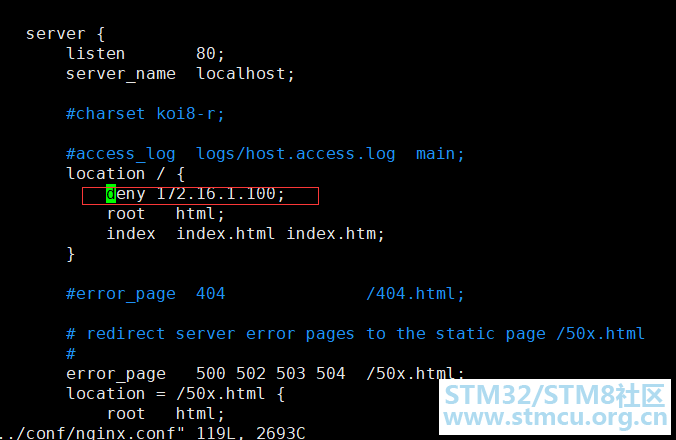
' K3 \1 |* o3 M8 r$ C9 J 172.16.1.100 ( \) h: p. n7 |3 y2 Z ` [root@localhost ~]# curl -I 172.16.1.10& S) [7 B( r l7 u# x9 h/ Q, ?HTTP/1.1 403 Forbidden4 N5 t" Z& q0 F* a9 {1 R& H% f( ?2 I Server: nginx/1.11.2- I& \# [6 D+ O! S Date: Sat, 25 Jul 2020 23:12:06 GMT Content-Type: text/html4 a' C7 A0 m0 W# M1 Y# P3 u1 p Content-Length: 169 Connection: keep-alive$ _7 M4 k0 }; B* ?) _; F # h% Q5 p3 G( E# D# j4 Z 总 结 以上就是两种简单的方法限制ip访问,还有许多方法可以利用工具进行ip限制。 |
 微信公众号
微信公众号
 手机版
手机版


