设备树替换& O: I0 o4 R& m! C+ }
Seeed在出厂烧录的固件中挂载的设备树为stm32mp1-seeed-npi-base.dtb,默认情况下此设备树是不支持Wi-Fi的,如需使用Wifi功能就需要挂载stm32mp1-seeed-npi-full.dtb这个设备树。' w5 m$ W% R' T8 s- }( A$ T
& O" f. a; c% x& Y1 l" u0 j直接修改uEnv.txt文件,此文件会在uboot引导Linux内核的时候主动去加载/boot/dtbs/4.19.9-stm32-r1目录下指定的设备树文件。
1 O: y, X9 ~$ K* |' u
. q7 b! ^' p. z* J6 d$ M4 B1.打开uEnv.txt- `8 ]$ ]6 m2 ^* H/ Y' Q' C) @
vim /boot/uEnv.txt- q8 u# l& h2 g6 y$ a% ]. ^
( N! V. ]# }4 u" o; L( m2 i2.编辑uEnv.txt文件将dtb修改为stm32mp1-seeed-npi-full.dtb0 a, V8 `8 h2 Q( P% x9 u6 t
5 U1 @% K! {/ g/ F; z- uname_r=4.19.9-stm32-r1# b6 p% \$ j8 i% m: I i
- #uuid=- U _7 m3 ^2 ?7 e" _
- dtb=stm32mp1-seeed-npi-full.dtb ##修改此处
$ M- x/ g1 t M: `5 Z7 P5 { - & u) E% c) A7 Y# V
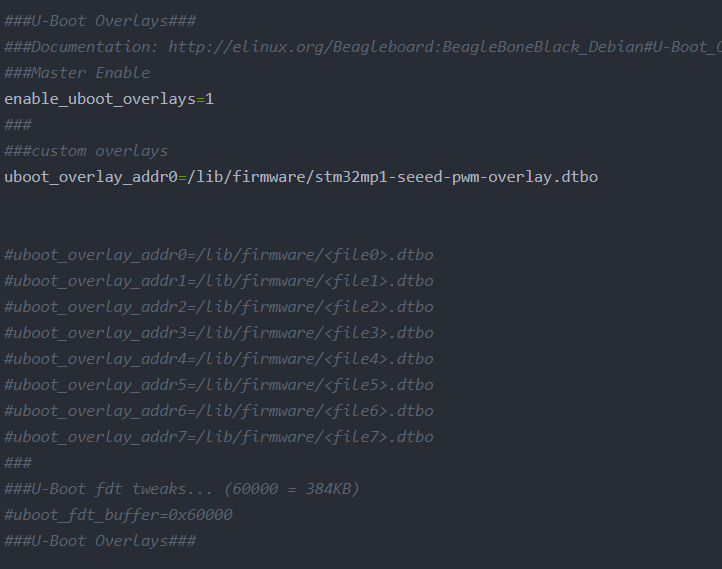
- ###U-Boot Overlays###8 d+ l% l& K3 q2 L9 s! [! Z
8 y1 Z' J- L' `9 J- ###Master Enable1 n" U. A* O& Z( k H
- enable_uboot_overlays=1
8 A: O" ^& m3 h6 L; u; f; g& | - ###" F; H2 A- s% _3 O! Q
- ###custom overlays1 N# m' V7 V" f6 T$ o! L% X' P( M
- uboot_overlay_addr0=/lib/firmware/stm32mp1-seeed-pwm-overlay.dtbo' [( k" P6 b9 a2 J
- ! _" m; I: O% A+ R
/ }; c3 o( w( ~ Y8 u; [; v- L) R6 _- #uboot_overlay_addr0=/lib/firmware/<file0>.dtbo
* l" i7 Z }6 Z! C* W) r - #uboot_overlay_addr1=/lib/firmware/<file1>.dtbo
' t: @# Q( K. Q+ N$ C - #uboot_overlay_addr2=/lib/firmware/<file2>.dtbo; ^2 N1 I0 F: Q& W' m% c
- #uboot_overlay_addr3=/lib/firmware/<file3>.dtbo5 c2 m0 ]6 ~% G7 y$ U2 S
- #uboot_overlay_addr4=/lib/firmware/<file4>.dtbo
+ e& m; @5 Y b8 n, K) a - #uboot_overlay_addr5=/lib/firmware/<file5>.dtbo
0 \0 a- o N( c& p/ a - #uboot_overlay_addr6=/lib/firmware/<file6>.dtbo
5 D3 u8 Y- B, j$ u - #uboot_overlay_addr7=/lib/firmware/<file7>.dtbo! X' N, i/ N+ V8 P o5 J
- ###+ J4 W; Q! Q/ U! c
- ###U-Boot fdt tweaks... (60000 = 384KB)
) B! c R) B& a, d; J3 ? - #uboot_fdt_buffer=0x60000" o1 y, Q. s7 k/ ]4 ~# {
- ###U-Boot Overlays###
' n. g% k/ y6 U- l9 D# t3 x
" W; P1 W5 s0 w1 O! y- J+ ~- cmdline=coherent_pool=1M net.ifnames=0 quiet
) q: z$ j" q o# \9 V/ R
$ p# Z! }# T1 t. B6 Q- #In the event of edid real failures, uncomment this next line:* Y1 m3 \) A8 ~! _
- #cmdline=coherent_pool=1M net.ifnames=0 quiet video=HDMI-A-1:1024x768@60e, B9 M. I3 e- F$ P$ N
- ' M4 E5 f( n) ~9 `0 B
- #Use an overlayfs on top of a read-only root filesystem:
, ^5 b4 ?6 v4 T! ~ - #cmdline=coherent_pool=1M net.ifnames=0 quiet overlayroot=tmpfs
/ u: V/ b, j4 ]' n4 t. a - , y6 t" T2 w4 }( ~# z8 @
- ##enable Generic eMMC Flasher:
5 A# n# p' S% ]' K$ ~4 H - ##make sure, these tools are installed: dosfstools rsync& |3 ^8 a+ L0 w0 r3 f! y
- #cmdline=init=/opt/scripts/tools/eMMC/init-eMMC-flasher-v3-stm32mp1.sh
8 e* R7 q. G- |* g - # m. g# _, F% h9 s
: v, R7 N" ?1 O6 M7 L! w- # specify kernel eth0 mac address) |1 O, w; W1 X1 D8 p& _
- ethaddr=42:9a:42:e1:f7:23
& ]: T/ d4 x4 tWi-Fi连接
( H3 [8 n+ i& K9 z2 I6 L- robot@ev3dev:~$ sudo connmanctl" c- Y5 l; ~- n
- Error getting VPN connections: The name net.connman.vpn was not provided by any$ d4 f; z2 G$ w4 ^# p1 P
- connmanctl> enable wifi: R- {7 @3 D' M2 s5 ^
- Enabled wifi
7 d: F, `/ V- ]* w - connmanctl> scan wifi: d- I4 d% n2 a; m& L6 x
- Scan completed for wifi
& Y+ Y" r0 }) t+ a* P9 f$ _- { - connmanctl> services1 C+ V) a, h+ l' v* x! B
- *AO Wired ethernet_b827ebbde13c_cable N, ^% R" q/ i M
- wifi_e8de27077de3_hidden_managed_none( ]8 H6 x/ P) Z' N$ z
- AH04044914 wifi_e8de27077de3_41483034303434393134_managed_psk
* m% v1 P* \7 K( P/ b) T0 C - Frissie wifi_e8de27077de3_46726973736965_managed_psk3 b4 m- M" k8 M! ~ s& [% v
- ruijgt gast wifi_e8de27077de3_7275696a67742067617374_managed_psk: A! v* M* S# W) ~1 X: t
- schuur wifi_e8de27077de3_736368757572_managed_psk9 r. t: A) n6 @2 u, k! X8 _
- connmanctl> agent on2 o1 O$ D! b1 F9 I
- Agent registered
" k- P& c9 U& y9 H4 C7 a; f - connmanctl> connect wifi_e8de27077de3_41483034303434393134_managed_psk ##对应的wifi名称的实际编码5 m8 Y& ~; m; n4 M- D' H
- Agent RequestInput wifi_e8de27077de3_41483034303434393134_managed_psk! j* w0 ~) v% L! C
- Passphrase = [ Type=psk, Requirement=mandatory ]1 d8 w; f! b X% X. d
- Passphrase? ************* ##wifi密码+ Z0 q4 F G# N! h' e x6 p, V, Q0 | d
- Connected wifi_e8de27077de3_41483034303434393134_managed_psk
3 @( a8 y; E$ M - connmanctl> quit
& H5 x& Z) V4 k2 G. `9 ~3 h我们可以使用下面的指令来找到ODYSSEY – STM32MP157C的IP地址:
/ d, n0 s, i1 B% D# J5 w6 }
; I0 |1 ?2 q; O }0 P* X# ]( f
* I: g, Z) V- g \7 d% s————————————————
+ L9 M0 S4 r( t/ x2 o1 V- P& u9 e( j版权声明:Argon_Ghost
% i9 Z6 w; U b+ R# c4 W. ~+ D
- w& r% P9 s' m! M7 t7 f |





 STMCU小助手
发布时间:2022-10-24 22:38
 微信公众号
 手机版