




有图有真相!

程序如下: // VGA Output.ino #define LED_PIN PC13 #define VGA_R PA7 #define VGA_G PA6 #define VGA_B PA5 #define VGA_V PA3 #define VGA_H PA4 #define VGA_R_HIGH (GPIOA_BASE)->BSRR = BIT(7) #define VGA_R_LOW (GPIOA_BASE)->BRR = BIT(7) #define VGA_G_HIGH (GPIOA_BASE)->BSRR = BIT(6) #define VGA_G_LOW (GPIOA_BASE)->BRR = BIT(6) #define VGA_B_HIGH (GPIOA_BASE)->BSRR = BIT(5) #define VGA_B_LOW (GPIOA_BASE)->BRR = BIT(5) #define VGA_V_HIGH (GPIOA_BASE)->BSRR = BIT(3) #define VGA_V_LOW (GPIOA_BASE)->BRR = BIT(3) #define VGA_H_HIGH (GPIOA_BASE)->BSRR = BIT(4) #define VGA_H_LOW (GPIOA_BASE)->BRR = BIT(4) #define NOP do { __asm__ __volatile__ ("nop"); } while (0) void isr_porch(void); void isr_start(void); void isr_stop(void); void isr_update(void); boolean h_active; int x, y = 0,z; void setup() { pinMode(LED_PIN, OUTPUT); pinMode(VGA_R, OUTPUT); pinMode(VGA_G, OUTPUT); pinMode(VGA_B, OUTPUT); pinMode(VGA_V, OUTPUT); pinMode(VGA_H, OUTPUT); Timer4.pause(); Timer4.setPrescaleFactor(1); // 72M Full speed Timer4.setChannel1Mode(TIMER_OUTPUTCOMPARE); Timer4.setChannel2Mode(TIMER_OUTPUTCOMPARE); Timer4.setChannel3Mode(TIMER_OUTPUTCOMPARE); Timer4.setOverflow(2287); //72M / 2287 = 31.4685KHZ Timer4.setCompare1(1); Timer4.attachCompare1Interrupt(HV); Timer4.setCompare2(40); Timer4.attachCompare2Interrupt(HS); Timer4.setCompare3(2140);//2100 Timer4.attachCompare3Interrupt(HL); Timer4.setCount(0); Timer4.resume(); } void loop() { //digitalWrite( LED_PIN,0);delay(500); //digitalWrite( LED_PIN,1);delay(500); } void HH(void) { VGA_H_HIGH;} void HV(void) { y++; if( y > 523 ) { y = 0;h_active = 1;return;} if( y > 492 ) { VGA_V_HIGH;return;} if( y > 490 ) { VGA_V_LOW;return;} if( y > 479 ) { h_active = 0;} } void HS(void) { VGA_H_HIGH; if ( h_active == 0) { return;} for ( x = 0; x < 22; x++){ z=( y / 40 + x) %3; if ( z == 0){ VGA_B_LOW;VGA_R_HIGH;NOP;NOP;NOP;NOP;NOP;} if ( z == 1){ VGA_R_LOW;VGA_G_HIGH;} if ( z == 2){ VGA_G_LOW;VGA_B_HIGH;NOP;NOP; NOP;NOP;NOP;NOP;NOP;NOP;NOP;NOP;NOP;NOP;} NOP;NOP;NOP;NOP;NOP;NOP;NOP;NOP;NOP;NOP; NOP;NOP;NOP;NOP;NOP;NOP;NOP;NOP;NOP;NOP; NOP;NOP;NOP;NOP;NOP;NOP;NOP;NOP;NOP;NOP; NOP;NOP;NOP;NOP;NOP;NOP;NOP;NOP;NOP;NOP; } VGA_R_LOW;VGA_G_LOW;VGA_B_LOW; } void HL(void) { VGA_H_LOW; } 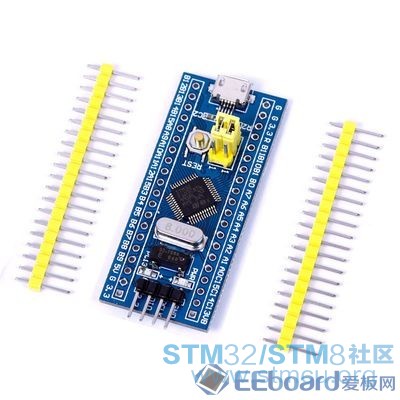
芯片为STM32F103C8T6,参考Crude VGA Output程序。640X480的图像不够细腻,还需改进。今抛砖引玉,望高人赐教。 |
【福利三:雨露均沾·逢7狂欢】之三:AI帮我查BUG
福利三:雨露均沾·逢7狂欢】之二:STM32F407VG串口通信乱码故障的排除
基于STM32F103的I2C主从机通信
OpenBLT移植到STM32F103战舰开发板上适用于所有STM32F103系列的Bootloader
TFT LCD 与 FSMC 的硬件连接大容量 STM32F10xxx FSMC 接口
单片机:初学者该了解的STM32F103基础知识
2025软件工具兔哥知道
STM32之继电器模块
STM32固件库分享,超全系列整理
【MCU实战经验】基于STM32F103的二轮平衡车(6轴上位机 源代...
 微信公众号
微信公众号
 手机版
手机版


//Analog Input speed test (STM32F103C8T6 AD RTC.ino)
#include <RTClock.h>
#define LED_PIN PC13
RTClock rt (RTCSEL_HSE); //RTClock rt (RTCSEL_LSE);
int i=0,THH,TMM,TSS;
int sensorPin0 = 0,sensorValue0;//
int sensorPin1 = 1,sensorValue1;
int sensorPin2 = 2,sensorValue2;
long TimeVar;
void blink () {
digitalWrite(LED_PIN,!digitalRead(LED_PIN));
//RTC_GetCounter() % 86400;
TimeVar=rt.getTime();
if (TimeVar>86399){rtc_set_count(0);}
THH = TimeVar / 3600;// Compute hours
TMM = TimeVar / 60;
while (TMM>59){TMM=TMM-60;}// Compute minutes
TSS = TimeVar % 60; // Compute seconds
Serial.print(THH);Serial.print(":");
Serial.print(TMM);Serial.print(":");
Serial.print(TSS);Serial.print(" ");
Serial.print(sensorValue0);Serial.print(" ");
Serial.print(sensorValue1);Serial.print(" ");
Serial.print(sensorValue2);Serial.print(" ");
Serial.println(i);
i=0;
}
void setup() {
Serial.begin(115200);
pinMode(LED_PIN, OUTPUT);
//pinMode(sensorPin0, INPUT_ANALOG);
//pinMode(sensorPin1, INPUT_ANALOG);
//pinMode(sensorPin2, INPUT_ANALOG);
rtc_set_prescaler_load(62500); //rtc_set_prescaler_load(32768);
rtc_set_count(43199);//11:59:59
rt.attachSecondsInterrupt(blink);
Serial.println("start");
}
void loop() {
sensorValue0=analogRead(sensorPin0);
sensorValue1=analogRead(sensorPin1);
sensorValue2=analogRead(sensorPin2);
i=i+1;
}
程序里顺便把AD的读取速度测了。我用的是8M晶振分频方式,也可用32768晶振,即上面标注的LSE方式。原板上的32768晶振有问题,已换掉了。