【前言】
在前一篇我使用zephyr来驱动了st7789LCD屏,只需要添加少量代码就可以实现lvgl。
【实现步骤】
1、prj.conf中添加宏开关:
    LVGL 核心
    CONFIG_LVGL=y
    CONFIG_LV_USE_LOG=y
    CONFIG_LV_USE_LABEL=y
    CONFIG_LV_USE_ARC=y
    CONFIG_LV_USE_BUTTON=y
    CONFIG_LV_USE_LINE=y
    CONFIG_LV_USE_IMAGE=y
    CONFIG_LV_FONT_MONTSERRAT_14=y

    显示缓冲区(静态分配)
    CONFIG_LV_Z_VDB_SIZE=25
    CONFIG_LV_Z_BUFFER_ALLOC_STATIC=y
    CONFIG_LV_Z_DOUBLE_VDB=y
    CONFIG_LV_Z_VDB_ALIGN=4
    CONFIG_LV_COLOR_DEPTH_16=y
    CONFIG_LV_Z_BITS_PER_PIXEL=16

    LVGL 运行时
    CONFIG_LV_Z_MEM_POOL_SIZE=16384
    CONFIG_LV_Z_INIT_PRIORITY=50
    CONFIG_LV_Z_LVGL_WORKQUEUE_STACK_SIZE=2048
    CONFIG_LV_Z_LVGL_WORKQUEUE_PRIORITY=10
    CONFIG_LV_Z_RUN_LVGL_ON_WORKQUEUE=n
    CONFIG_LV_Z_LVGL_MUTEX=y
2、添加main.c中的代码:
#include <zephyr/device.h>
#include <zephyr/devicetree.h>
#include <zephyr/drivers/display.h>
#include <zephyr/drivers/gpio.h>
#include <zephyr/input/input.h>
#include <zephyr/kernel.h>
#include <lvgl.h>

#define LOG_LEVEL CONFIG_LOG_DEFAULT_LEVEL
#include <zephyr/logging/log.h>
LOG_MODULE_REGISTER(app);

/* BLK (backlight) on PE11 */
#define BLK_GPIO_NODE   DT_NODELABEL(gpioe)
#define BLK_PIN     11

static uint32_t counter;
static lv_obj_t *counter_label;
static const struct device *blk_gpio;
static int blink_state;

static void touch_cb(struct input_event *evt, void *user_data)
{
    if (evt->type == INPUT_EV_ABS) {
        if (evt->code == INPUT_ABS_X) {
            LOG_INF("touch X=%d", evt->value);
        } else if (evt->code == INPUT_ABS_Y) {
            LOG_INF("touch Y=%d", evt->value);
        }
    } else if (evt->type == INPUT_EV_KEY && evt->code == INPUT_BTN_TOUCH) {
        LOG_INF("touch %s", evt->value ? "PRESS" : "RELEASE");
    }
}
INPUT_CALLBACK_DEFINE(NULL, touch_cb, NULL);

static void btn_clear_cb(lv_event_t *e)
{
    counter = 0;
    lv_label_set_text_fmt(counter_label, "%u", counter);
}

static void btn_blk_cb(lv_event_t *e)
{
    blink_state = !blink_state;
    gpio_pin_set(blk_gpio, BLK_PIN, blink_state ? 1 : 0);
}

int main(void)
{
    const struct device *display_dev;
    int ret;

    LOG_INF("STM32U3C5 ST7789V LVGL demo");

    display_dev = DEVICE_DT_GET(DT_CHOSEN(zephyr_display));
    if (!device_is_ready(display_dev)) {
        LOG_ERR("Display device not ready");
        return 0;
    }

    blk_gpio = DEVICE_DT_GET(BLK_GPIO_NODE);
    if (!device_is_ready(blk_gpio)) {
        LOG_ERR("BLK GPIO not ready");
        return 0;
    }

    ret = gpio_pin_configure(blk_gpio, BLK_PIN, GPIO_OUTPUT_HIGH);
    if (ret < 0) {
        LOG_ERR("BLK pin config failed: %d", ret);
        return 0;
    }

    display_blanking_off(display_dev);

    /* UI */
    lv_obj_t *scr = lv_screen_active();
    lv_obj_set_style_bg_color(scr, lv_color_hex(0x111122), LV_PART_MAIN);

    /* Title label */
    lv_obj_t *title = lv_label_create(scr);
    lv_label_set_text(title, "STM32U3C5 + ST7789V");
    lv_obj_set_style_text_color(title, lv_color_hex(0x00FFFF), LV_PART_MAIN);
    lv_obj_set_style_text_font(title, &lv_font_montserrat_14, LV_PART_MAIN);
    lv_obj_align(title, LV_ALIGN_TOP_MID, 0, 8);

    /* Arc progress bar */
    lv_obj_t *arc = lv_arc_create(scr);
    lv_obj_set_size(arc, 80, 80);
    lv_arc_set_rotation(arc, 135);
    lv_arc_set_bg_angles(arc, 0, 270);
    lv_arc_set_value(arc, 0);
    lv_obj_set_style_arc_color(arc, lv_color_hex(0x00FF00), LV_PART_MAIN);
    lv_obj_set_style_arc_color(arc, lv_color_hex(0xFF8800), LV_PART_INDICATOR);
    lv_obj_align(arc, LV_ALIGN_CENTER, 0, -20);

    /* Counter label */
    counter_label = lv_label_create(scr);
    lv_label_set_text_fmt(counter_label, "%u", counter);
    lv_obj_set_style_text_color(counter_label, lv_color_hex(0xFFFFFF), LV_PART_MAIN);
    lv_obj_set_style_text_font(counter_label, &lv_font_montserrat_14, LV_PART_MAIN);
    lv_obj_align(counter_label, LV_ALIGN_CENTER, 0, 20);

    /* Hello button */
    lv_obj_t *btn_hello = lv_button_create(scr);
    lv_obj_set_size(btn_hello, 100, 32);
    lv_obj_align(btn_hello, LV_ALIGN_CENTER, 0, 60);
    lv_obj_add_event_cb(btn_hello, btn_clear_cb, LV_EVENT_CLICKED, NULL);
    lv_obj_t *lbl_hello = lv_label_create(btn_hello);
    lv_label_set_text(lbl_hello, "Clear Counter");
    lv_obj_set_style_text_color(lbl_hello, lv_color_hex(0xFFFFFF), LV_PART_MAIN);

    /* BLK toggle button */
    lv_obj_t *btn_blk = lv_button_create(scr);
    lv_obj_set_size(btn_blk, 100, 32);
    lv_obj_align(btn_blk, LV_ALIGN_CENTER, 0, 100);
    lv_obj_add_event_cb(btn_blk, btn_blk_cb, LV_EVENT_CLICKED, NULL);
    lv_obj_t *lbl_blk = lv_label_create(btn_blk);
    lv_label_set_text(lbl_blk, "Toggle BLK");
    lv_obj_set_style_text_color(lbl_blk, lv_color_hex(0xFFFF00), LV_PART_MAIN);

    /* Bottom hint */
    lv_obj_t *hint = lv_label_create(scr);
    lv_label_set_text(hint, "Zephyr + LVGL v9");
    lv_obj_set_style_text_color(hint, lv_color_hex(0x888888), LV_PART_MAIN);
    lv_obj_set_style_text_font(hint, &lv_font_montserrat_12, LV_PART_MAIN);
    lv_obj_align(hint, LV_ALIGN_BOTTOM_MID, 0, 8);

    while (1) {
        lv_timer_handler();
        k_sleep(K_MSEC(5));
        counter++;
        lv_label_set_text_fmt(counter_label, "%u", counter);
        lv_arc_set_value(arc, (counter / 10) % 100);
    }
}
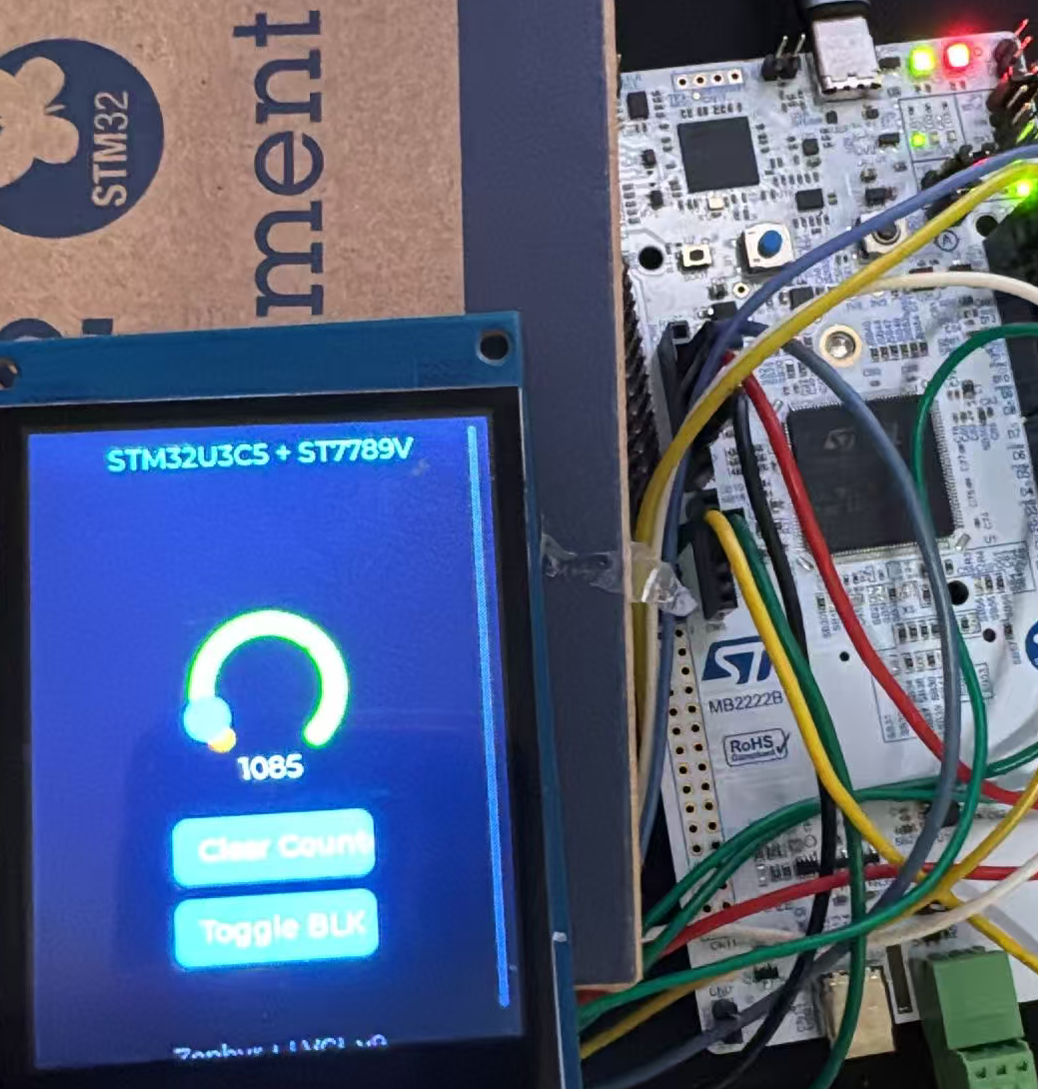
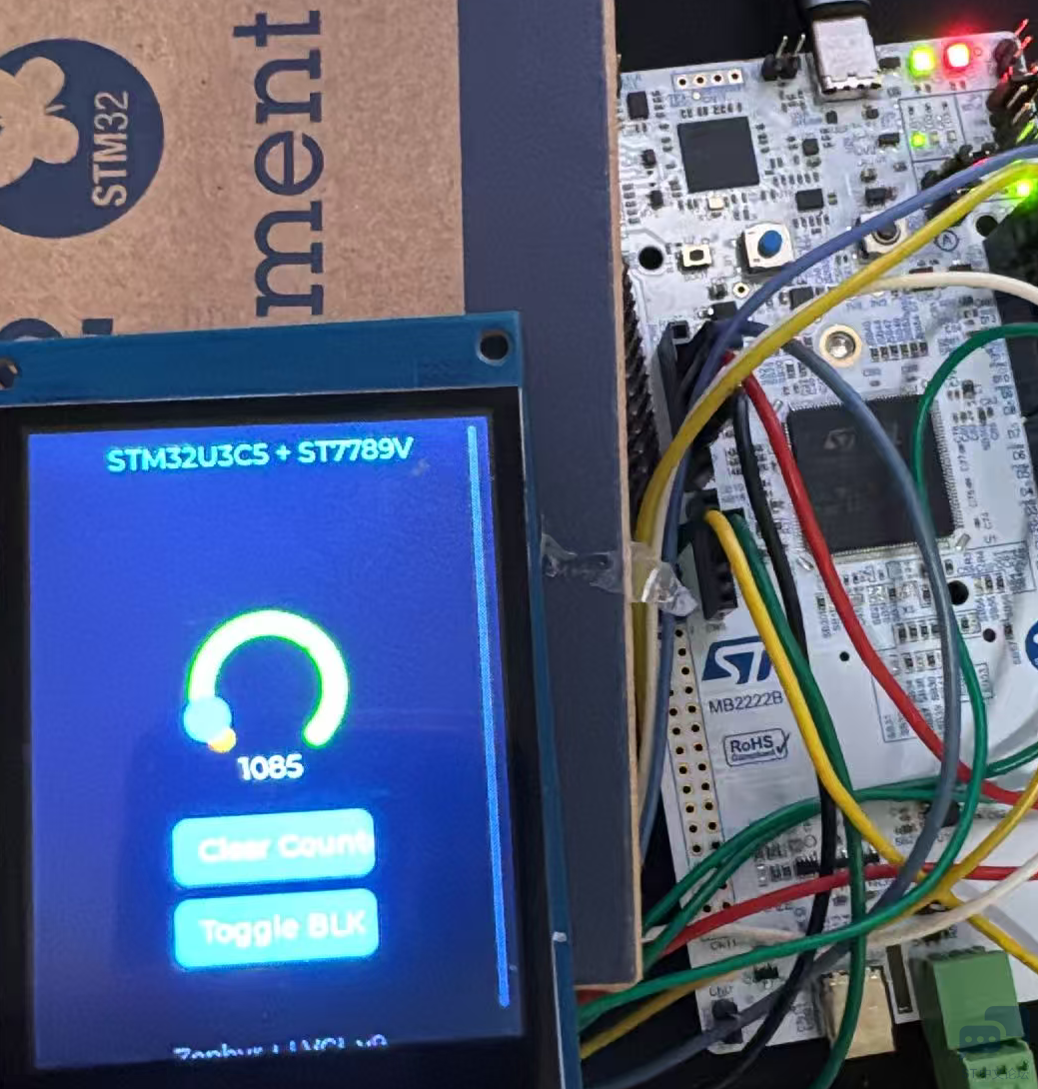
编译后下载到开发板就可以实现lvgl的漂亮界面了:
【注意事项】
颜色问题:Zephyr SPI 8bit 模式按小端顺序发送像素,而裸机先发高字节再发低字节。需要在 display_st7789v.c 的 st7789v_write() 中,对 16bit 像素数据做字节交换:
/ 在 st7789v_write() 里,RAMWR 命令发送前 /
row[w] = sys_cpu_to_be16(row[w]);
LVGL workqueue 模式:建议关闭(CONFIG_LV_Z_RUN_LVGL_ON_WORKQUEUE=n),在 main loop 中直接调用 lv_timer_handler()。
zephyr,display chosen:LVGL 自动从设备树的 chosen { zephyr,display } 获取显示设备驱动,不需要手动调用任何注册函数。





 微信公众号
微信公众号
 手机版
手机版