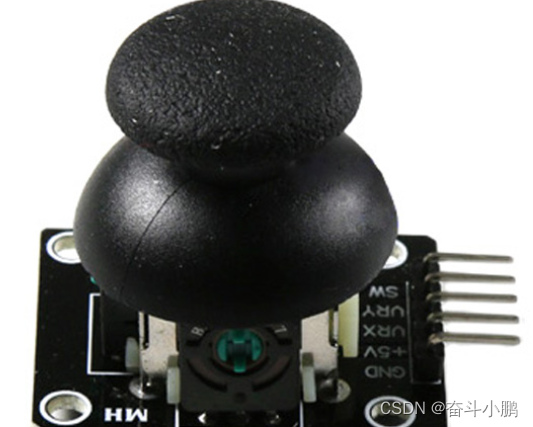
一. 简介5 e# d$ M/ A8 ], i9 C, r# H
在按键控制方面,双轴按键遥感远比按键要方便,而且使用非常简单。它一共包括三个数据引脚,分别是X轴的模拟输入,Y轴的模拟输入和按键输入,另外还有一个GND和VCC。这里VCC是一个参考电压,可以接5V,也可以接3.3V。如果接的是5V的话,那么X轴的模拟输入电压就为0-5V。3 S+ |8 x% t- V% v# o
! f0 T9 }* ?) i% z/ P
! [& w( k, Q) T8 E# o/ R$ u9 D0 l, s( [2 c3 O% B2 D5 s
二. STM32读取双轴遥感数据! v2 x) H' E! k) W+ ?% ]5 E
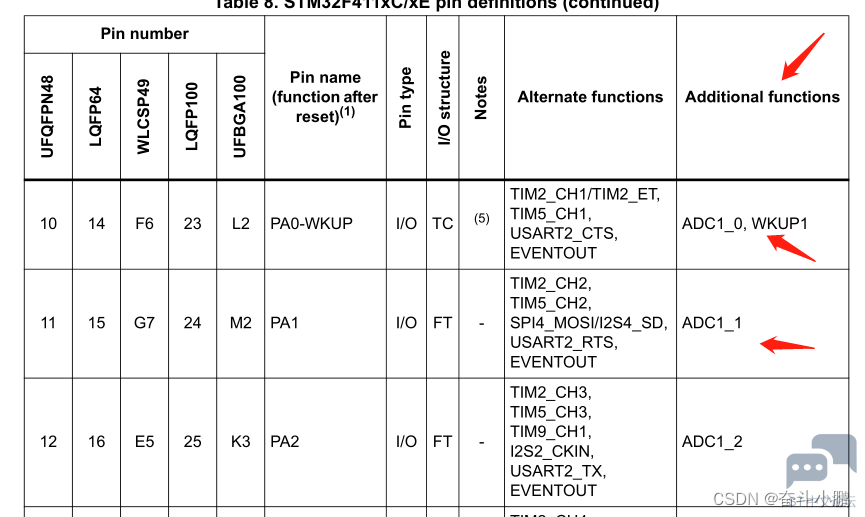
由于输入的是模拟值,所以需要使用ADC进行模拟采集。通过数据手册可以知道,ADC是其引脚的附加功能,不需要进行复用配置。只需要将GPIO_Mode配置成AN即可,然后配置ADC的相关信息就可以了。; g- B( W. W! X# g& ~& j/ d* R
6 m& \, I8 j. x7 ] I
0 S0 p e4 T7 |* Y) s! D# l; a, J& Q4 K6 T4 h* x. \$ {3 W0 Z
1.GPIO初始化1 _, A& c. @4 t+ v, A
( {, l. `/ M0 m$ }6 _. q- a7 Y- /*GPIO Init*/
# R. A1 r) k8 Z5 ^ - void XYRocker1GPIOInit(void)
$ }( J( X4 u- @! Y+ }0 b( v - {: h9 D1 t# f k9 b" k% W
- GPIO_InitTypeDef GPIO_InitStruct;
5 A& o' ]: v. H2 _6 E, r8 `& e - RCC_AHB1PeriphClockCmd(RCC_AHB1Periph_GPIOA,ENABLE);: J: d: d( `9 c$ c5 h4 j. d% h! r
- : h0 {: C% k( F
- /*XY GPIO*/+ ~4 K% z0 K! I& Q+ h( B: K
- GPIO_InitStruct.GPIO_Pin = GPIO_Pin_0 | GPIO_Pin_1;
* D$ t# f5 }7 y2 P - GPIO_InitStruct.GPIO_Mode = GPIO_Mode_AN; /"附加功能"/
1 n+ ~" G$ P" H; t' s - GPIO_InitStruct.GPIO_Speed = GPIO_Speed_100MHz;2 \/ b) ~' R7 M8 p! q6 d
- GPIO_InitStruct.GPIO_PuPd = GPIO_PuPd_NOPULL;, @9 C! `; u& k( p" f# }: R) t* F
- GPIO_Init(GPIOA,&GPIO_InitStruct);
' H+ }/ U: J z2 \* {: c
( p% o6 O6 \. E) _4 t5 L% b# h- /*rocker key 双轴遥感的按键*/ 5 ]. T" d4 ]4 _# z+ l# l5 ]
- GPIO_InitStruct.GPIO_Pin = GPIO_Pin_12;: {; c( q: _ P8 a
- GPIO_InitStruct.GPIO_Mode = GPIO_Mode_IN;
1 o8 Q8 o3 h& J& x, k, v/ c9 b( w - GPIO_InitStruct.GPIO_Speed = GPIO_Speed_50MHz;# `7 [0 ?: d: Z& j) _7 \; n- l, n8 n
- GPIO_Init(GPIOB,&GPIO_InitStruct);+ | j- U! m2 ?: h, \
- }
% z9 p; u# F: b' {% b4 o9 pADC初始化
8 o: F6 w) t2 e; \, g: K; d0 Q# `- void XYRockerADCInit(uint8_t num)
# L4 @1 v( @# h1 ?# }) p - {
; [2 U1 F n& G/ ]4 u" ? - ADC_InitTypeDef ADC_InitStruct;
. ^) S* T+ \1 u- O& s3 x/ Z - ADC_CommonInitTypeDef ADC_ComminInitStruct;* D( U/ p1 d" [4 P/ W
- 6 _7 t8 S3 U( _ \ e
- RCC_APB2PeriphClockCmd(RCC_APB2Periph_ADC1,ENABLE);) J: g1 E4 J* ^" h0 J7 t' z
- ADC_DeInit();
I! n% k& ]: g" }8 \# I9 d - 5 b: M0 n j: s% @# t& `2 E
- ADC_ComminInitStruct.ADC_Mode = ADC_Mode_Independent;
_8 k- T/ p; A - ADC_ComminInitStruct.ADC_TwoSamplingDelay = ADC_TwoSamplingDelay_20Cycles;
1 _6 a/ i+ z, g - ADC_ComminInitStruct.ADC_DMAAccessMode = ADC_DMAAccessMode_Disabled;
' V* C, k: U* `# o8 H: m4 M - ADC_ComminInitStruct.ADC_Prescaler = ADC_Prescaler_Div4;
7 Z" |. M! O" r7 t8 b; p - ADC_CommonInit(&ADC_ComminInitStruct);7 Y$ T6 }0 S! c) ^# e
- & n U# e8 w/ f! P8 e, B/ |
- ! e' Z& B* L8 e1 ^* E
- ADC_InitStruct.ADC_Resolution = ADC_Resolution_12b;0 i$ b y6 [3 E, N3 C
- ADC_InitStruct.ADC_ScanConvMode = DISABLE;
5 _4 C1 M9 F0 M) L8 V - ADC_InitStruct.ADC_ContinuousConvMode = DISABLE;
& X2 C3 i* D% a - ADC_InitStruct.ADC_ExternalTrigConvEdge = ADC_ExternalTrigConvEdge_None;" O0 n, ]5 Y, S
- ADC_InitStruct.ADC_DataAlign = ADC_DataAlign_Right;//右对齐
6 F d2 O: O2 R5 z6 H& F - ADC_InitStruct.ADC_NbrOfConversion = num;
9 L9 G2 _7 w5 C0 z, t( H+ B. ?' c - /*双轴有两个模拟输入,所以这里设置为2,如果是两个遥感,使用的是同一个ADC的话,这里设置为4*/# }, n* L3 N7 h- H2 q3 L
& b0 U' o3 X' z% f: U! Y; k8 S* @( Z- ADC_Init(ADC1,&ADC_InitStruct);
3 ^8 k/ D5 f: Q - 9 ~/ i2 W: y$ \, @& V. L9 S
- + \, z7 s. E% a) n, G
- ADC_Cmd(ADC1,ENABLE);; y. c; X" Q+ I( n
- }8 H- ~: z" y3 }& v
数据读取! T" J; A& |" P, m/ G6 a
- uint16_t getX1Value()# x/ J+ v5 |. g4 Q3 S: w
- {
/ D( @$ ~$ ]+ R8 j3 R2 |; b& o - /*设置通道进行转换*/" m) b4 a! U& U' L; s
- ADC_RegularChannelConfig(ADC1, ADC_Channel_0, 1, ADC_SampleTime_480Cycles );
. l( x/ `0 ~, r - ADC_SoftwareStartConv(ADC1); //使能指定的ADC1的软件转换启动功能
! P6 {# b$ D8 s - while(!ADC_GetFlagStatus(ADC1, ADC_FLAG_EOC ));//等待转换结束
! W1 N7 x/ q. g4 Y$ N5 v$ g - return ADC_GetConversionValue(ADC1); //返回最近一次ADC1规则组的转换结果/ i, \9 I# g! ~+ P; }
- }
- `0 v3 y1 l8 S' O1 c经过上面的几步,就可以进行双轴遥感的读取啦。
5 I5 D% ]8 l8 f% L/ |- I1 p复位状态值为2200左右。双轴遥感向上的时候只就为0左右,向下的时候,就是65536左右了(16bit 0-65536)。左右方向也是如此。其实际的电压值,会由0-65536映射到0-VCC来(VCC是你给它接的电压值)。
( d2 b) R1 g) A2 P; E% w. z+ b z8 A' I" p( v+ w1 f
! @" U6 v! p; K& m' z |





.png) STMCU小助手
发布时间:2022-8-20 16:00
STMCU小助手
发布时间:2022-8-20 16:00
 微信公众号
微信公众号
 手机版
手机版