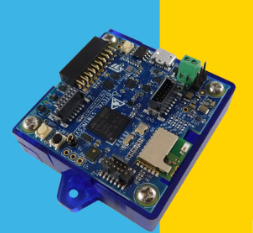
前期准备
ST官方例程在D:\STM32_WorkSpeace\CubeIDE\stsw-stwinkt01\STSW-STWINKT01_V2.2.0\Projects\BLE_SampleApp 这个路径下
我们首先简单分析下这个例程
系统初始化
系统初始化顺序如下
- 按键、LED、电源管理
- 电池管理芯片(BC)初始化
BLE协议栈初始化
Init_BlueNRG_Stack(); // 初始化BLE协议栈
Init_BlueNRG_Custom_Services(); // 添加自定义服务
这里生成并使用了静态BLE MAC地址 并设置了配对参数,注册GATT服务。
数据发送实现
在服务初始化时 创建两个GATT服务 用于交换数据 其中包含了特征值。
数据发送实现由Environmental_Update()实现
tBleStatus Environmental_Update(int32_t Press, uint16_t Hum,
                                int16_t Temp2, int16_t Temp1)
{
    tBleStatus ret;
    uint8_t BuffPos;

    // 动态分配缓冲区(根据传感器配置)
    uint8_t buff[2+4/*Press*/+2/*Hum*/+2/*Temp2*/+2/*Temp1*/];

    // 1. 添加时间戳(毫秒/8,节省空间)
    STORE_LE_16(buff, (HAL_GetTick() >> 3));
    BuffPos = 2;

    // 2. 根据板载传感器配置,选择性打包数据
    if(TargetBoardFeatures.HandlePressSensor)
    {
        STORE_LE_32(buff + BuffPos, Press);  // 气压:4字节
        BuffPos += 4;
    }

    if(TargetBoardFeatures.HandleHumSensor)
    {
        STORE_LE_16(buff + BuffPos, Hum);    // 湿度:2字节
        BuffPos += 2;
    }

    // 3. 温度数据处理(支持1或2个传感器)
    if(TargetBoardFeatures.NumTempSensors == 2)
    {
        STORE_LE_16(buff + BuffPos, Temp2);  // 第二温度:2字节
        BuffPos += 2;

        STORE_LE_16(buff + BuffPos, Temp1);  // 第一温度:2字节
        BuffPos += 2;
    }
    else if(TargetBoardFeatures.NumTempSensors == 1)
    {
        STORE_LE_16(buff + BuffPos, Temp1);  // 单温度:2字节
        BuffPos += 2;
    }

    // 4. 通过BLE发送
    ret = aci_gatt_update_char_value(
        HWServW2STHandle,           // 服务句柄
        EnvironmentalCharHandle,    // 特征句柄
        0,                          // 偏移量
        EnvironmentalCharSize,      // 特征大小
        buff                        // 数据缓冲区
    );

    // 5. 错误处理
    if (ret != BLE_STATUS_SUCCESS)
    {
        // 如果USB调试开启,通过串口输出错误
        if(W2ST_CHECK_CONNECTION(W2ST_CONNECT_STD_ERR))
        {
            BytesToWrite = sprintf((char *)BufferToWrite,
                                   "Error Updating Environmental Char\r\n");
            Stderr_Update(BufferToWrite, BytesToWrite);
        }
        else
        {
            STLBLE_PRINTF("Error Updating Environmental Char\r\n");
        }
        return BLE_STATUS_ERROR;
    }
    return BLE_STATUS_SUCCESS;
}
通过获取先前的传感器数据 将数据存储到Buffer中等待通知订阅
void Attribute_Modified_CB(uint16_t attr_handle, uint8_t *att_data,
                           uint8_t data_length)
{
    // 环境数据特征值订阅处理
    if(attr_handle == EnvironmentalCharHandle + 2)
    {
        if (att_data[0] == 01)  // 客户端订阅
        {
            env_flag += 1;
            if (env_flag == 1)
            {
                W2ST_ON_CONNECTION(W2ST_CONNECT_ENV);  // 标记已连接

                // 启动定时器,开始周期性发送
                HAL_TIM_OC_Start_IT(&TimCCHandle, TIM_CHANNEL_1);

                // 设置比较值
                uint32_t uhCapture = __HAL_TIM_GET_COUNTER(&TimCCHandle);
                __HAL_TIM_SET_COMPARE(&TimCCHandle, TIM_CHANNEL_1,
                                      (uhCapture + uhCCR1_Val));
            }
        }
        else if (att_data[0] == 0)  // 客户端取消订阅
        {
            env_flag = 0;
            W2ST_OFF_CONNECTION(W2ST_CONNECT_ENV);  // 清除连接标记
            HAL_TIM_OC_Stop_IT(&TimCCHandle, TIM_CHANNEL_1);  // 停止定时器
        }
    }
}
实现震动 电压等数据上报
有了前两部分的铺垫 我们大概熟悉了数据是如何获取的 并且如何通过BLE发送到手机端的
ST官方已经给我们提供好了BSP以及传感器驱动 我们只需要添加好驱动并在conf中配置好即可
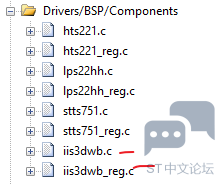
首先在Driver中添加IIS3DW传感器驱动
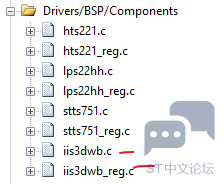
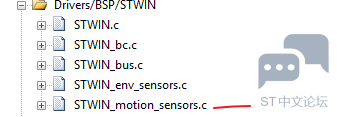
然后再运动传感器中添加motion驱动代码这里给我们提供好了如何开启各个接口
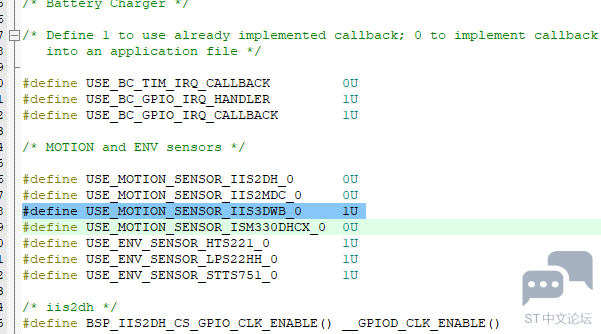
然后需要在#include "STWIN_conf.h"中使能震动传感器,这样才会激活驱动
   float ax, ay, az;
    uint8_t device_id;
    float odr;
    int32_t fullscale;

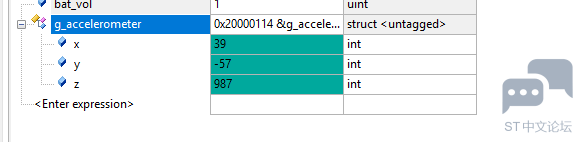
BSP_MOTION_SENSOR_Axes_t g_accelerometer;
定义了一个结构体用来存储传感器数据
在main中添加如下代码用来设置传感器
 /* 1. 初始化IIS3DWB传感器 */
    if (BSP_MOTION_SENSOR_Init(IIS3DWB_INSTANCE_ID, MOTION_ACCELERO) != BSP_ERROR_NONE)
    {
        while(1);
    }

    /* 2. 读取设备ID */
    if (BSP_MOTION_SENSOR_ReadID(IIS3DWB_INSTANCE_ID, &device_id) == BSP_ERROR_NONE)
    {

    }

    /* 3. 设置输出数据率(100Hz) */
    BSP_MOTION_SENSOR_SetOutputDataRate(IIS3DWB_INSTANCE_ID, MOTION_ACCELERO, 100.0f);

    /* 4. 设置满量程(±16g) */
    BSP_MOTION_SENSOR_SetFullScale(IIS3DWB_INSTANCE_ID, MOTION_ACCELERO, 16);

    /* 5. 获取当前配置 */
    BSP_MOTION_SENSOR_GetOutputDataRate(IIS3DWB_INSTANCE_ID, MOTION_ACCELERO, &odr);
    BSP_MOTION_SENSOR_GetFullScale(IIS3DWB_INSTANCE_ID, MOTION_ACCELERO, &fullscale);

    /* 6. 启用传感器 */
    BSP_MOTION_SENSOR_Enable(IIS3DWB_INSTANCE_ID, MOTION_ACCELERO);
在主循环中读取数据
if (BSP_MOTION_SENSOR_GetAxes(IIS3DWB_INSTANCE_ID, MOTION_ACCELERO, &g_accelerometer) == BSP_ERROR_NONE)
        {
            /* 数据单位是mg,转换为g */
            ax = (float)g_accelerometer.x / 1000.0f;
            ay = (float)g_accelerometer.y / 1000.0f;
            az = (float)g_accelerometer.z / 1000.0f;

        }
编译下载 debug运行查看数据是否正确
BLE发送
拿到了数据 就可以通过update接口向上位机发送
  else if(TargetBoardFeatures.NumTempSensors==1)
    {
      if (BSP_ENV_SENSOR_GetValue(STTS751_0, ENV_TEMPERATURE,(float *)&SensorValue)!=BSP_ERROR_NONE)
      {
        BSP_ENV_SENSOR_GetValue(LPS22HH_0, ENV_TEMPERATURE,(float *)&SensorValue);
      }
      MCR_BLUEMS_F2I_1D(SensorValue, intPart, decPart);
      Temp1ToSend = intPart*10+decPart;
#ifdef ENABLE_USB_DEBUG_NOTIFY_TRAMISSION
      if(W2ST_CHECK_CONNECTION(W2ST_CONNECT_STD_TERM))
      {
        BytesToWrite = sprintf((char *)BufferToWrite,"Temp1=%d ",Temp1ToSend);
        Term_Update(BufferToWrite,BytesToWrite);
      }
      else
      {
        STLBLE_PRINTF("Temp1=%d ",Temp1ToSend);
      }
#endif /* ENABLE_USB_DEBUG_NOTIFY_TRAMISSION */

    }//震动 温度 电池电压
    Environmental_Update(g_accelerometer.x*100,g_accelerometer.z*100,Temp2ToSend,(float)bat_vol/100);
  }
直接替换官方例程中发送的变量
实现效果见视频
<iframe src="https://player.bilibili.com/player.html?isOutside=true&aid=116266610200199&bvid=BV14cAwz3EPP&cid=36862233560&p=1" scrolling="no" border="0" frameborder="no" framespacing="0" allowfullscreen="true"></iframe>





 微信公众号
微信公众号
 手机版
手机版