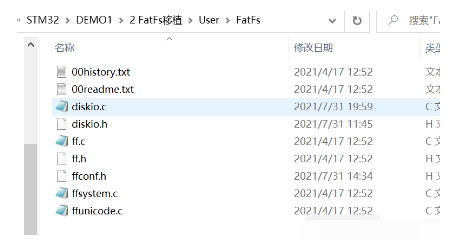
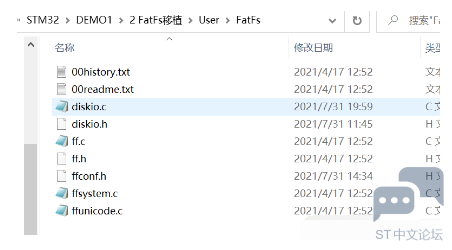
一、把FatFs源码拷贝到工程目录,此此移植文件系统是基于之前SPI_FLASH的工程下进行。
4 w- ^. |# n! p! l% b& _. p1 U+ h- E3 C# k# O) C
源码地址:Petit FAT File System Module。7 i3 M, A, S- ?$ ]5 Q/ C$ }
) E/ F5 d: y7 _, k1 c& Y( {5 O
4 c( j: V( T5 Z# F# T2 c* V5 c) H0 v3 X, \$ |
二、在keil打开工程文件,将源码添加到工程中。
/ |0 [4 _7 }, [+ O/ I1 v' j' a. X2 c
![SF[`BVY4XT4]PF(BKZ15RWV.png](data/attachment/forum/202204/07/180245tcwkologalc2elu2.png "SF[`BVY4XT4]PF(BKZ15RWV.png")
( J& o0 o, {3 C+ I, f& M9 T/ H' H M. f
三、添加FatFs源码的头文件。6 u& K# `4 H! ^
4 l- }- e# Z+ `
![TIA[82}~T28`T_Y5`2]GXY7.png](data/attachment/forum/202204/07/180245x0ikn4k0st40j00k.png "TIA[82}~T28`T_Y5`2]GXY7.png") - s4 D. q6 n% N- C# N5 n4 [! G& w5 q
- s4 D. q6 n% N- C# N5 n4 [! G& w5 q
4 k* H/ |0 [0 [& A( j
四、尝试构建程序,解决错误。
" m& J6 Q% m' m+ j3 p @7 {: k, J# L6 b3 d+ C- y7 J* L
主要错误为函数未定义却使用了。可以进行删除,或者实现即可。
6 L" b' W8 T: S4 z8 ^* u$ D+ r& j$ p: o. ^& z) ?" z
五、实现FatFs底层驱动的接口。2 }7 U9 I6 G" N9 Q. G) t
, W' F8 c m3 X- ma.disk_status 获取设备状态的接口。示例代码如下:
) L/ z( W1 x2 k) n( x3 q+ B) W3 y
( T% U: V5 r: w$ a* u6 I5 O- ^1 k- DSTATUS disk_status (
& E# B6 `4 z u6 d( Q* }# U+ V - BYTE pdrv /* Physical drive nmuber to identify the drive */
5 T% B$ D; Y" K! x2 u! v: @2 k) B - )
, d4 u, [) M4 ~6 R7 z6 X4 G - {
. Y# {$ T' z: o) H - DSTATUS stat=STA_NOINIT;( \2 o5 ?. B- o
- switch (pdrv) {( T/ l: v) a6 \0 ?5 ]
- case DEV_FLASH :+ A; A2 J0 q J5 y* q1 K
- {
: H% I0 s4 V! o$ T5 | - if(SPI_FLASH_ReadID()==sFLASH_ID)3 O6 i7 b* P3 R: Z+ u% w- f w$ V
- stat&=~STA_NOINIT;: x% L" l+ a' c; }/ \$ R
- else) _6 P k6 s/ y$ W- o D
- stat=STA_NOINIT;
! j" S5 G7 G a8 ? - }8 T) k" N3 o1 M/ U8 d2 m+ T! L
- return stat; - ?8 X. ^9 t/ n$ M& _
- }8 _* G- h0 {# p v2 I1 W
- return STA_NOINIT;
1 A W, }6 ~1 o/ G - }
+ d" v; P" A0 b5 |/ @- T9 O% s6 _2 G& \$ k) W
b.disk_initialize 初始化设备的接口。示例代码如下:: U! E x: J6 D& |
( u' K* }: L2 g
- DSTATUS disk_initialize (
% S$ L8 x) o8 Y. P2 D5 H e - BYTE pdrv /* Physical drive nmuber to identify the drive */( w' W! m; f8 u$ U: |* _, P
- )+ U, e( b5 d1 s- S3 F# d4 |) v# N
- {5 o M l* h+ Q( a& C6 T6 G$ q
- DSTATUS stat=STA_NOINIT;6 e! a' c5 Y& J( f5 C' U
- switch (pdrv) {2 {+ `4 a5 ]. o$ c& K; M
- case DEV_FLASH :
* t; F, v5 `5 W J( F! Z; g2 z - {
8 ^7 l0 v, {5 c R - SPI_FLASH_Init();+ _% e# G+ B6 Q$ h6 r
- if(SPI_FLASH_ReadID()==sFLASH_ID)
1 K9 Q4 J" O0 L3 ~5 J" v. {: C2 _/ X - stat&=~STA_NOINIT;
+ r' ?' ?! i2 W; E4 S - else' C) E; _; k3 }+ k, q$ \9 @
- stat=STA_NOINIT;- S, m& R0 L6 ]* w$ D" c( A. D- k
- }
) N3 c; B$ _. y/ m8 N3 p9 k - return stat;3 N1 P7 f; v W
- }
( |$ i; j! {6 ?4 g - return STA_NOINIT;' M7 D0 o! K+ w! j' A
- }
c.disk_read 读。示例代码如下:
$ U3 X% t3 ^6 n7 B+ d# i
/ e+ N4 V; y5 o( z2 ?/ N/ G- DRESULT disk_read (; O* f) ]9 @. k7 b( p
- BYTE pdrv, /* Physical drive nmuber to identify the drive */
/ b+ O4 l0 _( g" `% q( c5 C - BYTE *buff, /* Data buffer to store read data */. }; s6 g( {5 b$ ^# y% B9 R8 f8 {
- LBA_t sector, /* Start sector in LBA */
: P4 c+ ?/ e5 o. c+ x% c* G - UINT count /* Number of sectors to read */! D' \: _# B& X8 u7 A* S
- )
. b. N/ {0 ]! y3 \1 U9 q - {' o# n1 c2 q+ Q1 D9 b$ h! }" g8 D" X6 {
- DRESULT res;
& [2 U2 }" h5 Q5 W9 f& Z5 M# b - switch (pdrv) {* Q6 U' i$ W9 g
- case DEV_FLASH :. p- g) Q0 C# E) y! T& t4 `
- {& u+ \/ B6 l$ W
- SPI_FLASH_BufferRead(buff, sector*4096, count*4096);
* h* m& |% }- l; d" | - res=RES_OK;
4 ], ~. K D5 {, y; `8 X( i0 y; @, \ - }6 F# R0 f3 M+ z9 X
- return res;
/ V; U( `6 Y v5 r D - }8 r* }2 a0 I& Z% V' F
- return RES_PARERR;7 f$ Z9 H2 R1 F" `
- }
, j8 b$ K }; d/ V0 x) B5 ~. B& M$ u$ N4 J
d.disk_write 写。示例代码如下:: }2 E8 z# j! v7 ^& V2 H
0 L1 j+ o5 W8 q9 S- DRESULT disk_write (
0 u7 j: ?3 j4 _1 s) }1 D% U. P - BYTE pdrv, /* Physical drive nmuber to identify the drive */
; i& M# T+ N+ l% x4 [ - const BYTE *buff, /* Data to be written */
8 K+ q) W* }- K( Q - LBA_t sector, /* Start sector in LBA */0 H3 [; y4 J2 n8 b' Y" D& n
- UINT count /* Number of sectors to write */9 z" D+ N% `" `6 Q
- ), i( F; p3 \2 G% j
- {) g4 w7 B* v/ h3 T
- DRESULT res;
( |/ Z4 x6 F8 {6 E - switch (pdrv) {
; f1 v* t7 d- G1 s9 m" r8 C - case DEV_FLASH :
0 {. v) Q4 S1 @: C. {5 T! A( H) B - {8 @) J0 l4 X# E. Y3 f
- SPI_FLASH_SectorErase(sector*4096); 9 S1 d8 I9 J4 Z' X
- SPI_FLASH_BufferWrite((BYTE *)buff, sector*4096, count*4096);/ K4 Q, G9 o1 u2 A! S5 G7 z
- res=RES_OK;
3 ]8 h, V% Z$ B2 E - }- c. g* U/ t3 G: Y9 r5 Y5 {9 T
- return res;- J: S2 r ^) L ]9 U8 b
- }5 V8 P. v6 V( m
- return RES_PARERR;
0 v( F7 r. T2 E( J- Z; J - }
7 a0 y, U) \3 d+ O, |% u4 P. I
: Y' z' V5 N1 i" d4 W4 |+ ae.disk_ioctl 设备属性接口。示例代码如下:
7 S; c- n j- \5 U4 V3 F( e! V6 T. \9 H; T' D" G" Q
- DRESULT disk_ioctl () U, D5 W0 J. m
- BYTE pdrv, /* Physical drive nmuber (0..) */% }# k' Q3 D2 d( L$ y9 y
- BYTE cmd, /* Control code */
9 X( o' P2 y- o7 e - void *buff /* Buffer to send/receive control data */2 |/ W6 p3 ^# }: P( w
- )
2 |3 R0 p# h8 L8 E4 |- z - {, w8 t3 t) K+ p7 C9 j& v
- DRESULT res;. T" ?6 C6 y3 J) s$ x
- switch (pdrv) {
4 q' o9 [# E. p/ l4 c/ w% ^! j - case DEV_FLASH :
) i* B' K) S; V! m9 u: @ - {
) R& n- t: Z6 _ - switch (cmd) {0 x5 k' e/ \5 g
- /* 扇区数量:2048*4096/1024/1024=8(MB) */5 c5 v# P1 k! k7 n3 J6 A T
- case GET_SECTOR_COUNT:
# ], j! g. k Y& } - *(DWORD * )buff = 2048; . Q+ @$ m( D) \# Q1 @$ z
- break;
: i7 }) k4 O; G6 S3 m8 [ - /* 扇区大小 */& [# Q$ ~) V' t; L: E
- case GET_SECTOR_SIZE :
. y. Q2 k) ~. J+ ?6 |) M3 @ - *(WORD * )buff = 4096;
" B& O1 _: ^6 W6 O5 G" t, t - break;) {) o& W K( q
- /* 同时擦除扇区个数 */2 v, f4 T# x, P" [) E1 s) f
- case GET_BLOCK_SIZE :7 C$ ?; E3 |* s2 G2 d b) U
- *(DWORD * )buff = 1;
1 b) F! Z; o9 P1 J9 J8 V - break; ) w5 [- g. Y! r: h8 D. q r# l
- }
/ b3 I- L" w6 Q- _# { - res=RES_OK;
( c. j8 c4 k, m Q0 W1 g - }+ q8 ~( z, o$ G8 K) v
- return res; ! R8 e$ f$ I( |( }0 G# j3 g- \3 D
- }
0 i0 S, @2 f- g& Y: M( o9 W - return RES_PARERR;
, p k+ f# R( A) u t- X$ a - }
) p4 ?* i, y9 @f.DWORD get_fattime 获取时间。示例代码如下:- V: @7 W; p1 d4 P: I; m
9 ]" \' T# o! V R- E+ Q- DWORD get_fattime (void)" `) O2 M& C# W5 U
- {$ U$ S, h% T# X% T
- return ((2021-1980)<<(25)|(1)<<(21)|(1)<<(16)|(1)<<(11)|(1)<<(5)|(2)<<(0));
% {, U+ r9 f, J3 t6 u - }
4 A& z$ U/ F4 P2 `6 ]: w8 u: i六、修改ffconf.h,配置文件系统的具体功能。
h j- ^% ]% p& ^: p# m& F9 f4 r& P3 |. ?5 d
a.FF_USE_MKFS 1 使用格式化的功能, [7 w2 t# b1 U/ Z
- Q. _; H+ V J# ?4 T; sb.FF_CODE_PAGE 936 修改编码页以支持中文文件名
- T% X) d& I p" N( m
, L8 g9 O: A( Y! gc.FF_USE_LFN 0 支持长文件名6 @* t6 Z; k8 z
: |5 J! h3 t# D' Z1 z" a% }$ |) `
d.FF_MAX_SS 4096 修改支持最大的设备扇区大小,与flash设备对应。
# S" E2 d; y/ i$ L$ G3 G2 f
7 z* [5 P# `4 o 七、尝试使用文件系统来测试是否移植成功。& x2 o! b3 v8 p, G
. f0 y# R, K/ F% K1 ]: Q
常规使用流程1 n: g2 T& h- s3 q
" X% b' M# G: ]6 x, T+ U
a.挂在文件系统到一个设备。使用函数:f_mount()2 c0 E- | b% o8 x7 e
3 [, p( F: E4 n+ a. j! i
b.打开文件。使用函数:f_open()
& y$ g$ W: c& V3 U! T @0 y4 m0 h k, U0 x) j" Q3 R& ^4 q
c.数据的读取与写入
! P" z6 [5 \2 m `1 q4 [, }1 ^0 v* m7 Z! m) L. q# U
d.关闭文件。使用函数:f_close()
/ g0 ?" n; H8 b6 ?6 X2 J! h2 \$ ^: m$ ? G! B& c8 C1 T
注意:测试过程可使用返回值判断是否移植成功。在挂载设备时,存在错误FR_NO_FILESYSTEM(13),可采用函数f_mkfs进行解决,该函数用于格式化文件系统。相关代码如下:
. C, c& g; w/ z: ^- w0 u' H( J1 a. L
6 J& k9 j B7 A% i- printf("\r\nFatFs测试实验\r\n");
2 d* F+ V4 A: ` - res=f_mount(&flash_fs, "", 1);8 B* `# \; W* @' h7 B# w, }7 M0 X! }, [
- if(res==FR_OK)+ l$ F: ^3 }# r
- {' g* d3 M& D" X( ~4 t
- printf("\r\n文件系统挂载成功!\r\n");
* d8 `8 E, V: |! I* z - }
/ R; K7 T6 }: E* Z - else- t3 {+ v- c4 t0 s" q. u! u3 z7 g
- {$ H& E, w0 h# ]8 m* f
- printf("\r\nf_mount错误代码:%d\r\n",res);
6 I! ]$ @3 B6 T1 o4 |3 S - if(res == FR_NO_FILESYSTEM)1 f9 j2 S2 p9 o5 E
- {" [/ D" {1 X' c6 T$ G1 x
- res=f_mkfs("", 0, work, sizeof work);
7 l6 L( r6 \2 D# a l - if(res==FR_OK)2 Z7 b7 S3 _& U
- {& B2 }& c# m' @+ |5 f; A8 A. Q
- printf("\r\n文件系统格式化成功!\r\n");
0 `2 g) m2 p w5 j - }) \, b" S" }" l; w+ V/ D
- else3 P# t* G7 x, B8 |) E+ r9 G
- {; X2 ~6 I- G9 b, {1 K' ^
- printf("\r\nf_mkfs错误代码:%d\r\n",res);6 l, ~ x4 E, \, Z
- }
& F. ]6 E$ R5 s, A X7 K1 ?3 m - }
( _" \4 H' i; K - }
/ A+ M/ Q2 ]8 [! W8 Z - //打开文件,写入数据,关闭文件! P1 }! a# H2 G) H
- res = f_open(&flash_fil, "hello.txt", FA_OPEN_ALWAYS|FA_WRITE|FA_READ);
3 b, Y1 w: T) W) S; p6 G - if(res==FR_OK)) A @7 X! j& ^; N
- {' o. B- q- x( D; G7 F3 h" C5 s
- printf("\r\nf_open测试成功!\r\n");& x: K/ F2 @2 G' [1 i. _
- }; ?" q V" W) s5 L
- else1 {0 Y; t* Q7 G. |# X% p
- {
' Q3 E* A' w* L. R - printf("\r\nf_open错误代码:%d\r\n",res);
7 W9 `5 Q) O/ n- b7 _" m6 C - }
, H; F/ k I8 x& B+ X+ r - //3 x( @$ J" r; v9 Y3 y; _
- printf("\r\n正在写入:%s\r\n",Tx_Buffer);
/ {2 m6 D. Q8 r5 g - res=f_write(&flash_fil, Tx_Buffer,BufferSize,&Num_Of_Written);, f! ~; ^* \" j$ O# z
- if(res==FR_OK)
0 f8 I7 G5 x1 h - {; O* e0 P/ F2 d( y: w$ w- D
- printf("\r\nf_write测试成功!\r\n");9 y$ D' }7 Z/ \. f
- }6 c+ [9 [% O% T. b, W/ a R
- else7 g3 l, P1 D" [' e
- {. P* p- U% ]) d0 k/ }
- printf("\r\nf_write错误代码:%d\r\n",res);8 h. j' ]0 g/ c O2 I# f0 @" p" R7 {
- }+ K8 A8 R) o1 G6 I& O# ?
- //9 S7 {# i9 I* m
- f_close(&flash_fil);
; ?% N' M6 h. w8 y; A7 H/ o$ ]3 w - //打开文件,读取数据,关闭文件
% d/ H, w$ z2 d: [6 M3 r - res = f_open(&flash_fil, "hello.txt", FA_OPEN_ALWAYS|FA_WRITE|FA_READ);% k" R5 i2 v- D* ]. N
- if(res==FR_OK)1 a' y+ P; @/ u0 p( F0 N+ z
- {
! d0 X% |7 y8 @' F - printf("\r\nf_open测试成功!\r\n");
, K, W) w( i! G, N - }
8 m- h" ?4 b- I: N2 | - else: t. {: }9 }: p6 o$ W3 v/ y t
- {
5 h$ s6 V. j, [9 `1 J$ N" Y( M - printf("\r\nf_open错误代码:%d\r\n",res);6 a# U/ ?- n" Q8 N$ P
- }
+ x. g6 E! p$ x: m7 s# t0 J- \0 Q0 n - /// [, O1 P9 r) K/ w9 \1 v- m
- res=f_read(&flash_fil, Rx_Buffer, BufferSize, &Num_Of_Read);
5 J3 e5 `2 O0 n6 X1 E - printf("\r\n读取完成:%s\r\n",Rx_Buffer);
$ ^- _% b' D8 j0 M) S - if(res==FR_OK)
6 x D% f9 E1 L" y# j2 T - {/ f* T7 ]( u: n
- printf("\r\nf_read测试成功!\r\n");
5 t! n+ ?7 w" H$ A - }
, V; {# \0 a/ j2 j1 a* h9 R7 f# I - else8 b/ _( ]3 H2 X( }
- {
5 X, L. B4 W2 K0 C7 c - printf("\r\nf_read错误代码:%d\r\n",res);* {( u" n/ E( `' F, _
- }" G7 _& o2 W* W* a$ w, M* j9 n3 w4 I$ n
- //0 G9 W& j3 M9 a, G" V# v
- f_close(&flash_fil);
3 A. c4 ^. D1 k% Z0 c9 w- K
) \7 C! _! m. c/ a9 Z, g! g 结果展示:" |( C0 i# F4 @) N W$ d
. n& z2 q; n% N7 t
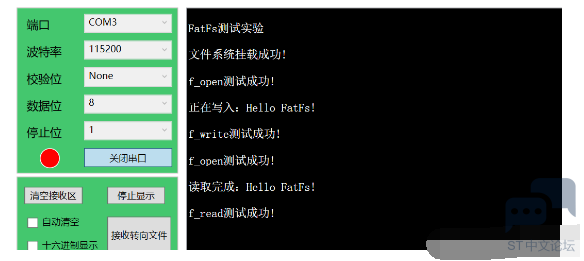
- ]- m- v. R8 G, V4 u/ C# J6 Y! u4 Z0 g/ g( z3 F7 O
1 N5 V4 q$ g" u$ n* ^ |





.png) STMCU小助手
发布时间:2022-4-7 18:02
STMCU小助手
发布时间:2022-4-7 18:02
 微信公众号
微信公众号
 手机版
手机版