滑动列表
) h! F9 K- i7 J5 f0 F+ p1 @在TouchGFX上滑动列表有三种实现方式,scrollList和scrollWheel这两个实现方式在官方Demo中会有简单的使用教程,对于ListLayout有单独的demo在TouchGFX Designer中,这里对于简单的实现我们不做过多的分析,主要是在scrollList滑动列表基础上再加入其他的按钮进行分析一下。如果大家对于其他的类想了解的话可以参照官方给的API文档,这三种类在TouchGFX上显示的大同小异。& s d! ]% a9 e' u
9 _2 L( v5 P/ L( L4 r, h
滑动列表基本用法, a- S5 B# v% i9 ?) Q
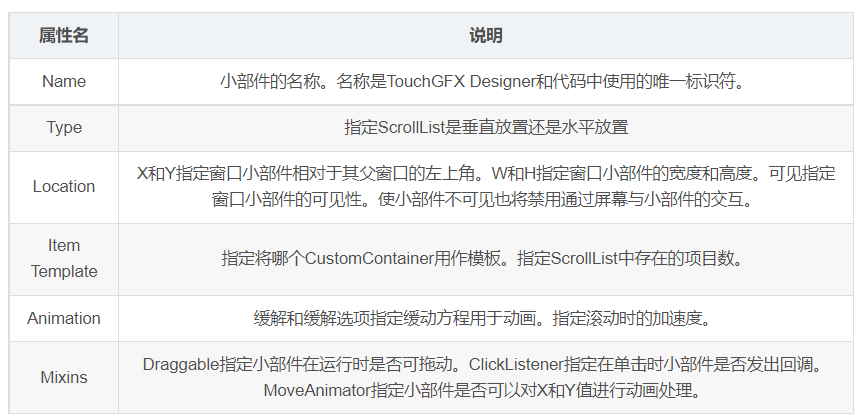
scrollList 的属性及介绍
! ~6 H- K& i" S1 u! Z& v- ?! c. @. V2 q4 T8 F7 G( g7 a
7 `" a. d8 A* z+ s8 m* k
$ Z1 F( S) X4 ]4 i! tscrollList 的成员函数及介绍5 p* c9 L3 ~( t; c3 \
改列表除了有TouchGFX自带的函数外还存在这一些它独有的函数,接下来给大家一一介绍。
# p* D+ ~: F* W7 tscrollListUpdateItem(CustomContainer1& item, int16_t itemIndex)1 e1 v' M! k* ?
这个函数由于scrollList是个容器,当在容器中创建item的时候会触发这个函数机制,这个时候其中参数item代表当前更新的item,而itemIndex代表当前更新的序号。
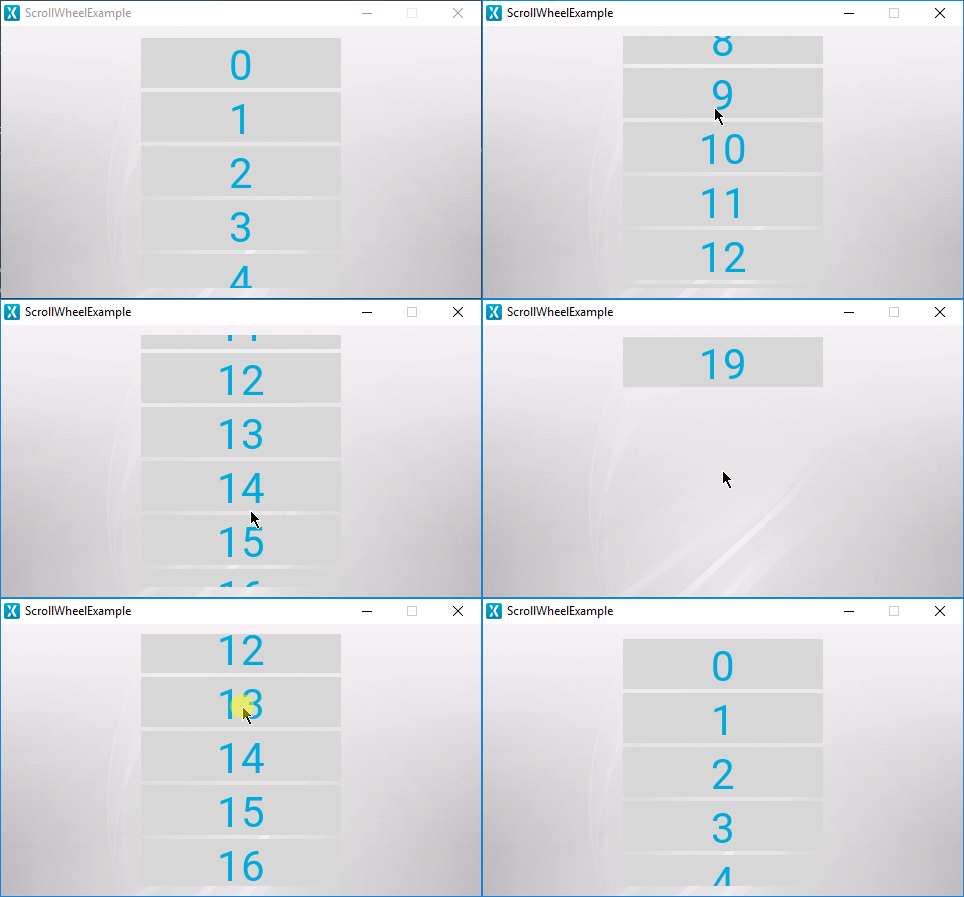
' E9 C9 H+ U. n9 N# p/ H, q我们现在每个item都是在容器中放置一个文本输入框,这时通过buffer更新文本内容。如下所示。4 U7 h L/ Z; F5 j. {+ s- Q
- void Screen1View::scrollListUpdateItem(CustomContainer& item, int16_t itemIndex)
% A2 c, ?$ Q: S* v; L - {* b9 j. o& g; v4 X0 Y" }
- item.setValue(itemIndex);
/ Z% c: S* T& J: W2 z - }+ O* \- P' N3 a
这时列表上会显示如下
8 _8 S& W4 ^$ e9 G+ O: U8 W! }- {% T
 8 |" ]4 n/ S" J6 g
8 c7 Q8 O% A" e" @1 S) g
animateToItem(int16_t itemIndex,int16_t animationSteps = -1)
; P+ }- K4 D" i6 i0 B+ D这个函数的作用是强行将中心位置移动到想要的item上,但是前提是需要知道item号。% u4 ~$ o+ E; |, L: k! H$ A
$ Y2 D& t- G7 d+ z8 @
. b. W( a, _/ U* O3 I& _
虽然是个容器,但是scrollList类也有点击事件的回调函数。
6 A$ u* o6 _. u, p6 l. W1 JsetItemSelectedCallback(GenericCallback< int16_t > & callback)* W% Z0 A% {/ i6 _$ X) a7 P
设置单击选定项目时将调用的回调。% {, G9 T; Y) T' w5 I0 A- v: Z
setItemPressedCallback(GenericCallback< int16_t > & callback). C* C) t( P" H% r1 S8 S
设置在按下某个项目时将调用的回调。
' J) f+ C: h3 j, {6 X9 n# U0 o3 o* I5 b8 m: D4 ~( D5 t) t4 z
! H3 u L; ?& f, y0 Y" h说到这里终于要进入正题了。现在scrollList上面只有显示的文本没有按钮,例如checkbox button,如果加上button这时应该如何操作呢,接下来会给大家展示。
~" K+ d0 c, a7 s1 `3 r2 Y7 g8 R5 ~2 X
: |0 j( D1 E- h0 R; ? @: E滑动列表数据添加5 Y9 G7 x, z6 N3 F1 V
在展示之前先看一下通过TouchGFX Designer自动生成的代码。
. U! A) `2 \. }6 Z9 b- class ScreenViewBase : public touchgfx::View' @, G2 ~1 K8 F! d' q! v' |
- {4 j; Z5 J: V6 U4 e b0 \; P: e
- public:( y* t2 c& f" r6 D! v/ n4 K" l
- ScreenViewBase();
. n5 e( J8 B4 m - virtual ~ScreenViewBase() {}
4 j8 E* A/ A0 i0 h _( X! t - virtual void setupScreen();
- [5 o' d; M/ K, K% V - 7 \4 N0 Q' V- b& K1 \% [
- virtual void scrollListUpdateItem(CustomContainer& item, int16_t itemIndex)
/ u6 f' w! b5 F3 L - {
" P/ S) ~. L1 |5 X% Y/ l, R - // Override and implement this function in Screen4 T# |9 C1 {* h
- }
+ [* g7 ~- o% a - 6 b+ ?3 v3 D9 _
- protected:# R+ g) h% a5 T" p0 s; `7 o
- FrontendApplication& application() {' Y1 H+ ]1 Y3 i3 \6 T* j. O& Z$ a
- return *static_cast<FrontendApplication*>(Application::getInstance());
7 S/ R" c$ t, d1 e+ | - }$ g) w2 Y) d1 H7 s. u
- touchgfx::BoxWithBorder boxWithBorder;1 G, G& }/ x+ H) q+ G/ h% n
- touchgfx::ScrollList scrollList;0 L* Z; f" s: ?5 Y- K* X
- //这里有个有意思的地方,大家可以带着疑问看下面的base.cpp文件/ u/ P8 D4 u/ G/ X9 w" o4 G5 |) A
- touchgfx::DrawableListItems<CustomContainer, 7> scrollListListItems;7 x$ a5 O. d8 i0 m
- private:7 I) _; P0 I* s. Z9 B7 \
- void updateItemCallbackHandler(DrawableListItemsInterface* items, int16_t containerIndex, int16_t itemIndex);$ F4 R( F3 @9 U8 N, Y
- touchgfx::Callback<ScreenViewBase, DrawableListItemsInterface*, int16_t, int16_t> updateItemCallback;8 `/ ?2 z) \. [" ? s4 \6 R
- };
& Y6 h5 c# l8 h6 l5 e
- #include <gui_generated/screen1_screen/Screen1ViewBase.hpp>) m5 x" d2 b" u+ r7 q1 x- r) v
- #include "BitmapDatabase.hpp"% F$ G1 W. b P: [) K. {. W- n
" _9 ]6 W4 j& N6 s* j- Screen1ViewBase::Screen1ViewBase() :% X2 ~( Q% l3 W) u2 _7 B2 y
- updateItemCallback(this, &Screen1ViewBase::updateItemCallbackHandler). q' f8 i# F/ d1 S
- {+ k/ g8 [2 M% m7 O0 h
- //这里主要是创建一个scrollList需要配置的地方。2 |8 o) X: h2 q8 Z6 V: |
- scrollList.setPosition(140, 10, 200, 252);
( V1 n' {6 q4 q9 U; C6 v2 f - scrollList.setHorizontal(false);
w t8 S/ S/ o - scrollList.setCircular(false);
, M, S) h6 m e$ h - scrollList.setEasingEquation(touchgfx::EasingEquations::backEaseOut); \0 ]7 q5 B, H
- scrollList.setSwipeAcceleration(10);7 p ?" s# r9 c* i/ M# I: n
- scrollList.setDragAcceleration(10);
6 W! Z; K8 c5 b3 o7 H5 e+ u1 U - scrollList.setNumberOfItems(15);//这里造的item是二十个,还记的上面的DrawableListItems<CustomContainer, 7>吗,为什么造了二十个却只画7个。
$ {' b' q* a5 p2 H' s - scrollList.setPadding(0, 0);
V& L( e2 {% M9 y" L0 Q& g - scrollList.setSnapping(false);
7 _4 D6 c) e" G( L/ \: q - scrollList.setDrawableSize(50, 2);
4 F2 M0 F! R7 ~# x7 O' r - scrollList.setDrawables(scrollListListItems, updateItemCallback);
- _1 X0 _2 t! d& L' l; |
# i8 _6 P2 p0 Z0 b- add(scrollList);( C( R) y0 k* w" w5 V
- } w k4 C4 k# M8 S7 ?
3 {* @) I, R/ ~% @( i. q- void Screen1ViewBase::setupScreen()+ P% F+ _/ A- w# b9 P; g! \
- {# q2 y8 S/ h+ @ Q5 V
- scrollList.initialize();! S4 c) I& s3 \4 i2 p; p
- for (int i = 0; i < scrollListListItems.getNumberOfDrawables(); i++)
. w/ X8 F' r2 a) n2 T) \ - {
1 _) `" e9 @; |, B; E - scrollListListItems[i].initialize();) e* x* q% c. N* x9 `3 i
- }
1 y5 ^4 ~8 ]0 K1 O; o - }5 m8 D* `* ^4 p2 K
f' P) ^0 F. P- void Screen1ViewBase::updateItemCallbackHandler(touchgfx::DrawableListItemsInterface* items, int16_t containerIndex, int16_t itemIndex)! l0 O' c5 i9 {5 Y2 e8 j* R
- {- b) z- ^2 {$ Y# L& a5 l8 `0 ~: d
- if (items == &scrollListListItems)$ Z- K! d% U# R1 | h" j
- {
q2 A p! T% w0 t$ i - touchgfx::Drawable* d = items->getDrawable(containerIndex);
0 x1 G* p+ C; s8 }4 J7 q9 b4 I - TextContainer* cc = (TextContainer*)d;: K9 x- Y7 Q4 c0 {4 N9 ?; _
- scrollListUpdateItem(*cc, itemIndex);
1 v' \# P* ^# e - }5 f6 z) V8 {9 E. F5 P' T( F; t8 |- o
- }; g3 v" \/ g9 R' Q; ~9 X
对于touchgfx来说scrollList是动态分配的item,也就是说现在显示几个就单独画几个,所以说窗口大小只能显示6个所以将反复的画其中的前六个。# A+ X( ]' v, d0 j
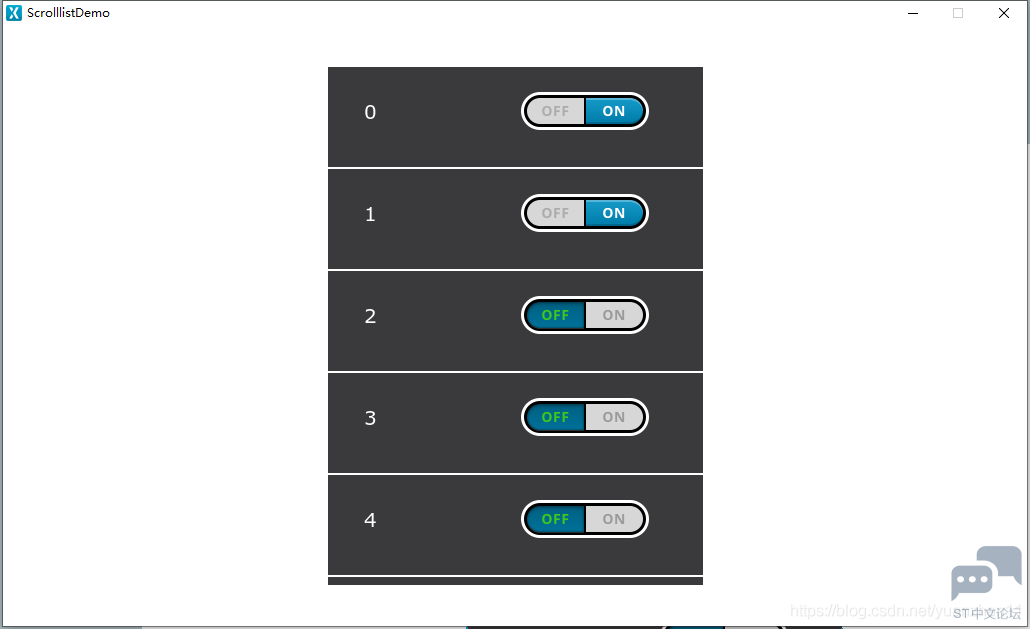
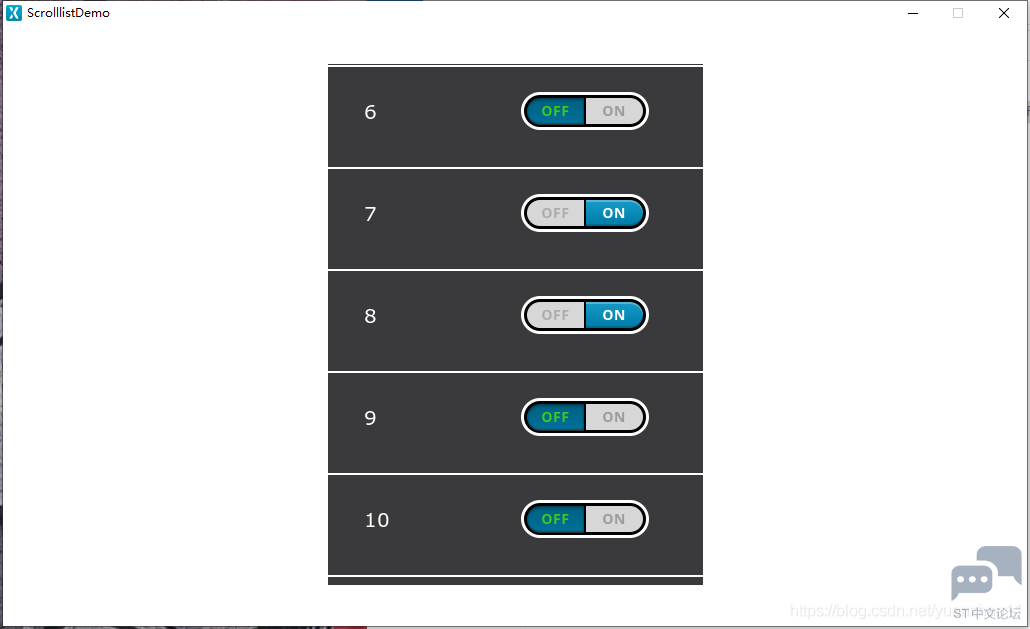
为了展示这个地方我在每个item上加入了checkbox button。接下来会看见神奇的地方。% M; u r9 _+ R: e. p
0 h' Q% @/ Y) r) T' J
* l0 G% Z- d2 {( ^7 Q& b, X
5 }6 |* P4 @& u$ W0 }! O3 h' M这里手动修改了第0个和第一个的开关状态- }3 B2 E* R& ?
+ _: p" ?6 D1 C9 `7 P5 C" b
 * ~( Z( T; p# f- x M8 j+ i
5 j% `/ e5 T* s3 L/ Q& E; K0 s
但是第7个和第8个也同时跟随变化,因为我的窗口在创建scrollList时,可以创建7个,刚好是0-6,但是第7个是重复了第0个的checkbox button的状态,以此类推则出现了以下现象。这时有人就要问了,那前方的文字为什么不是0-6的循环显示呢?接下来会给大家答案。# K |% p9 I, L- n2 z
0 z# c. m+ O* }/ ~( A
3 o- V+ L2 F0 k) C) o滑动列表数据更新
) b- F' [( W) V" _- f. f还记得scrollListUpdateItem函数吗,我们在这个函数中写了更新,每次新载入一个item将会调用该函数,虽然item的动态创建一直是前6个,但是创建一个后调用scrollListUpdateItem时会强行将其中的文字修改为需要的内容。如果在上方的Demo中添加一个if(itemIndex<7)则大家就会看见想要的结果了。
( A8 i* I. C9 q, H到这里也就是说checkbox button想要保持你所点击的状态,那么大家就需要一个数组进行维护这些item的状态。所以如果大家需要的是一个复杂的item列表这里不给大家推荐这个item,如果只是一个图片查看器之类的list用这个scrollList还是可行的。复杂的item推荐大家使用listLayout这个容器进行开发。
# M H6 v( n, x, t& Y1 ^0 L2 R' b- ]' r! z# T; q$ r
6 x7 F/ n! Z: e* U5 i5 q# P1 b3 R总结
- F" t) L/ W2 x( a$ }/ X6 J# z这里给大家展示了scrollList,虽然有些短板,但是对于MCU的GUI开发还是比较好用的,在touchGFX上如果需要简单的使用,那么这个scrollList还是可以满足大家的,这里可以看出除了这个控件外,其实TouchGFX最大的优势是可以自己组装出复杂的控件。对比于高级语言的GUI工具来说还是比较有代表性的一种ui搭建模式。
$ [, [/ |3 F4 A; ?3 g: n————————————————' W3 S! B# o0 s3 `( V T
版权声明:空闲的程序员$ N2 c" {" }$ D* B
5 J4 i% ^& e2 t3 a
|





 STMCU小助手
发布时间:2023-3-4 20:00
 微信公众号
 手机版